LaCie Internet Space • DESIGN BY NEIL POULTON Appendix A: Router Configuration
User Manual page 63
Step 3 - Finish your HipServ™ installation
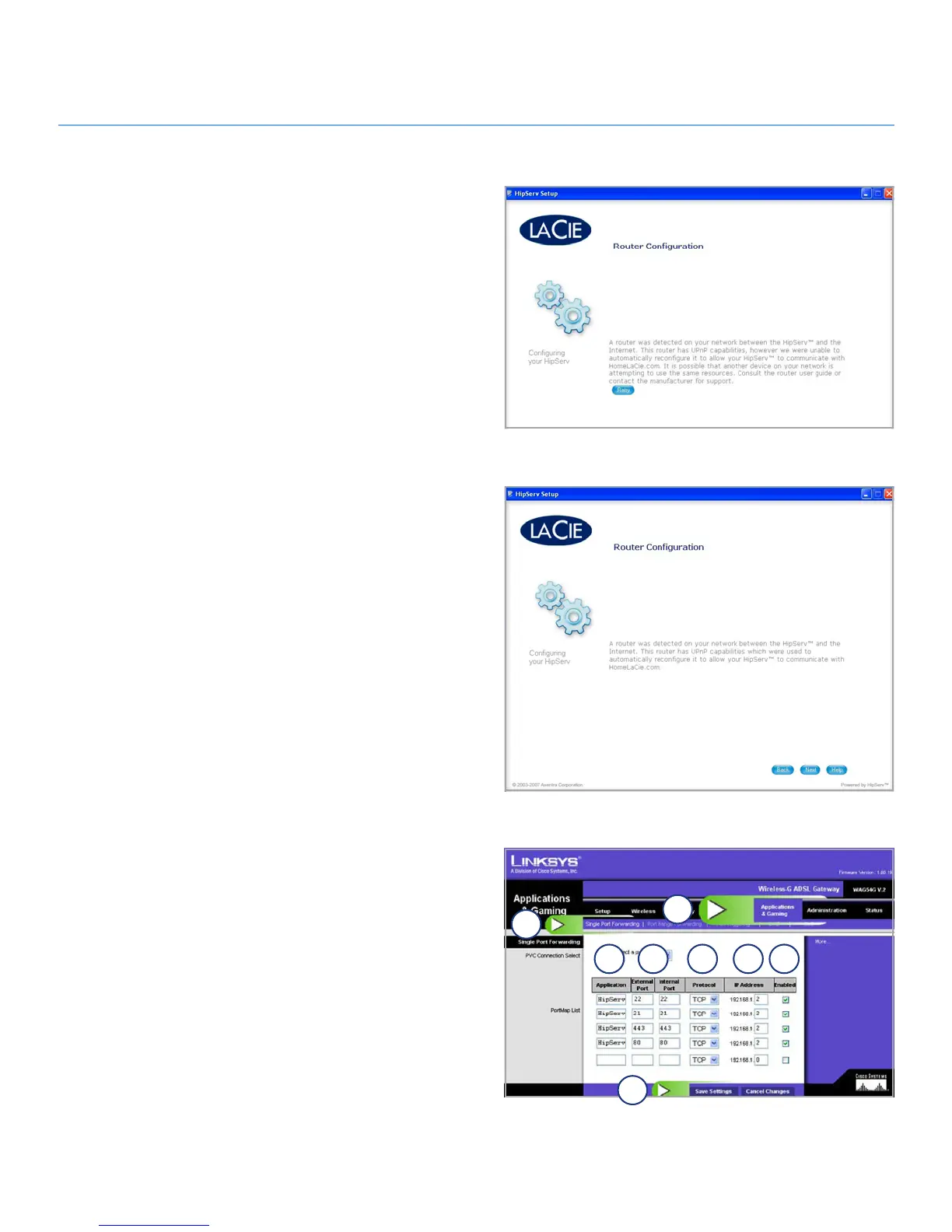
Go back to Ethernet disk setup and click the 1. Retry button on
the router configuration page (Fig. 4).
If the message in Figure 4 appears after you click
2. Retry, con-
tinue to Step 4 – Manual Configuration. If the message below
in Figure 5 appears, click Next to continue with Setup.
Step 4 – Manual Configuration
Click on the 1. Applications & Gaming tab (a, Fig. 6).
Click the
2. Single Port Forwarding link (b, Fig. 6).
Enter the name of your Ethernet disk in the Application field
3.
(c, Fig. 6).
Enter
4. 80 in External Port and 80 in Internal Port (d, Fig. 6).
Select
5. TCP as protocol type (e, Fig. 6).
Enter the IP address of your Ethernet disk in the IP Address
6.
field (f, Fig. 6).
Check the
7. Enabled checkbox (g, Fig. 6).
Repeat steps a to g, shown in Figure 6, for ports 21, 22 and
8.
443.
Click
9. Save Settings (h, Fig. 6).
(continued on next page)
Fig. 4
Fig. 5
Fig. 6
a
b
c d e f g
h


 To Next Page
 Loading...










