9.1 Kreos A-class
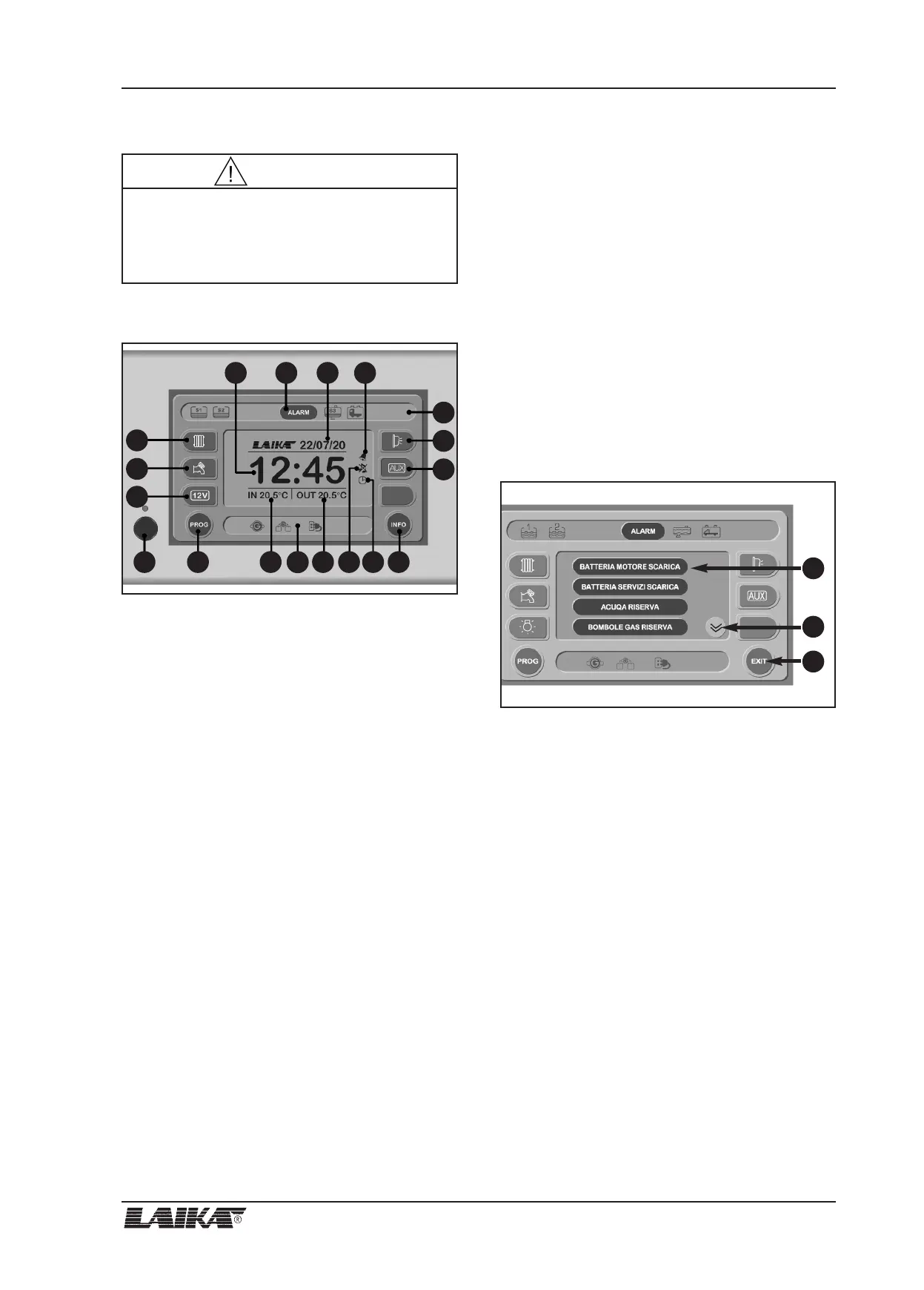
Main screen
1) On/off main switch (to switch on and off, press and
hold down the button for at least 2 seconds). If the
corresponding LED is green, the control panel is on.
A red light signals a warning (batteries, tanks,etc.).
2) 12 V button to switch the lights and 12 V sockets
on and off.
3) Button to switch the pump on and off.
4) Timer heating button (function not active).
5) Clock digital display.
6) Date digital display.
7) It displays that alarm clock is set.
8) PROG button: press to access main menu for
system programming (see PROGRAMMING
SCREEN).
9) Internal temperature digital indicator.
10) Symbol window.
11) External temperature digital indicator.
12) It displays that the tones are off.
13) Timer-function heating (function not active).
14) INFO button: press to access INFO page to check
status of:
- Engine battery (B1).
- Auxiliary battery (B2).
- Water tanks.
15) ALARM button: press to access ACTIVE ALARMS
screen to check alarms.
16) ALARM symbol window.
17) Awning light button; this light switches automati-
cally off when you start up the engine.
18) AUX output button.
Active alarms screen
The ACTIVE ALARMS screen lists all the alarms that are
operatives.
1) Alarm list (it is equivalent, in text format, to the
symbols displayed in the window above).
2) Button to access next alarm list.
3) EXIT button: press to return to main screen.
9 - CONTROL PANEL
USER’S GUIDE
49
1
2
3
1
2
3
4
5
8
7
18
16
17
6
9
10
11 12 13 14
15
The timer-function for the heating system is not
active on the control panel. Please use the control
panel Truma or Alde to program the timer for the
starting of the heating system.
WARNING



 To Next Page