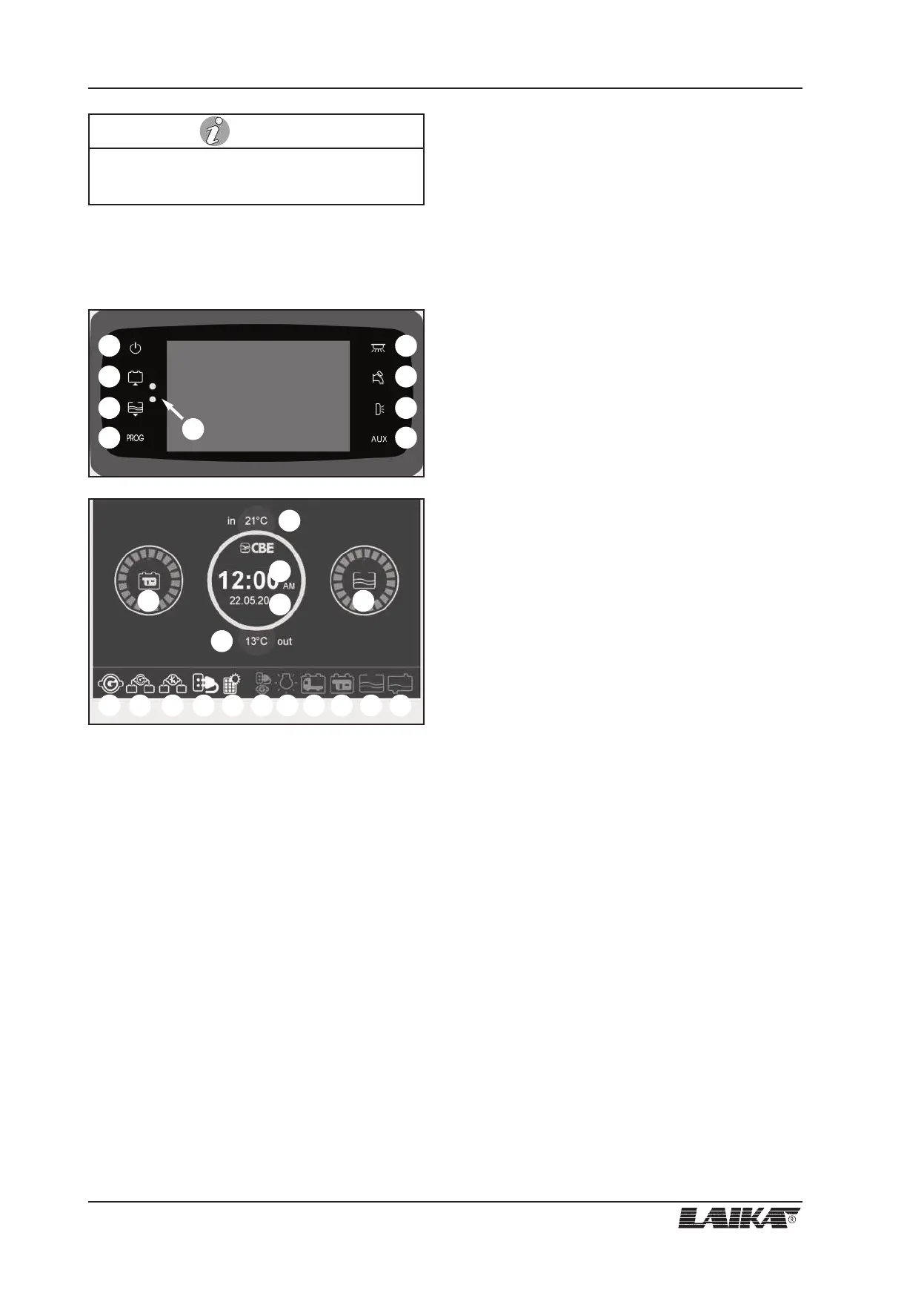
9.3 Ecovip series
Main screen
1) On/off main switch (to turn on/off press for two
seconds). If the relevant LED is green the control
panel is on, if it is red an alarm is on (batteries,
tanks, etc.).
2) Button for control of engine and auxiliary batteries
voltage (in Volt) and for the setting of the
programmable parameters (see "Setting").
3) Button for the control of fresh, waste and additional
(optional) water tanks, for fresh water tank refilling
function (see "Fresh water tank refilling function")
and for the parameters setting (see "Setting").
4) Button for system setting (see "Setting").
5) General light control button (light groups "A" and
"B").
6) Button to switch the pump on and off.
7) Awning light button; this light switches automati-
cally off when you start up the engine.
8) Button for “AUX” output power supply .
9) Sensor for activating the twilight function and
waking up the control panel with proximity system.
10) "B2" auxiliary battery status display.
11) Fresh water tank status display.
12) External temperature digital indicator.
13) Internal temperature digital indicator.
14) Clock digital display.
15) Date display.
16) It displays that the "+ key" is activated (the symbol
appears even when the panel is off).
17) It displays that the battery parallel is on when
engine is on (the symbol appears even when the
panel is off).
18) It displays that the engine battery recharging unit is
on.
19) It indicates that the 230 V power supply is
connected (the symbol appears even when the
panel is off).
20) It indicates the recharging through solar panel (with
a CBE solar regulator only).
21) It displays, with "+ key" inserted, that the 230V
mains is still connected. The alarm is signalled
even when the panel is switched off.
22) It displays the minimum voltage control device is
on.
23) It displays that the engine battery (B1) has run
down.
24) It displays that the auxiliary battery (B2) has run
down.
25) It displays that the fresh water tank or the
additional fresh water tank (optional) is empty.
26) It displays that the waste water tank is full.
9 - CONTROL PANEL
52
USER’S GUIDE
Refer to the producer's handbook for further infor-
mation on the control panel.
NOTE
1
2
3
4
5
6
7
8
9
1110
13
12
14
15
16 17 18 2019 21 22 23 24 25 26





 To Next Page