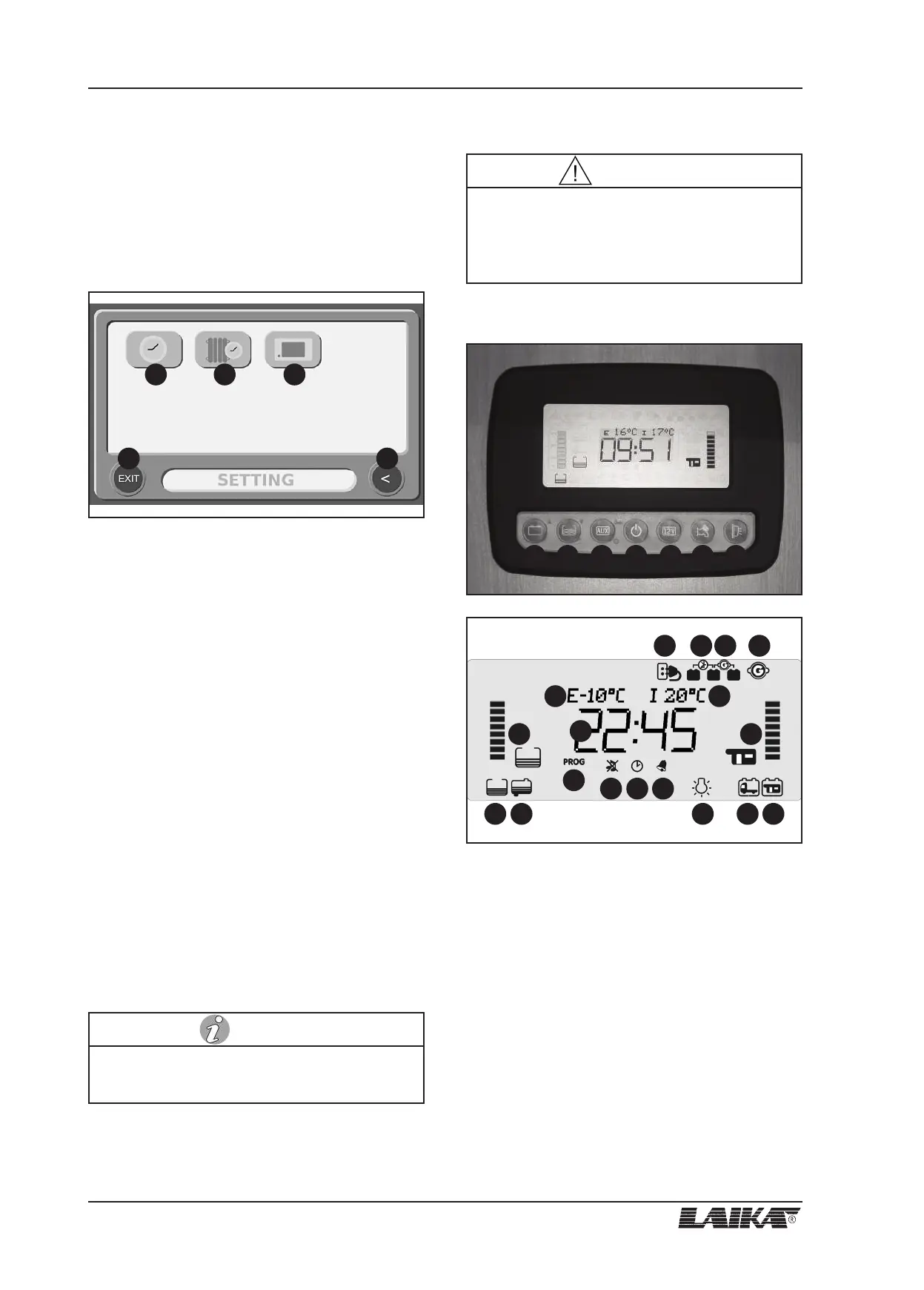
Programming screen
To enter the PROGRAMMING menu, press PROG button
in the main screen. Press any of the 3 button to access
main parameter setting menus. Press SAVE button to
confirm new settings. To return to previous display
without saving changes, press (<) button. To exit
PROGRAMMING menu, press EXIT, or wait for 30
seconds without pressing any button.
1) Button for CLOCK menu: clock time and date setting,
alarm setting and activation.
2) Timer heating button (function not active).
3) Button for PANEL SET-UP menu:
• LANGUAGE: language setting (ITALIANO /
DEUTSCH / FRANCAIS / ENGLISH).
• DISPLAY - MIN BRIGHT: setting the display
brightness with the backlight off (0÷100 %).
• TONES - STATUS: acoustic alarms setting
(ON/OFF).
• BATTERIES - VOLTAGE B2 - VOLTAGE B1: adjusting
the auxiliary battery (B2) and the engine battery
(B1) voltage. The value can be adjusted up to ±
0.5 V with 0.1 V step.
• TEMPERATURES - INTERNAL - EXTERNAL:
adjusting inside and outside temperature sensor
(Range ± 2 °C).
4) EXIT button to return to the main display /
SAVE button to confirm new settings.
5) Button (<), to return to previous display.
9.2 Kreos low-profiles
Main screen
1) Button for control of engine and auxiliary batteries
voltage (in Volt) and for the setting of the
programmable parameters (see "Setting").
2) Button for the control of fresh “S1”, additional
“S2”, waste “S3” and waste “S4” water tanks, for
fresh water tank refilling function (see "Fresh water
tank refilling function") and for the parameters
setting (see "Setting").
3) Button for “AUX” output power supply and for
system setting (see "Setting").
4) On/off main switch (to turn on/off press for two
seconds): at the start-up the display carries out a
functioning test and shows all symbols (including
unused symbols). If the relevant LED is green the
9 - CONTROL PANEL
50
USER’S GUIDE
Refer to the producer's handbook for further infor-
mation on the control panel.
NOTE
1 2 3
4 5
15
16 17 18
19
21
20
8 9 10 11
12
14
13
22 23 24 25
The timer-function for the heating system is not
active on the control panel. Please use the control
panel Truma or Alde to program the timer for the
starting of the heating system.
WARNING
1 2 3 4 5 76



 To Next Page