EasyManua.ls Logo

Leibinger JET3 up - Page 147

Leibinger JET3 up
214 pages
Print Icon
To Next Page IconTo Next Page
To Previous Page IconTo Previous Page
Loading...
Service Manual JET3
Rev. 1.0 147
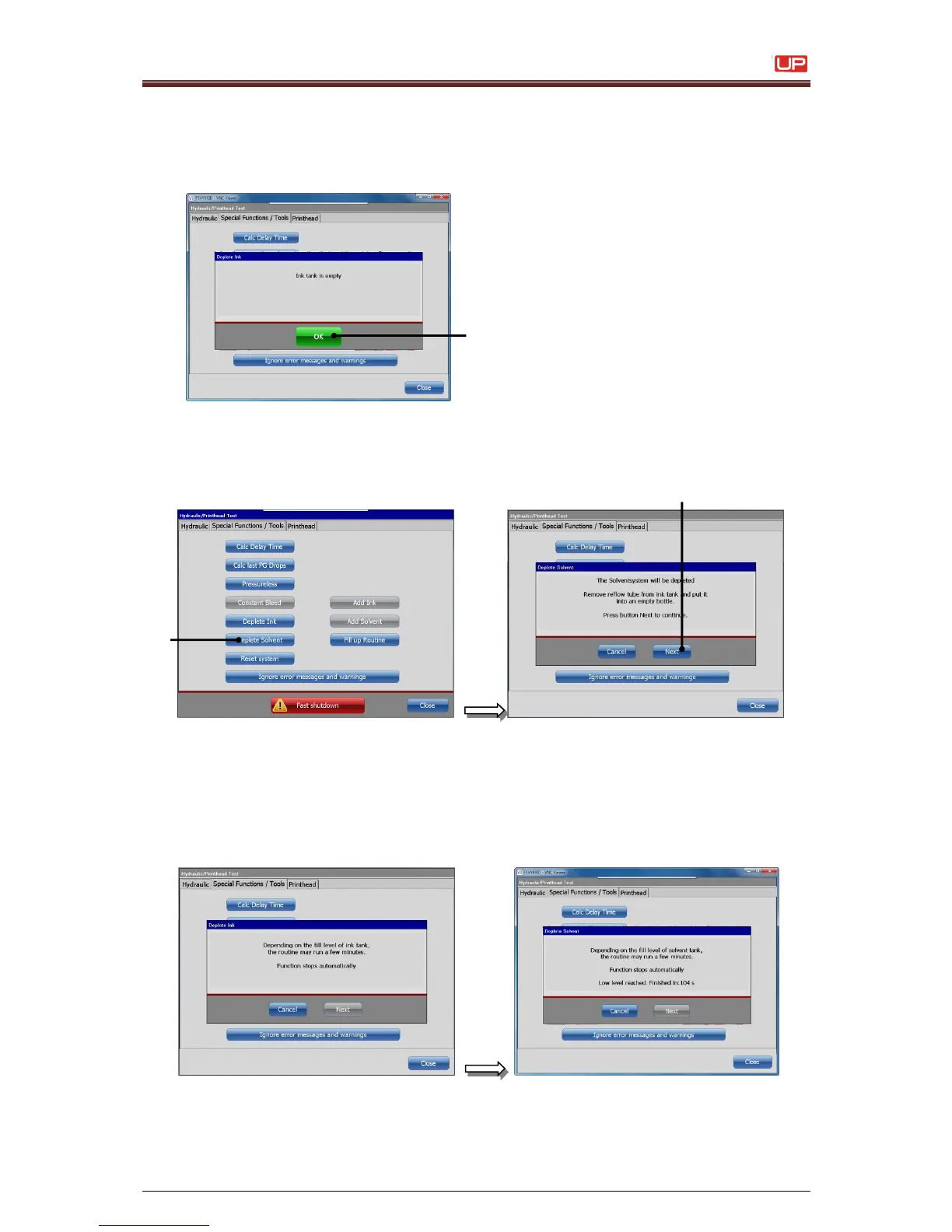
Please confirm with the button <OK>.
The menu will change back to <Special Functions/Tools>.
The drained ink from the system can be used again if required.
7. To drain the solvent-tank please activate the button <deplete solvent> (1).
Put the drain tube (see point 4) once more in an empty ink or solvent bottle and
start the deplete routine with the button <Next> (2).
1 Button <deplete solvent>
2 Button <Next>
In dependence of the filling state at the solvent-tank the routine runs some minutes.
If the sensor recognises the “low level” inside the tank, the routine runs another 120
seconds till the message „ink tank is empty“ appears automatically and switches off this
routine.
1
2
1

Table of Contents

Other manuals for Leibinger JET3 up

Related product manuals