• System fans
• Processor-heat-sink module (PHM)
Note: Do not disassemble the PHM.
• DIMMs
• CMOS battery
• PCIe adapters
• Riser assembly
• M.2 backplane
• LOM adapter
• TCM/TPM (for Chinese Mainland only)
4. Pull out the power supplies a little bit. Ensure that they are disconnected from the system board.
To remove the system board, complete the following steps:
Watch the procedure. A video of the removal process is available:
• YouTube:
https://www.youtube.com/playlist?list=PLYV5R7hVcs-AQrHuDWK6L3KtHWc6maY_O
• Youku: http://list.youku.com/albumlist/show/id_50437162
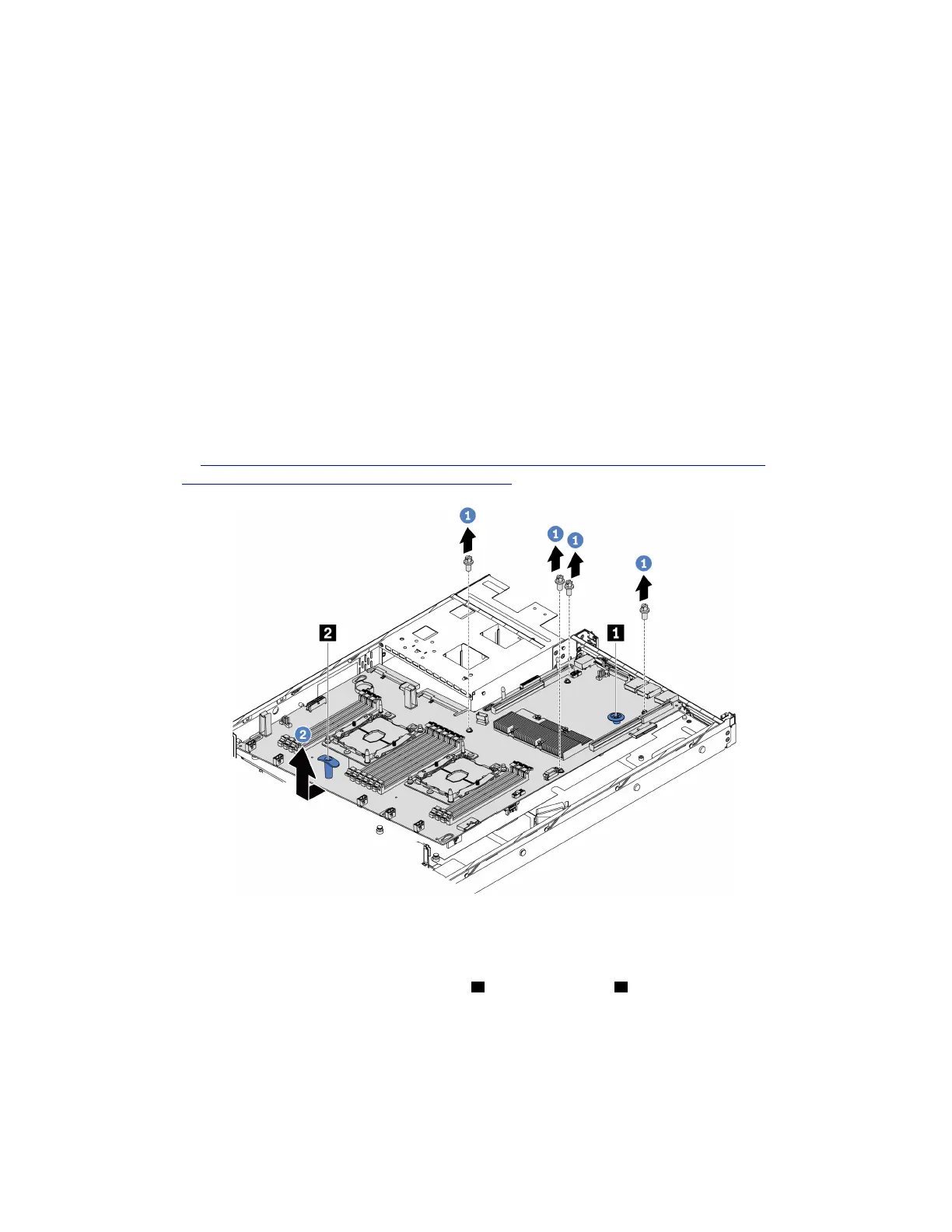
Figure 99. System board removal
Step 1. Remove the screws that secure the system board, and put the screws in a safe place.
Step 2. Grasp the system board by the release pin
1 and the lift handle 2 at the same time and gently slide
the system board to the front of the server. Then lift and tilt the system board upwards to remove it
from the server.
If you are instructed to return the old system board, follow all packaging instructions and use any packaging
materials that are provided.
Chapter 3. Hardware replacement procedures 135






 To Next Page