Fel! Använd fliken Start om du vill tillämpa 見出し 1 för texten som ska visas här.
25
4. BASIC OPERATION
1. Open the cassette cover and load the consumables to use. (See 3: LOADING THE
CONSUMABLES) Then, close the cassette cover and turn the power on.
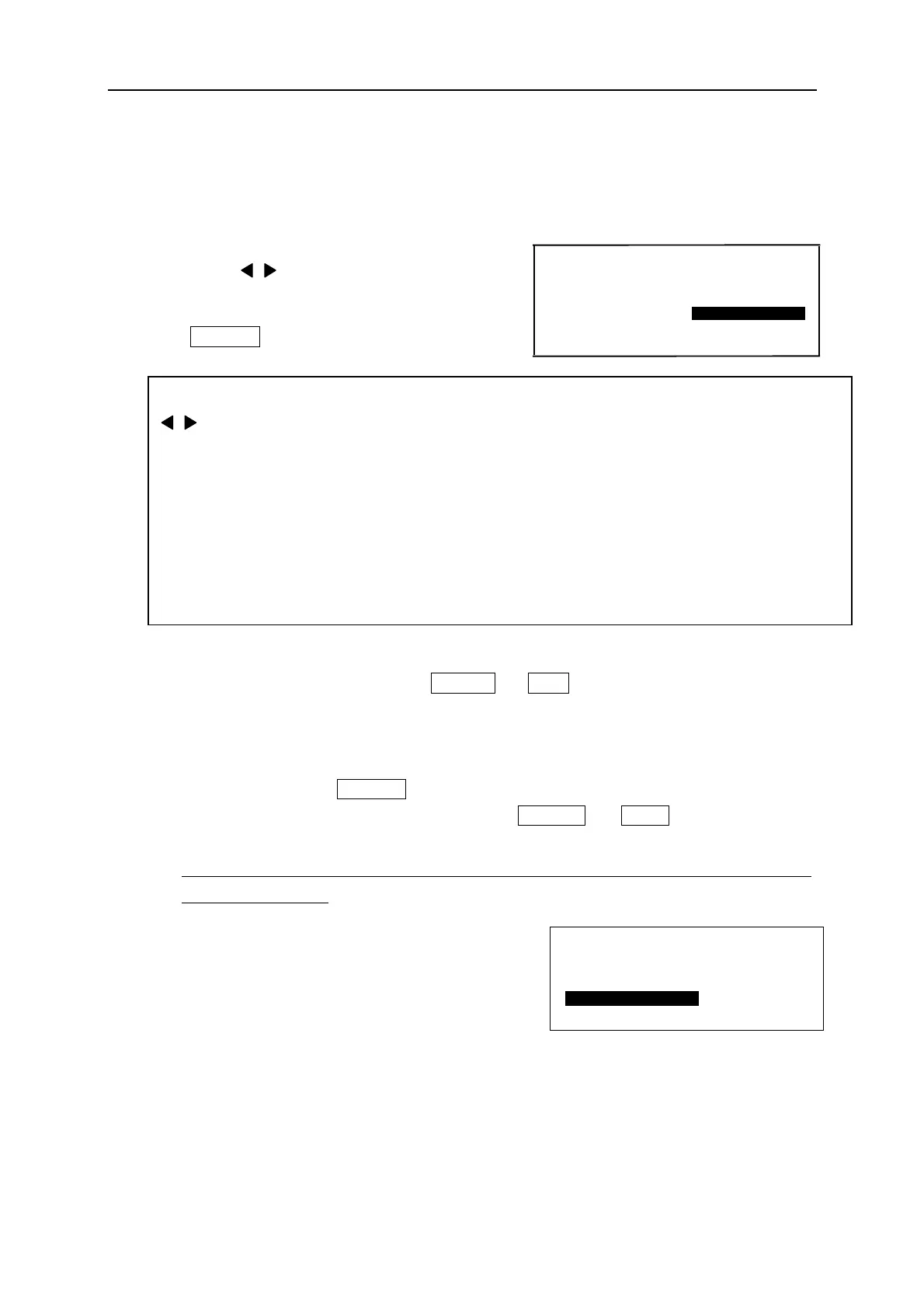
2. [PRINTED MATERIAL setting screen] appears.
Press ▲/▼/ / key to select “PRINTED
MATERIAL” and “SIZE.”
Press ENTER , then [INPUT screen] appears.
Note: ● When changing the material, press SHIFT → Esc (P.MATERIAL).
Then [PRINTED MATERIAL setting screen] appears.
After changing the kind of material (“TUBE” to “TAPE” or “TAPE” to “TUBE”),
[PITCH LENGTH setting screen] appears. Input the desired pitch length and
then press ENTER .
● When changing the material with pressing SHIFT → Esc (P.MATERIAL), the
“CHARACTER SIZE” is automatically changed to “AUTO”.
However, when the selected printed material is TAPE, “CHARACTER SIZE” is not
changed to “AUTO”.
● If any document is remained in the [INPUT
screen] before turning off the power, the right
screen appears when turning the power on next
time.
Press ▲/▼ key to select “INITIALIZE” or
“CONTINUE.”
▲/▼ key: Move the cursor between “MATERIAL” and “SIZE”
/ key: “MATERIAL” ・・・ Select from “TAPE”, “GENERIC TUBE” , “SHRINKABLE
TUBE”, “NON PVC TUBE” or “MAX TUBE”
“SIZE” ・・・・・・・・
GENERIC TUBE: Select from “2.5”,“3.2”,”3.6”,”4.2”,”5.2”, ”5.5” or “6.5”.
MAX TUBE: Select from “3.2”,”3.6”,”4.2”, ”5.2” or “6.4”.
SHIRNKABLE TUBE: Select from “2.5”,“3.2”,”3.6”,”4.2”,”5.2”, ”5.5” or “6.5”.
NON PVC TUBE (“PVC free” TUBE): Select from “3.2”,”3.6”,”4.2” or ”5.2.”
TAPE: Select from “5”,”9” or “12.”
F I L E B E I N G I N P U T
I N I T I A L I Z E
C O N T I N U E
MATERIAL=
MAX TUBE
SIZE=3.2


 To Next Page