Fel! Använd fliken Start om du vill tillämpa 見出し 1 för texten som ska visas här.
17
3. LOADING THE CONSUMABLES
Follow the steps bellow.
(1) Installing the ink ribbon to the ink ribbon case.
(2) Loading the tube or tape.
(3) Loading the ink ribbon case.
3-1 INSTALLING OR REPLACING THE INK RIBBON
Note: Use a ribbon case (LM-RC310) for LM-390A/PC.
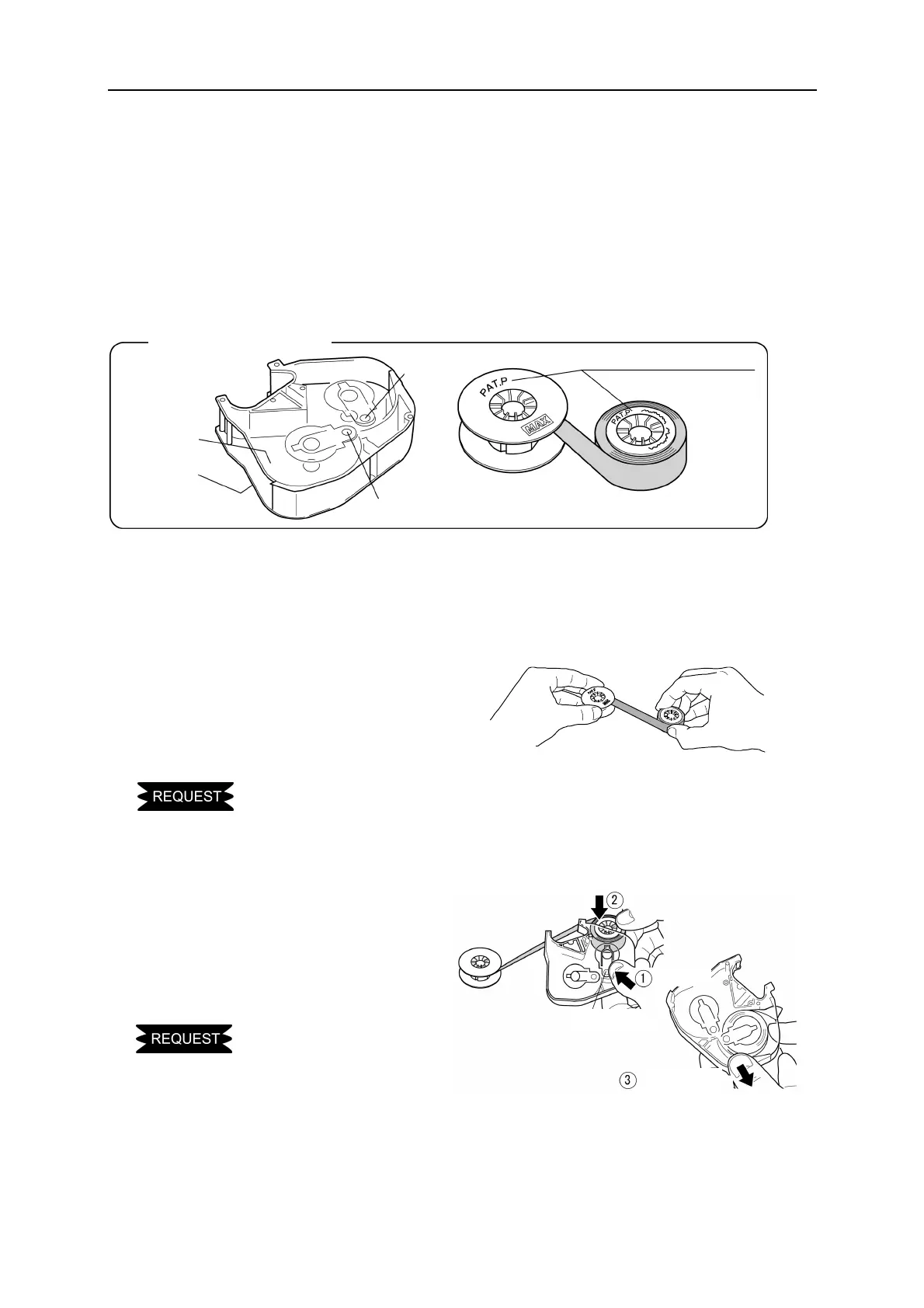
1. Install a new ribbon to the ribbon case.
Name of each section
Top
(Transparent)
Bottom
● Ribbon case
● Winding core
(Black)
● Ribbon core
The side with letters comes the top.
Button B
Button A
Insert
Press
Release
Button B
2. While pressing “Button B,” set
the ribbon core (green or blue)
as shown in the figure. Then,
release the “Button B” to lock
the ribbon.
● Pay attention to the top and bottom of ribbon case.
1. Holding the “Winding core”,
pull the “Ribbon core” lightly so
that the adhered portion comes
off.
● When pulling the “Ribbon core”, let the core turn so that the ribbon is not gone slack.


 To Next Page