Fel! Använd fliken Start om du vill tillämpa 見出し 1 för texten som ska visas här.
41
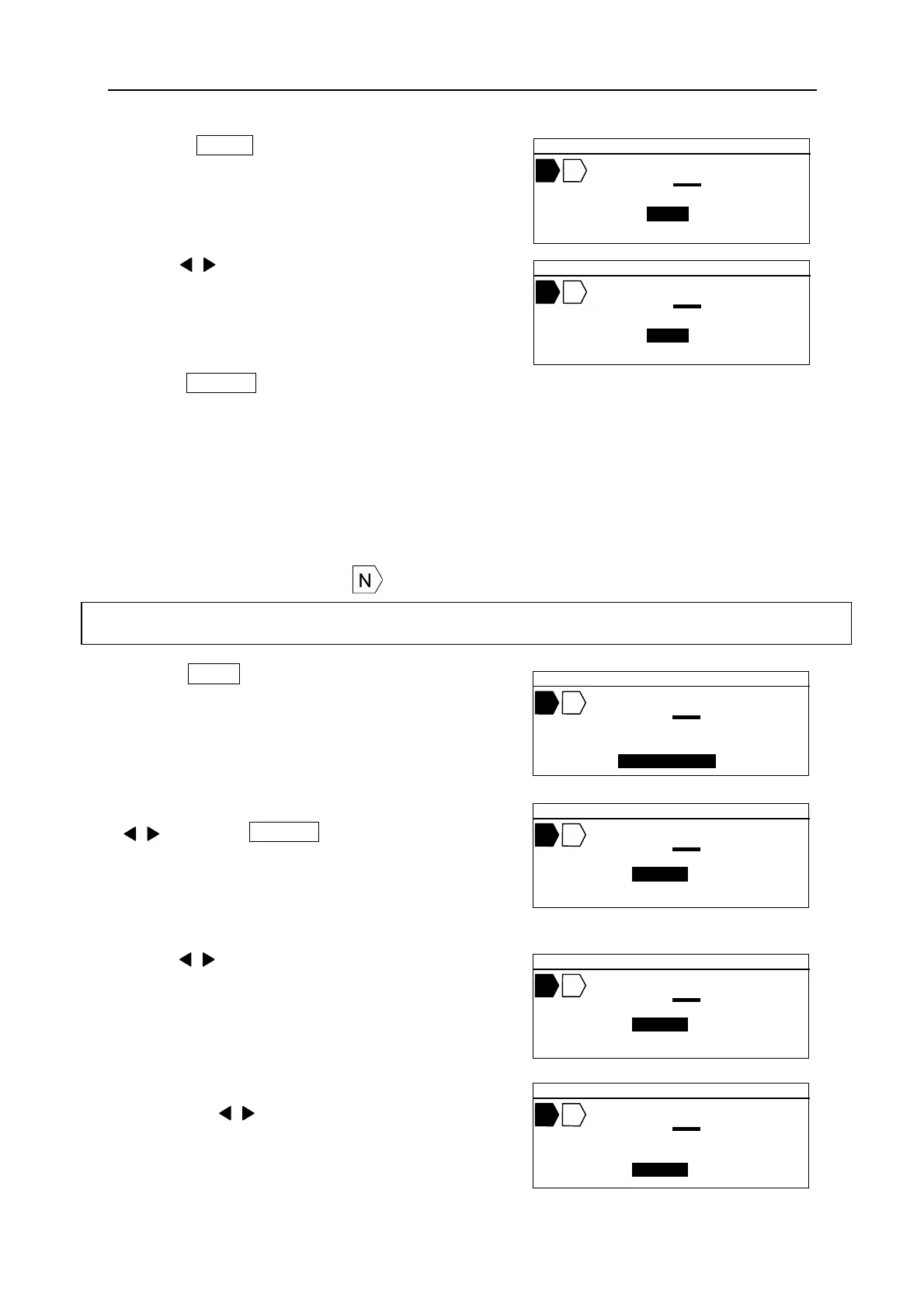
1. Press RPT . The [REPEAT setting screen]
appears.
2. Press / key or Ten key to input the value of the
“REPEAT.”
3. Press ENTER .
Note: The default value of “REPEAT” can be changed in the “OPTION” setting.
6-8 SEQUENCE
Setting sequential (running) numbers. To activate “SEQUENCE” function, set the “START”
number and “END” number as below.
If the “SEQUENCE” is set, appears.
1. Press SEQ . The [SEQUENCE setting screen]
appears.
2. After selecting the type of the “SEQUENCE
/ key, press ENTER .
The [START and the END number setting
screen] appears.
3. Press / key or Ten key to input the value of the
“START.”
4. Press ▼ key to move the cursor to the “END.” And
then Press / key or Ten key to input the value of
the “END.”
Selectable items: 8 SCALE=0 ~7777, 10 SCALE=0~9999, 16 SCALE=0~FFFF, ALPHABET=A~Z
▲ 2 0 .0 C U T 0 0 1
A B C
R E P E A T =
2 P C S
▲ 2 0 .0 C U T 0 0 1
A B C
R E P E A T =
1 P C S
▲ 2 0 .0 C U T 0 0 1
A B C
S E Q U E N C E =
1 0 S C A L E
▲ 2 0 .0 C U T 0 0 1
A B C
S T A R T = 0
E N D = 0
▲ 2 0 .0 C U T 0 0 1
A B C
S T A R T = 1 0
E N D = 0
▲ 2 0 .0 C U T 0 0 1
A B C
S T A R T = 1 0
E N D = 2 0


 To Next Page