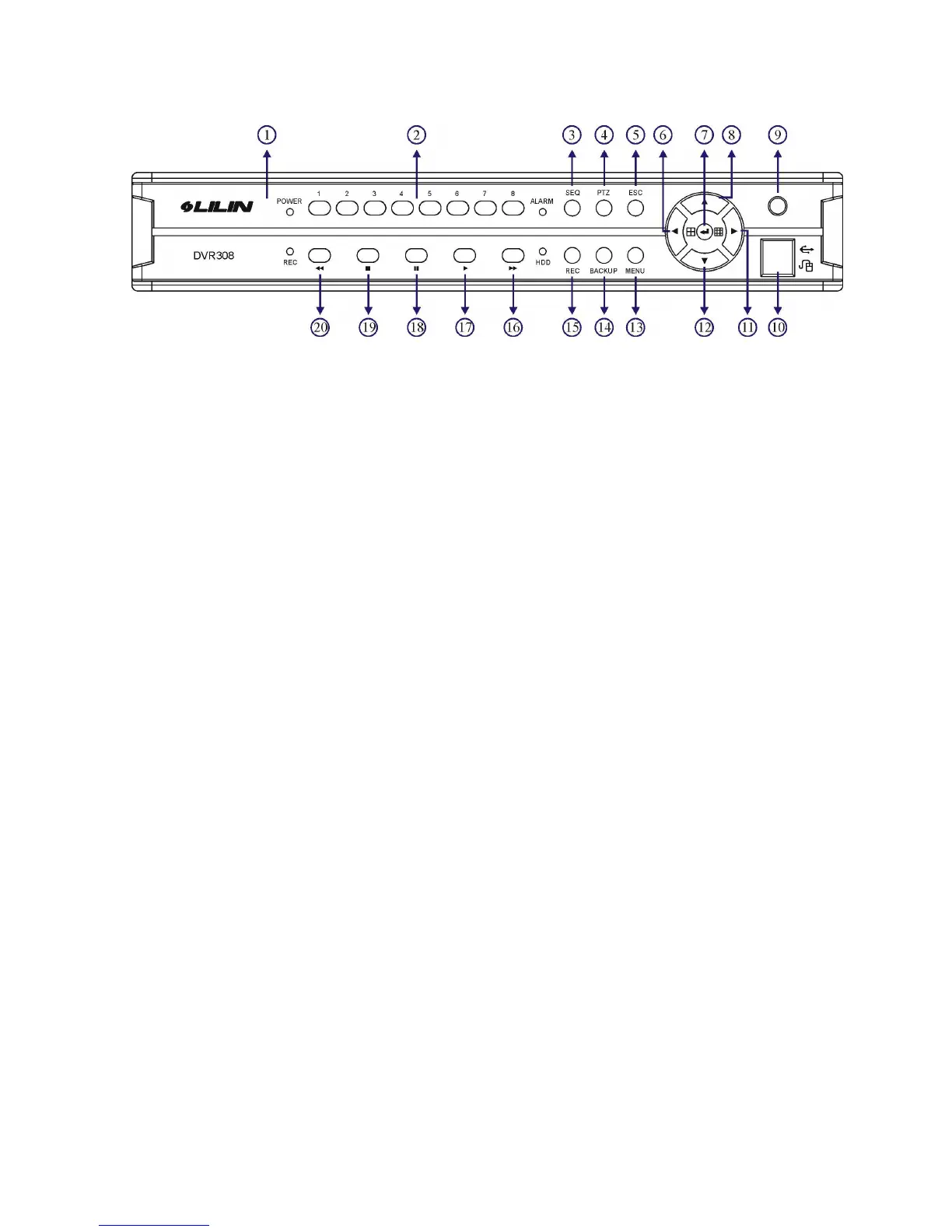
[DVR308]
1. LED status panel 11. Right button / Split-display
Please see system LED status panel. a. Move cursor right in menu.
2. Camera buttons b. Pan right at PTZ control mode.
Camera selection mode c. Increase a value.
3. SEQ button
d. 9 split-display
12. Down button
a. Move cursor down at menu mode.
4. PTZ button
a. At PTZ control mode
b. At Split-display mode
b. Tilt down at PTZ control mode.
5. ESC button
13. Menu button
6. Left button / Split-display 14. Backup button
a. Move cursor left at menu setup. 15. REC button
b. Pan left at PTZ control mode. Start recording operation or stop the
c. Decrease a value. recording task.
d. 4 split-display 16. Fast forward button
7. Enter button a. Video fast forward
a. Enter operation in menu setup. b. Next event page
b. Instant PTZ camera selection at live mode.
17. Play button
c. Camera active mode a. Invoke playback selection menu.
8. Up button b. Replay after FF, FR, Pause, stepping when
a. Move cursor up in menu. playing video.
b. Tilt up at PTZ control mode. 18. Pause button
9. Remote control IR receiver Live: freeze video, playback: pause video
10. USB 2.0 connector 19. Stop video playback button
a. USB flash disk
20. Fast reverse button
b. USB DVD/RW a. Video fast reverse
c. USB MOUSE b. Previous event page



 To Next Page