LinMot
Configuration Software
User Manual V1.01 5-38
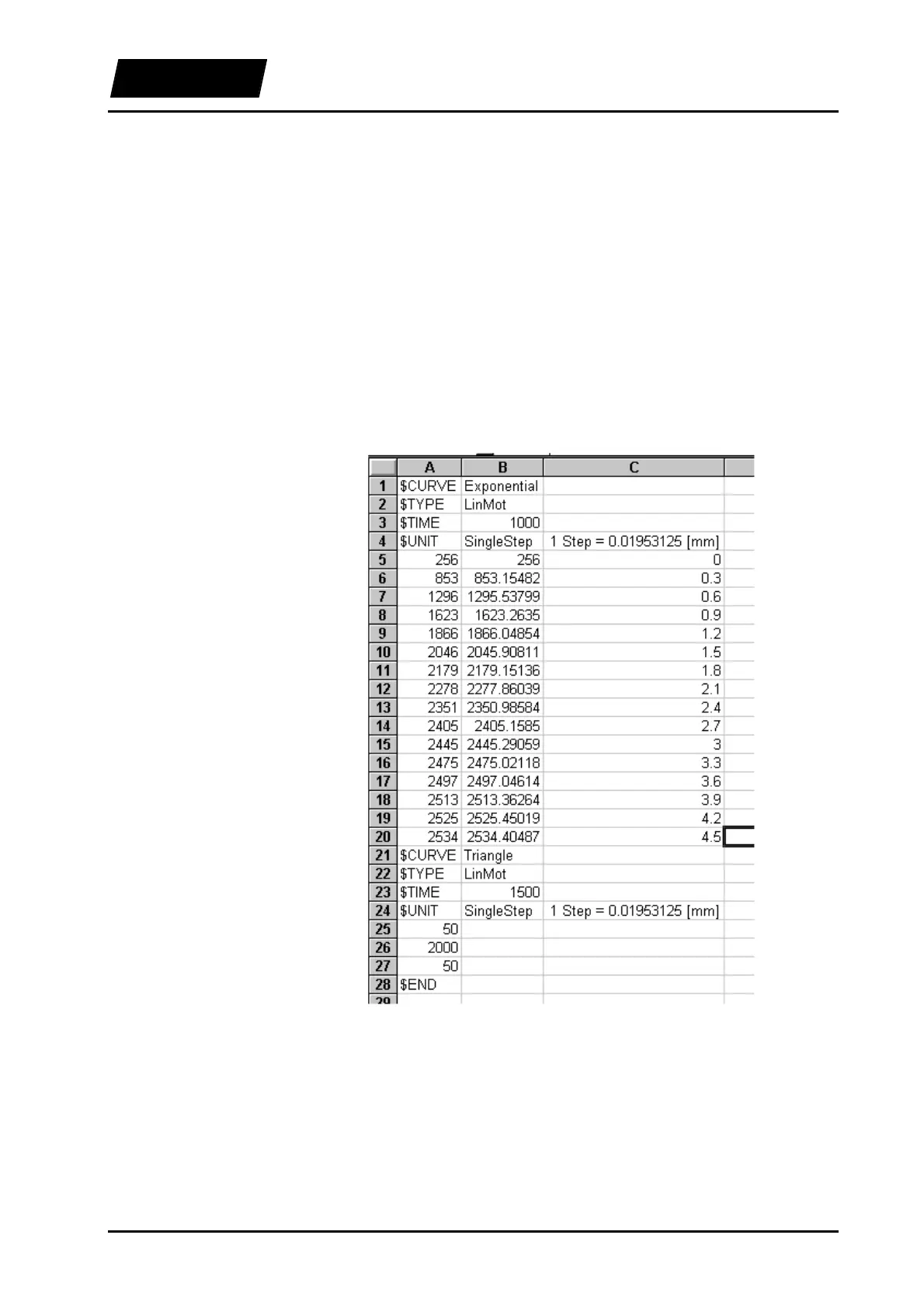
We will edit the “Exponential” curve, so that an exponential jump from 5 to 50 mm is
executed. For this we define the exponents in column C with the values 0, 0.3, 0.6, ...
4.5. In column B we enter the following formula
Bn = 1024/20*(45*(1-1/EXP(Cn))+5)
for the definition of the values. The factor 1024/20 is used for scaling from millimeters
to Singlesteps. In column A we enter the following function
An = ROUND(Bn,0)
in order to eliminate the decimal point. With this the “Exponential” curve is complete.
For the “Triangle” curve we enter the values 50, 2000 and 50 manually. You should now
see the following table:
Figure 5-31: The curves defined in Excel
In order not to loose the formulas in the table it is important to save the table as *.xls.
We save the document as “ExelTest.xls” first, and then as “ExelTest.csv”, which is the
format readable by the curve inspector. It is important to select the file type under “Save
As” in Excel, and not by manually entering the file extension.



 To Next Page