115
1.
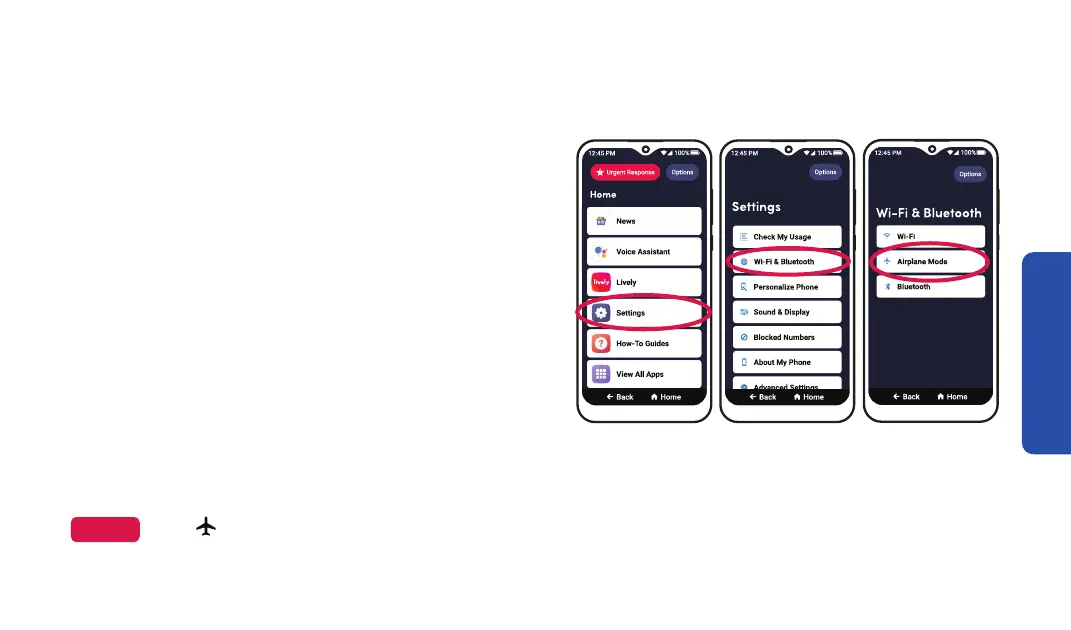
To turn on or off Airplane Mode:
When traveling on an airplane, you may be
required to put your phone in Airplane Mode. In
Airplane Mode, you cannot make or receive calls
(including Urgent Response), texts or browse
the Internet.
Airplane Mode
On the Home screen, TAP Settings.
2. TAP Wi-Fi & Bluetooth.
3. TAP Airplane Mode.
4. TAP Continue.
5. TAP the Airplane Mode slider.
Airplane Mode is turned on, the Cellular Signal Strength icon in the status bar changes into
an airplane.
NOTE
When
Step 1 Step 2
Step 3



 To Next Page