Getting Started
Home Screen Overview
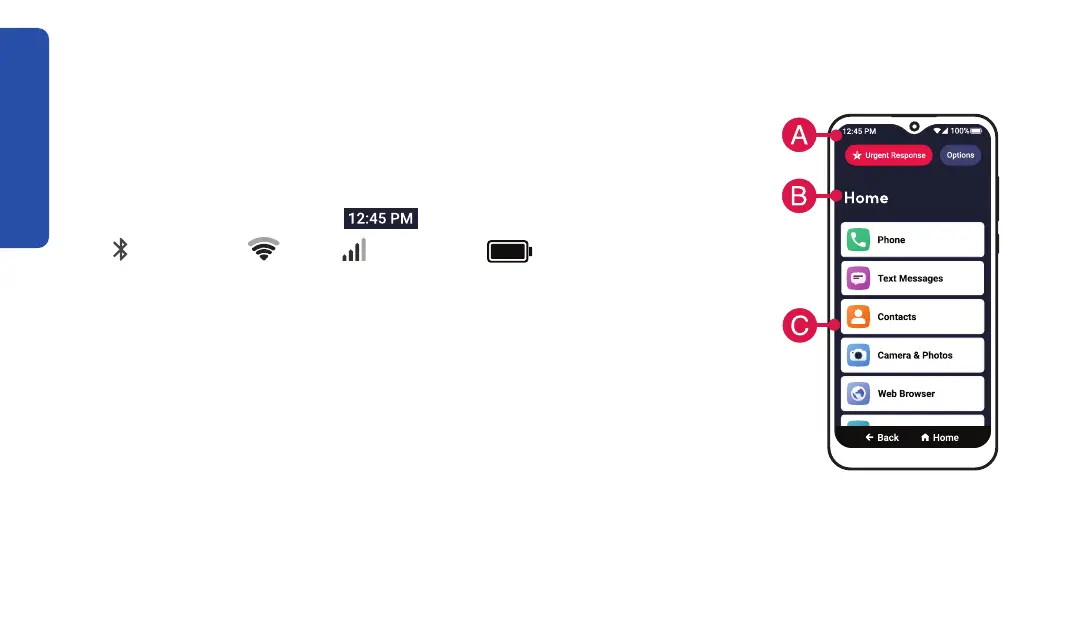
The Home screen lists commonly used apps in one place. From here,
you can access all features of your Jitterbug Smart4.
A. Status Bar – Shows you
the current time,
Bluetooth®,
Wi-Fi,
cellular and battery.
B. Title Bar – Name of the application or screen you are viewing.
C. App List – A list of commonly used apps. See "Customizing Your
Home Screen Applications" on page 118 to change which apps
appear on your Home screen.
34



 To Next Page