Dial Pad
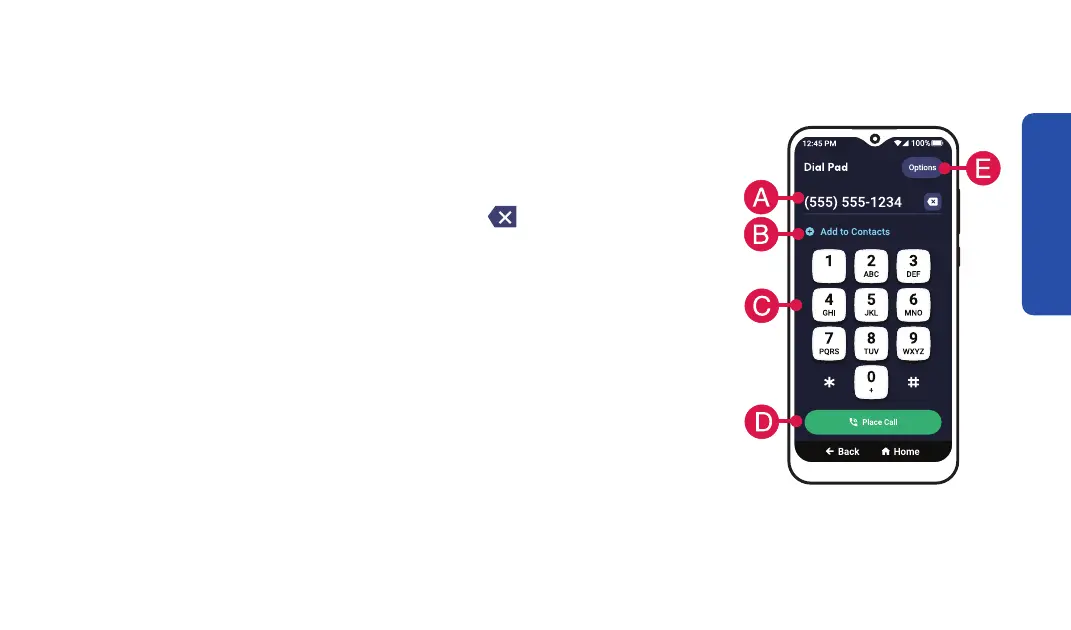
These are the features of the Dial Pad:
A. Phone Number Field – This shows the phone number you’re
about to call as you are dialing. Use the
delete button if you
make a mistake.
B. Add to Contacts – TAP to add this number to a contact name
for quicker dialing in the future.
C. Dial Pad – Use the dial pad to type the phone number.
D. Place Call Button – TAP Place Call when you are ready to call.
E. Options – TAP to open a drop-down menu that lets you View
Recent Calls, View Contacts or View How-To Guides.
Phone Calls
65



 To Next Page