Email / Internet / Apps
107
Sending an Email with a Photo or Video
These instructions are for Google (Gmail)
accounts. Your steps may vary if you use a different email provider.
1. From your Email inbox, TAP Compose.
2. TAP the
attachment button at the top right of
the screen.
3. TAP Attach file.
4. Choose the photos or videos you would like to attach to
your email message.
5. Enter in the recipient's email address, then TAP
send at
the top right of the screen to send your email message
with attachments.
NOTE
Step 1 Step 2
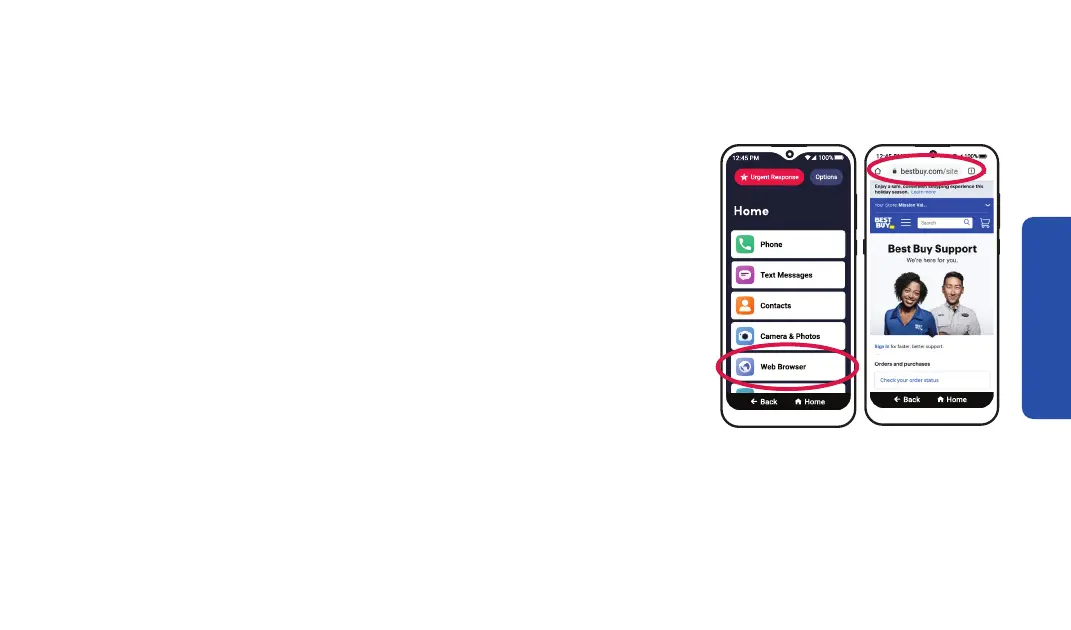
Browsing the Internet
1. On the Home screen, TAP Web Browser. The Chrome web
browser will open.
2. While browsing the Internet, you can:
• Navigate to a web page – Enter a web address (URL) in the
box near the top of the screen.
• Search for information – Enter your search terms in the box
near the top of the screen.
Step 1 Step 2



 To Next Page