117
Bluetooth
Bluetooth allows you to connect wirelessly to devices such as car stereos,
portable speakers and wireless headphones.
To connect to a Bluetooth device:
1. Make sure that your Bluetooth device is in Bluetooth pairing mode. See
the device’s instructions for more information.
2. On the Home screen, DRAG to scroll down, and TAP Settings.
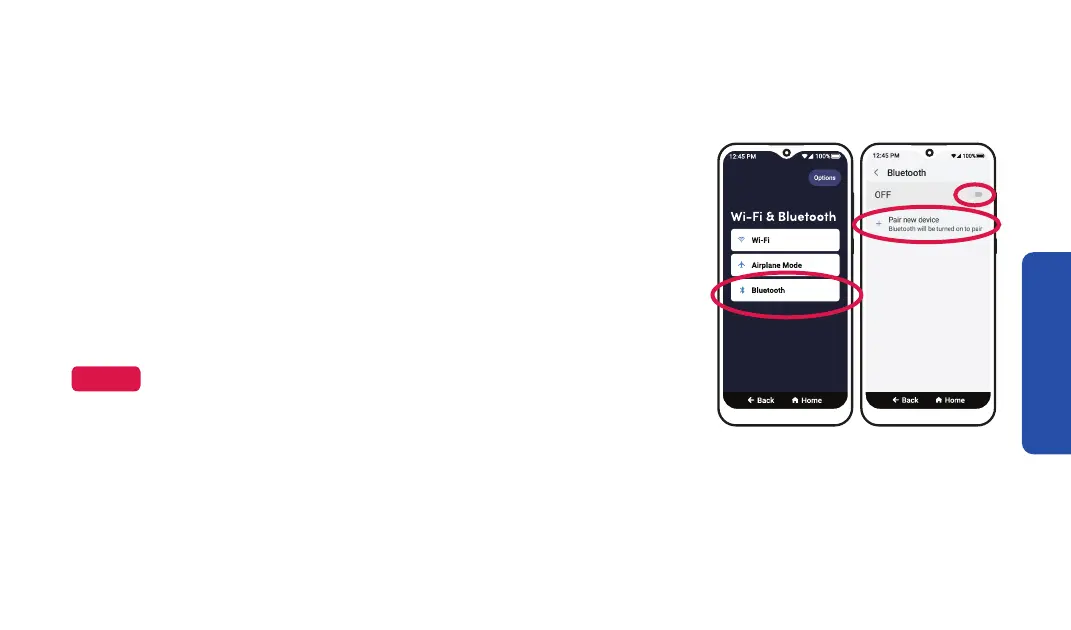
3. TAP Wi-Fi & Bluetooth.
Step 3
Bluetooth (continued)
4. TAP Bluetooth.
5. TAP the slider to turn Bluetooth on, then TAP
Pair new device.
6. TAP your Bluetooth device’s name from the list.
7. TAP PAIR
device PIN.
If
Step 4 Step 5
NOTE
If you’re reconnecting to a Bluetooth device that you’ve paired to
recently, your smartphone will automatically reconnect after you turn
on Bluetooth.



 To Next Page