Getting Started
Access your Assistant with "Hey Google"
Google Assistant™ can start when it hears you say "Hey
Google" even when your phone is locked.
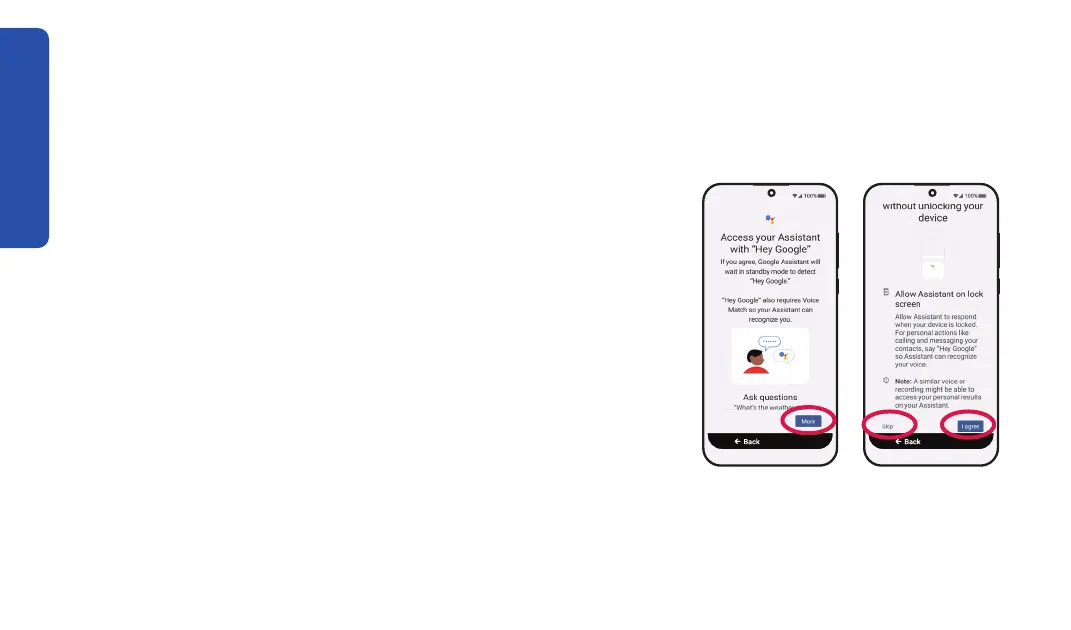
Step 1 Step 2 & 3
1. TAP More to read about Google Assistant.
2. If you want to turn on "Hey Google," TAP I agree.
Otherwise, TAP Skip and go to the next page.
3. If you want to let Google Assistant work without unlocking
your smartphone, TAP More to scroll down, then TAP I
agree. Otherwise, TAP Skip.
Lorem ipsum
22



 To Next Page