EasyManua.ls Logo

Lively Jitterbug Smart4 - Page 54

Lively Jitterbug Smart4
154 pages
Print Icon
To Next Page IconTo Next Page
To Previous Page IconTo Previous Page
Loading...
Learning the Basics
Sending a Text (continued)
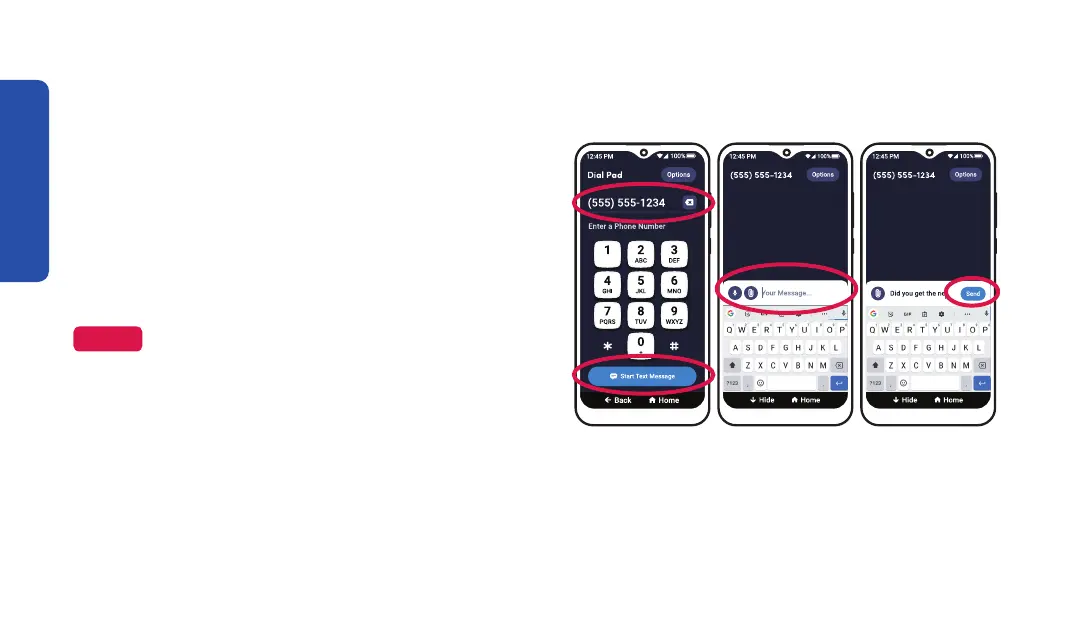
Step 4 Step 5 Step 6
4. Enter the 10-digit phone number and TAP
Start Text Message.
5. Compose your text message using the
ke
yboard or with voice typing.
6. TAP Send.
NOTE


46

Table of Contents

Related product manuals