EasyManua.ls Logo

Lively Jitterbug Smart4 - Page 60

Lively Jitterbug Smart4
154 pages
Print Icon
To Next Page IconTo Next Page
To Previous Page IconTo Previous Page
Loading...
Learning the Basics
52
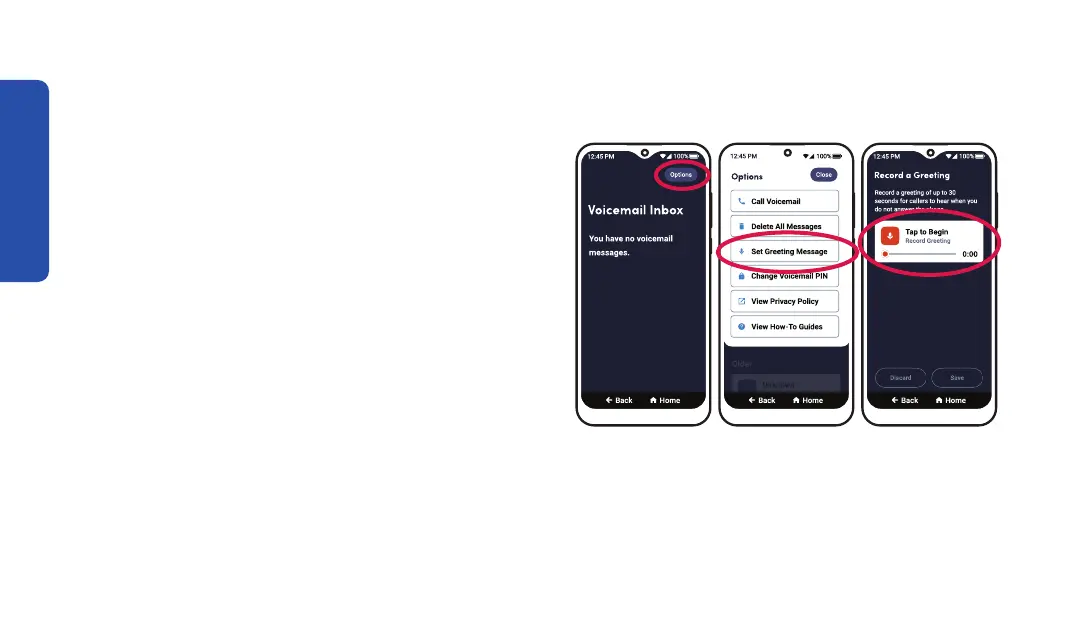
Setting Up Your Voicemail Greeting (continued)
3. TAP Options from the top right corner.
4. TAP Set Greeting Message.
5. 
TAP the Tap to Begin box. Or TAP Record a
New Greeting to create a different greeting.
6. Say your greeting.
Step 3 Step 4 Step 5


Table of Contents

Related product manuals