57
2 Description
8
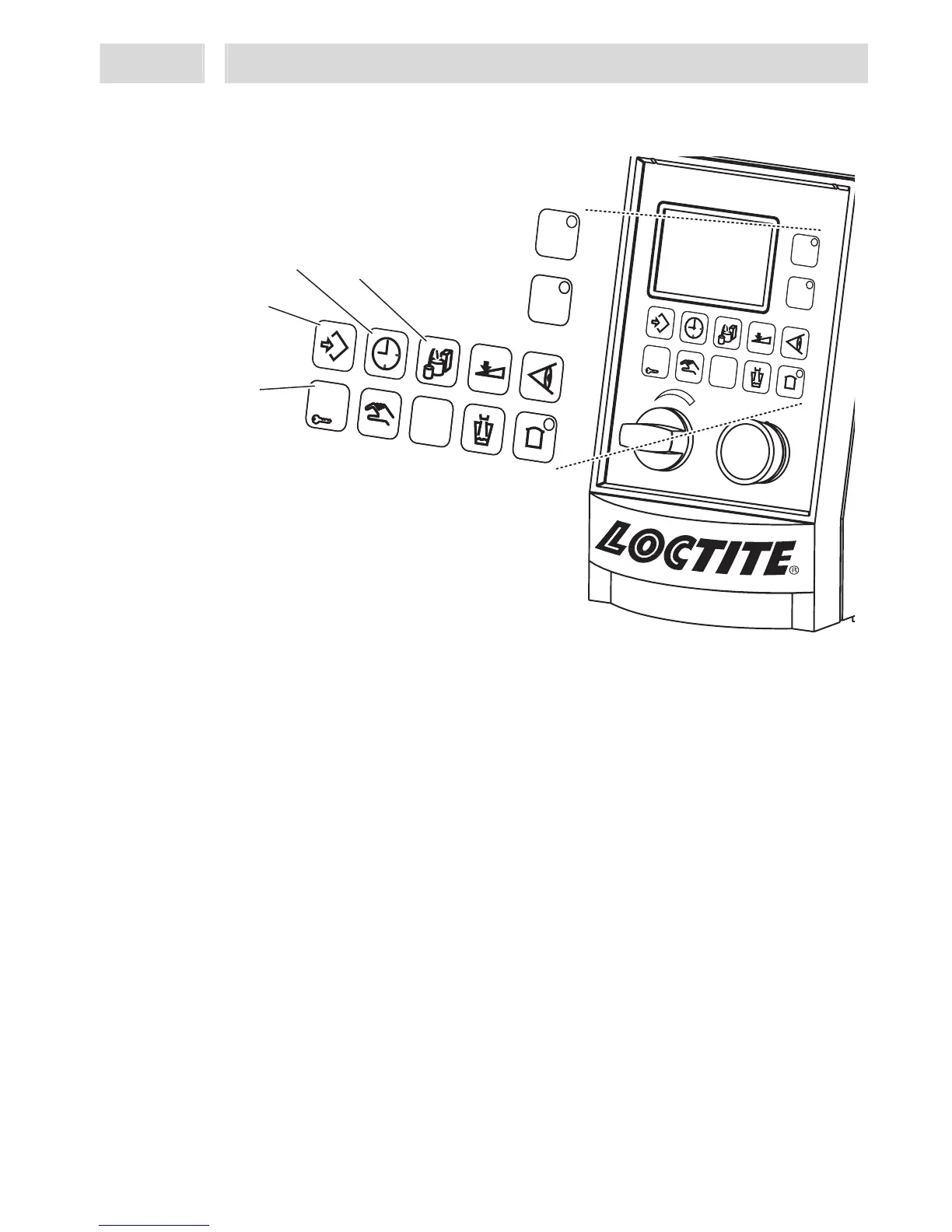
Key: Preselection of stored dispense programs
For manual selection of stored dispense applications. The display shows the selected
application in the 3rd line, indicated as letters (a-d) in square brackets.
9
Key: Time
With preselected channel, the value setup menu is displayed.
– For adjusting dispense, pre-delay and post-delay times.
If this key is pressed without preselecting a channel, Channel A will be automatically
switched to active mode.
10
Key: Enter
– For storing a setting.
– For resetting error messages. This function has priority when error messages are
displayed.
11
Key: ESC / Lock
– For leaving submenus without storing the values.
– For aborting input of values without storing.
– In the Operation display view, the system can be locked/unlocked by keeping the
key depressed for more than 2 s.
This prevents unauthorized access. A PIN must be entered for activation or
deactivation.
ESC
Start
A
B
97152
ESC
Start
A
B
97152
ESC
Start
A
B
ESC
Start
B
A
8
9
10
11


 To Next Page