Technical Manual LÖWEN Dart HB8
01/2019 20
3.5 Programming Further Coin Types
Coin acceptor NRI G13 only accepts 50 Cent, 1 € and 2 € coins. In factory setting, the acceptance of 10 and
20 Cent coins is disabled.
The NRI G13 coin acceptor can be programmed to accept further coin types (including token) without
additional software. This can be achieved via the NRI “Teach Mode”. Coin channels 9 – 16 of the activated
memory block can be used for programming further coin types. (S2.1 corresponds to coin channel 9, S2.2
corresponds to coin channel 10, S2.8 corresponds to coin channel 16).
1. Open the coin door.
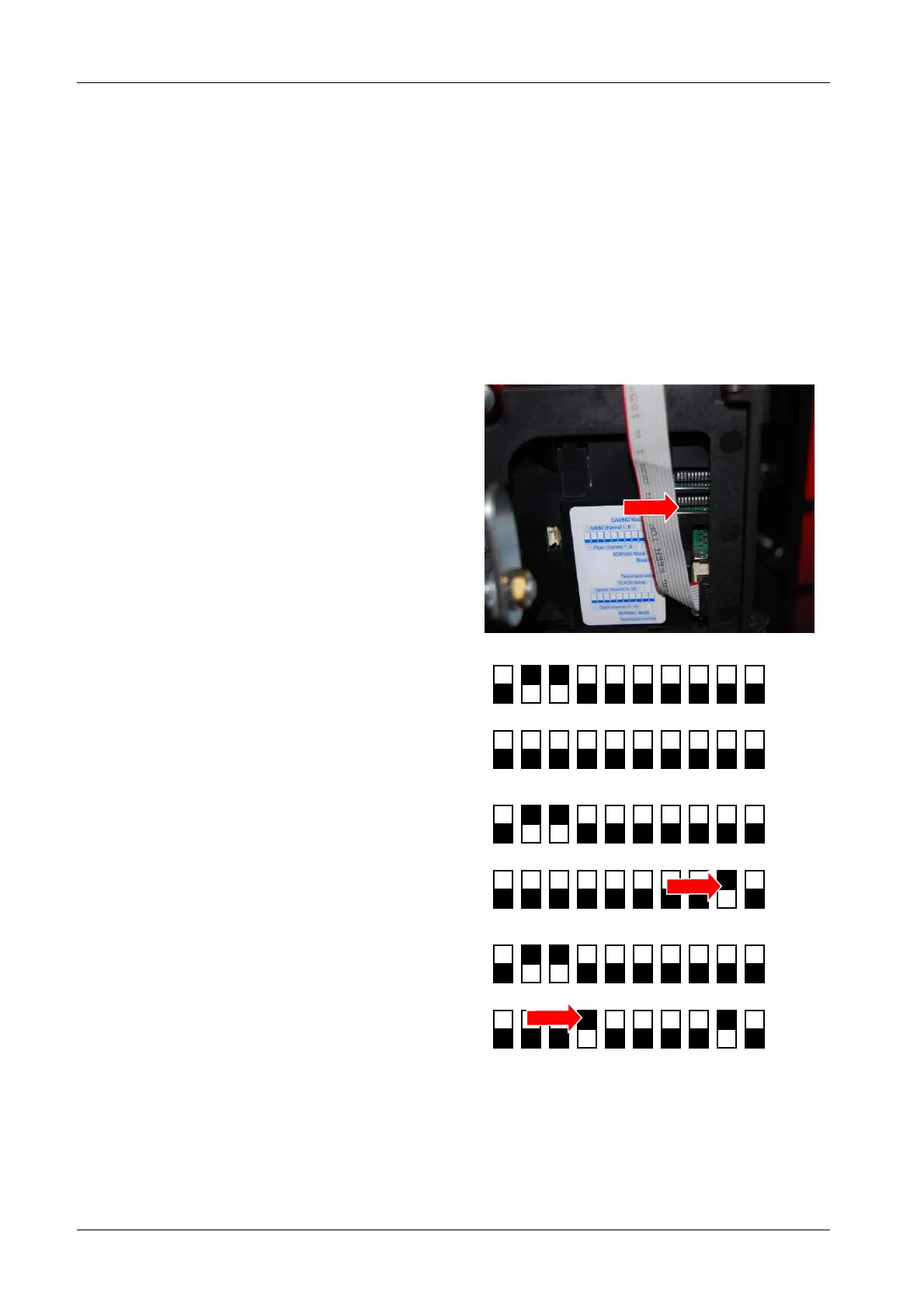
2. Set all DIL switches 1 – 10 (lower switch block S2)
downward to OFF position.
Delivery condition upper switch block S1:
DIL 2 and DIL 3 on ON position, meaning that 10
Cent and 20 Cent are disabled.
1 2 3 4 5 6 7 8 9 10
1 2 3 4 5 6 7 8 9 10
3. Set DIL switch 9 of the lower switch block upwards
to ON position. The coin acceptor is now in Teach
Mode.
1 2 3 4 5 6 7 8 9 10
1 2 3 4 5 6 7 8 9 10
4. Set the coin channel you wish to teach (S2.1[coin
channel 9] thru S2.8 [coin channel 16] upwards to
ON position.
Example
In this example, S2.4 lower switch block,
corresponding to coin channel 12, is set upwards
to ON position.
1 2 3 4 5 6 7 8 9 10
1 2 3 4 5 6 7 8 9 10
5. Insert at least ten coins of the new coin type into
the coin acceptor or dart machine.
After insertion of the tenth coin you hear a single
click sound. You can now insert further coins.



 To Next Page