5 User Interface
29
5 User Interface
CAUTION!
BEFORE PROCEEDING, ENSURE THAT THE INSTALLATION
INSTRUCTIONS HAVE BEEN FOLLOWED CORRECTLY. FAILURE TO DO SO
MAY RESULT IN AN ELECTRICALLY HAZARDOUS INSTALLATION, OR
DEGRADE INSTRUMENT PERFORMANCE.
When shipped the MOD53 is configured to the default % saturation set-up. In this
state, the instrument can perform all of the necessary function for a basic dissolved
oxygen monitoring instrument.
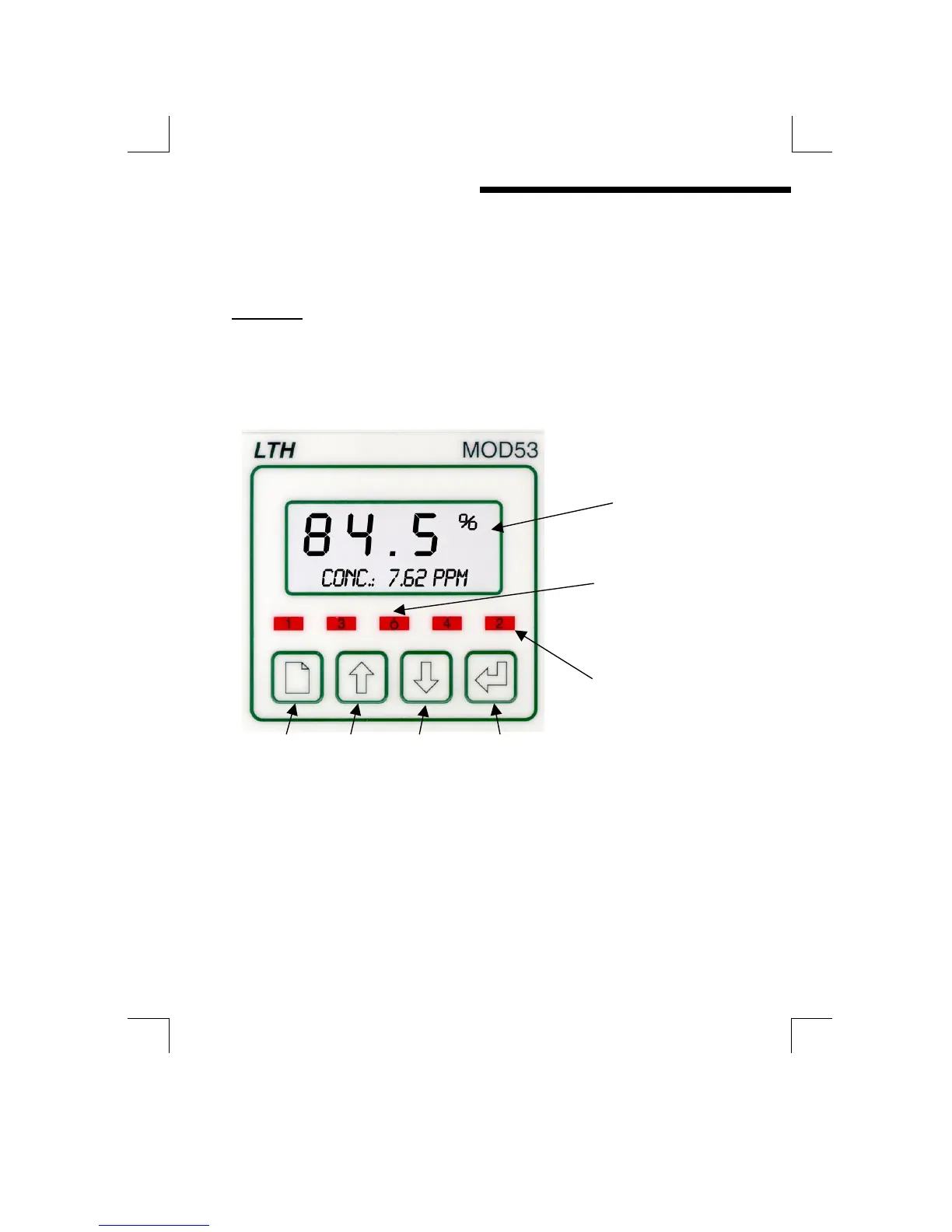
THE FRONT PANEL
The MOD53 uses a versatile dot matrix character LCD to display all of the settings
and readings. The seven segment digits at the top of the display indicate the
primary measured value during normal operation. The six character display to the
right of these indicates the units of measurement when a value is being displayed.
The sixteen characters on the bottom of the display are used to indicate secondary
readings or states, and to display scrolling error messages.
LIQUID
CRYSTAL
DISPLAY
OFFLINE
STATUS LED
UP TO 4
STATUS
LEDS FOR
SET POINTS
PAGE UP DOWN ENTER
PROGRAMMING BUTTONS


 To Next Page