LUMIPro 2017
6
Popouts Overview
Popout Menus
Preset lights are a great way to get started, both with LUMIPro, and
even when you’ve mastered LUMIPro and are just setting up a new
shoot. It’s useful to start from a good point, and then customize
lights and colors to achieve exactly the shot that is tickling your
imagination.
Sliders and Colors
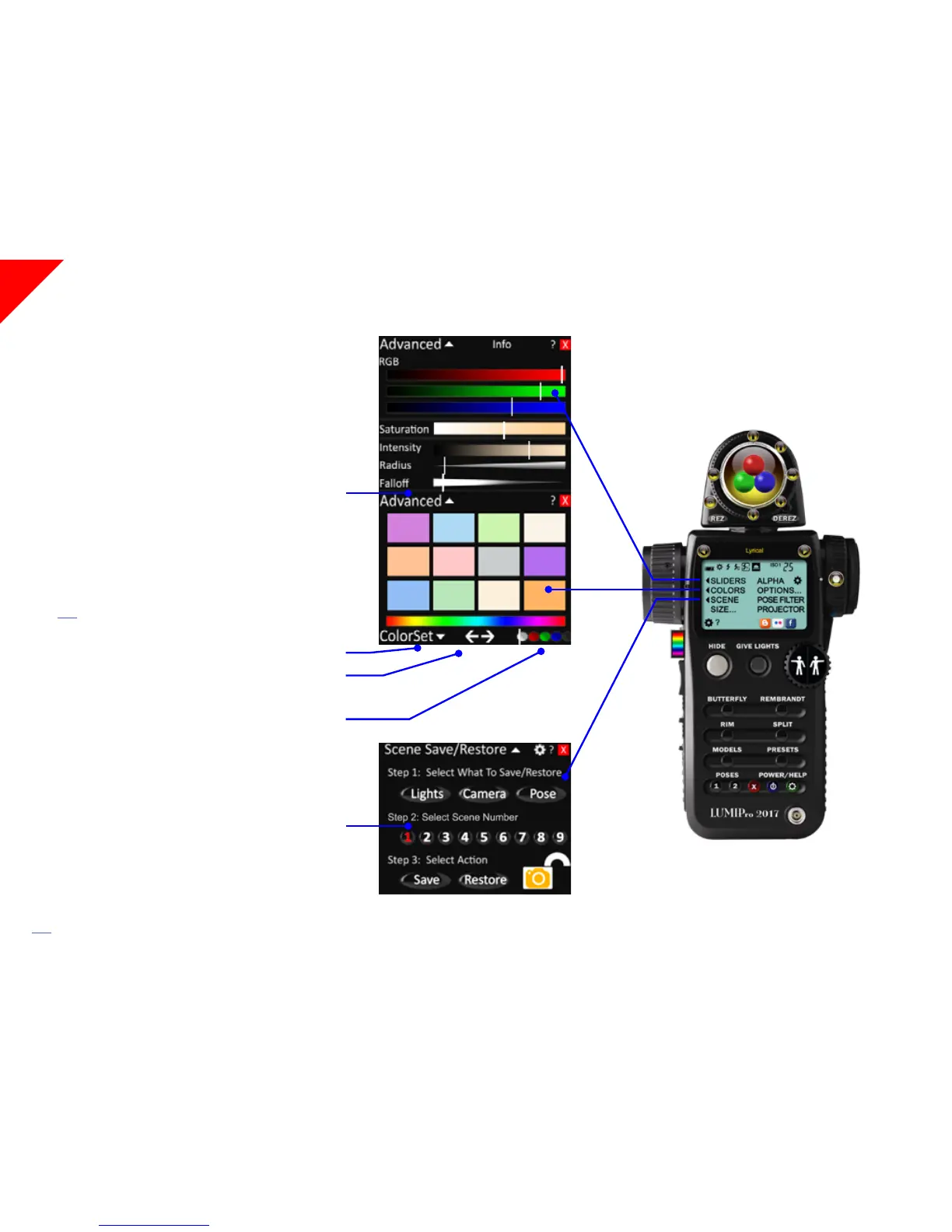
e Sliders and Colors popout menus oer deep control of your
lighting setup, either on a per-light basis, or for all the lights at once.
Clicking on the Colors control panel button will pop out just the
color palette, where you can select which light or lights you will be
adding a preset color to, as well as letting you pick from an assort-
ment of color sets, or any color at all from the color strip.
Clicking either the Advanced button at the top of the Colors menu
or clicking on the Sliders button in the control panel will display
both the Color Palette menu and the Sliders menu. Sliders let you
ne-tune the color using the RGB sliders at the top, and the char-
acter of the light using the Saturation, Intensity, Radius, and Fallo
sliders.
Click here to jump to the Sliders and Colors section to learn more.
Panel Options
ColorSet opens a menu list of palettes broken out by color
Le and Right arrows move you through the pages of each color set
When the white button is selected, all edits apply to all the lights
When the red, green, or blue buttons are selected, edits apply only to
the red, green, or blue light balls worn by the current model
e black ball edits apply to all unlocked projectors on a model.
Scene
e Scene Save/Restore menu, updated for LUMIPro 2017, lets you
instantly save up to 9 scenes, each one including the lighting setup,
camera position, and current pose. Even better, you can save and re-
store all parts or any single part of a scene. For example, you might
want to pull the pose from Preset 1, the lighting from Preset 2, and
the camera angle from Preset 3. e Scene Save/Restore system is a
fantastic way to manage product shoots, where you might want to
repeat the exact same set of poses/eye positions and camera location
with several dierent outts—long aer the original shoot! Click
here to jump to the Scene section to learn more.
NEW!


 To Next Page