LUMIPro 2017
8
e Power Strip
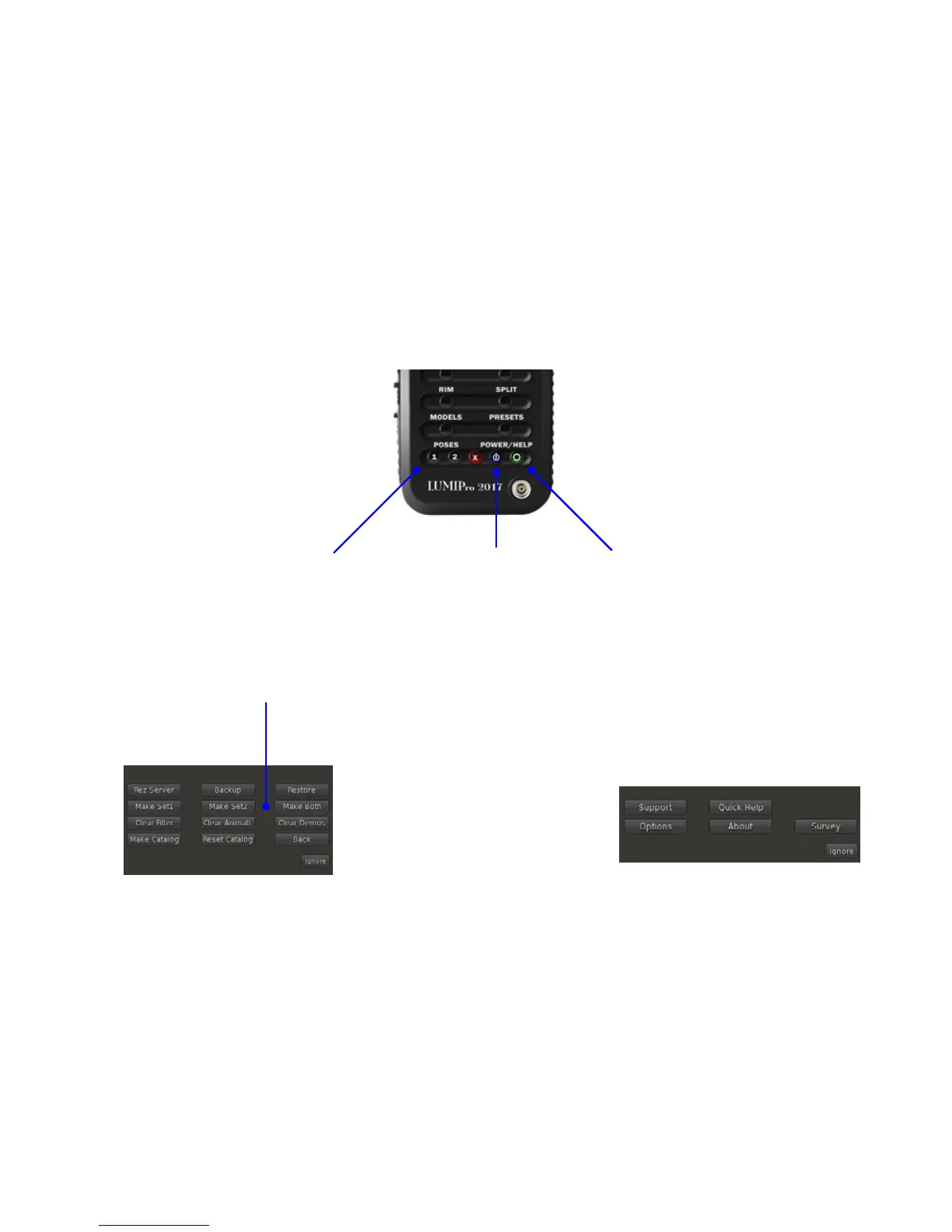
New for LUMIPro 2017 is the Power Strip. As part of the overall cleanup of the HUD, we decided to make things a little clearer, and to add a little more functionality to LUMIPro 2017.
Now you can work faster and more eciently, and still have time to go shopping at the end of a session!
Pose Groups 1 and 2. While not technically
“new,” the pose groups now make a little more
sense. Instead of making gender the default
choice, now you can divide up your poses into
any two groups that make sense to you and
how you work. Click button 1 or 2 to call up
the menu for all the poses in that group, or
click between them for the poses from both
groups. Click the red X button to stop the cur-
rent pose, and new for LUMIPro 2017, the X
button will also release the camera lock.
e Power Button. New for LUMIPro 2017,
the power is a simple, elegant little tool. How
many times have you hit the stores aer a
shoot, only to realize your lights are still on?
You can turn the intensity to 0, or take them
o (which is a pain if your wearable lights in-
cludes a projector, which would be reset if you
took it o and then put it back on), but now
you don’t have to: one click of the blue Power
button, and your lights are turned o. One
more click, and they’re back on, all at the same
levels you le them.
e Help Button. is button gives you access
to the Help menus, and the Options menus.
Support opens a eld where you can enter a
question that will be sent to us via email.
Quick Help gives you a texture with an over-
view of the LUMIPro HUD.
Options opens the Options menu (shown at
le, under Pose Groups 1 and 2)
About gives you a texture with information
about this current release
Survey opens a quick Google form so that we
can learn more about you, how you use LUMI-
Pro, and how we can improve!
Help Menu
Options Menu


 To Next Page