EasyManua.ls Logo

M-Audio DCP-200 - Page 33

M-Audio DCP-200
77 pages
Print Icon
To Next Page IconTo Next Page
To Previous Page IconTo Previous Page
Loading...
User Guide 33DCP-200
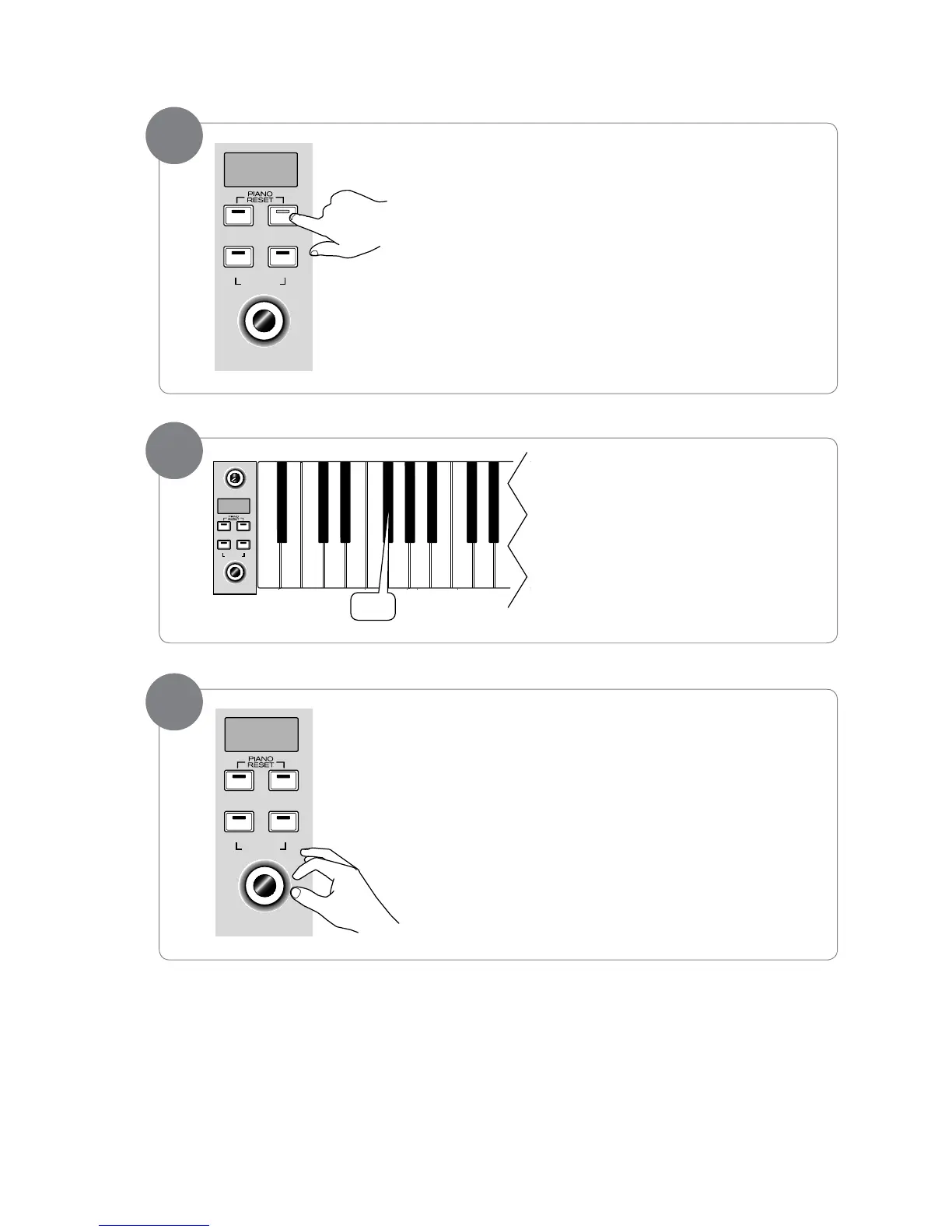
• RightHandVoiceVolume:
PresstheVoice/FunctionbuttontoenterEditMode.
Press the F#0 key to assign the Data Control
knob to control the Right Hand Voice
volume.
TheLEDdisplaywillshow:


Use the Data Control knob to select a Right Hand Voice volume
level between 1 (minimum) and 127 (maximum). You can play as
you do this to hear the volume change.
2

MASTER VOLUME
Reverb
Song
RECORD
Data Control
[Assignable]
Metronome
Voice / —
Function
vol
C0 C1
F#0
1
Reverb
Song
RECORD
Data Control
[Assignable]
Metronome
Voice / —
Function
120
3
Reverb
Song
RECORD
Data Control
[Assignable]
Metronome
Voice / —
Function
80

Table of Contents