When registration is complete, Sibelius 5 First will launch. When you see the Quick Start
window:
< On Windows computers:
“Openrecentle”and“Quicktour.sib”shouldalreadybeselected.Allyouhaveto
do is click OK.
< On Mac:
Choose“Openanotherle”andclickOK.
• IntheOpendialogthatappears,navigatetotheExampleScoresfolderonthe
installation CD-ROM.
• Double-clicktheExampleScoresfolder,thenopenthefoldernamed“Other,”select
the score called Quick tour, and then click Open.
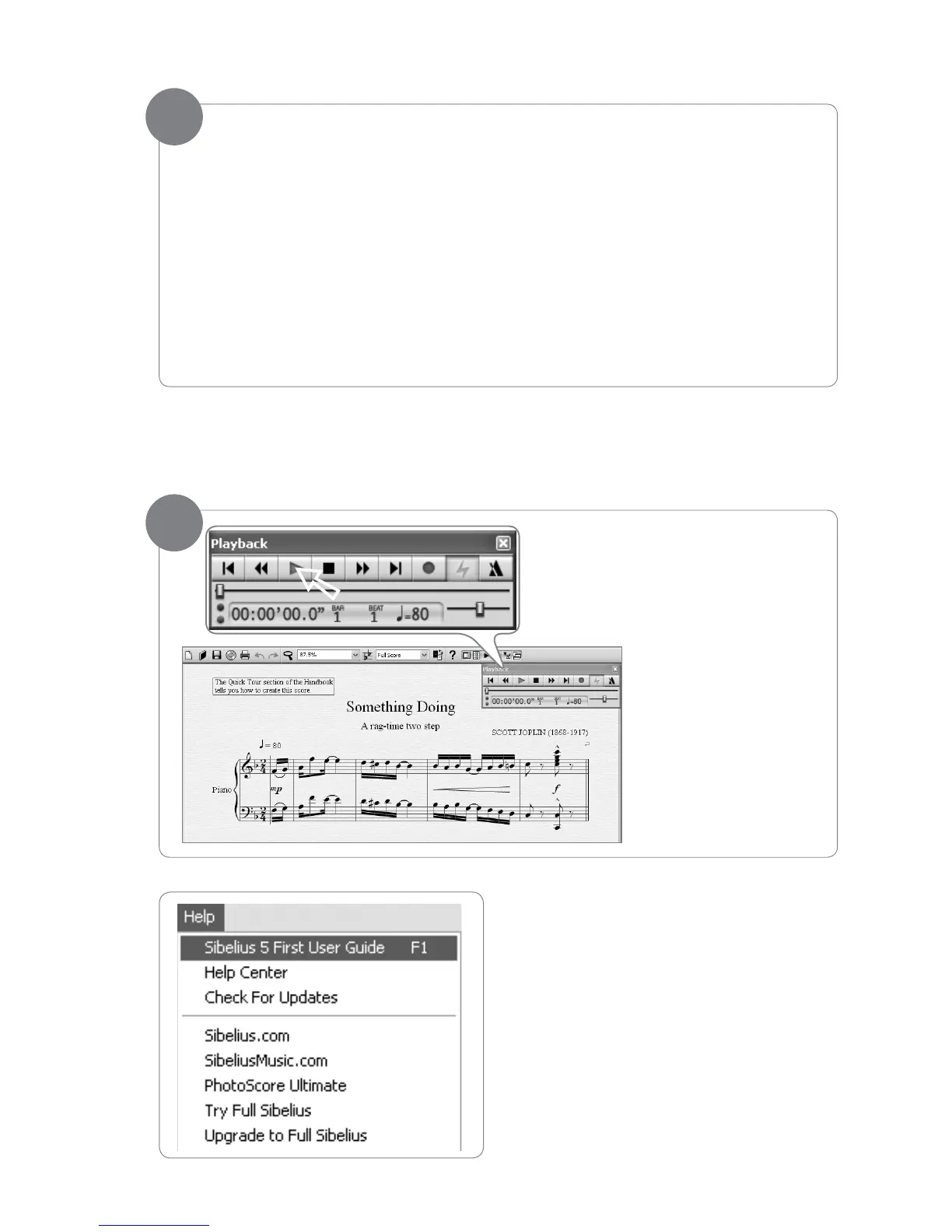
A single-page excerpt from a composition by Scott Joplin called “Something Doing” will open.
Click the Play button.
You will hear the score
played back using a
piano sound that is built
into Sibelius-- either
through your computer
speakers, or through the
DCP-200 speakers (if you
have connected the Aux
In as discussed in the
“Connecting the DCP-200
Auxiliary Input” section).
To continue learning about Sibelius First,
please refer to the Sibelius First User
Guide. It contains everything you need
to know about using the software. The
Sibelius First User Guide can be accessed
from the Help menu in Sibelius First.
6
7
➚


 To Next Page