18 EC-30C | 1.00.02 +49 2102 935 888 www.mc-techgroup.com
7 Using the EC-30C
7.1 Graphical user interface (GUI)
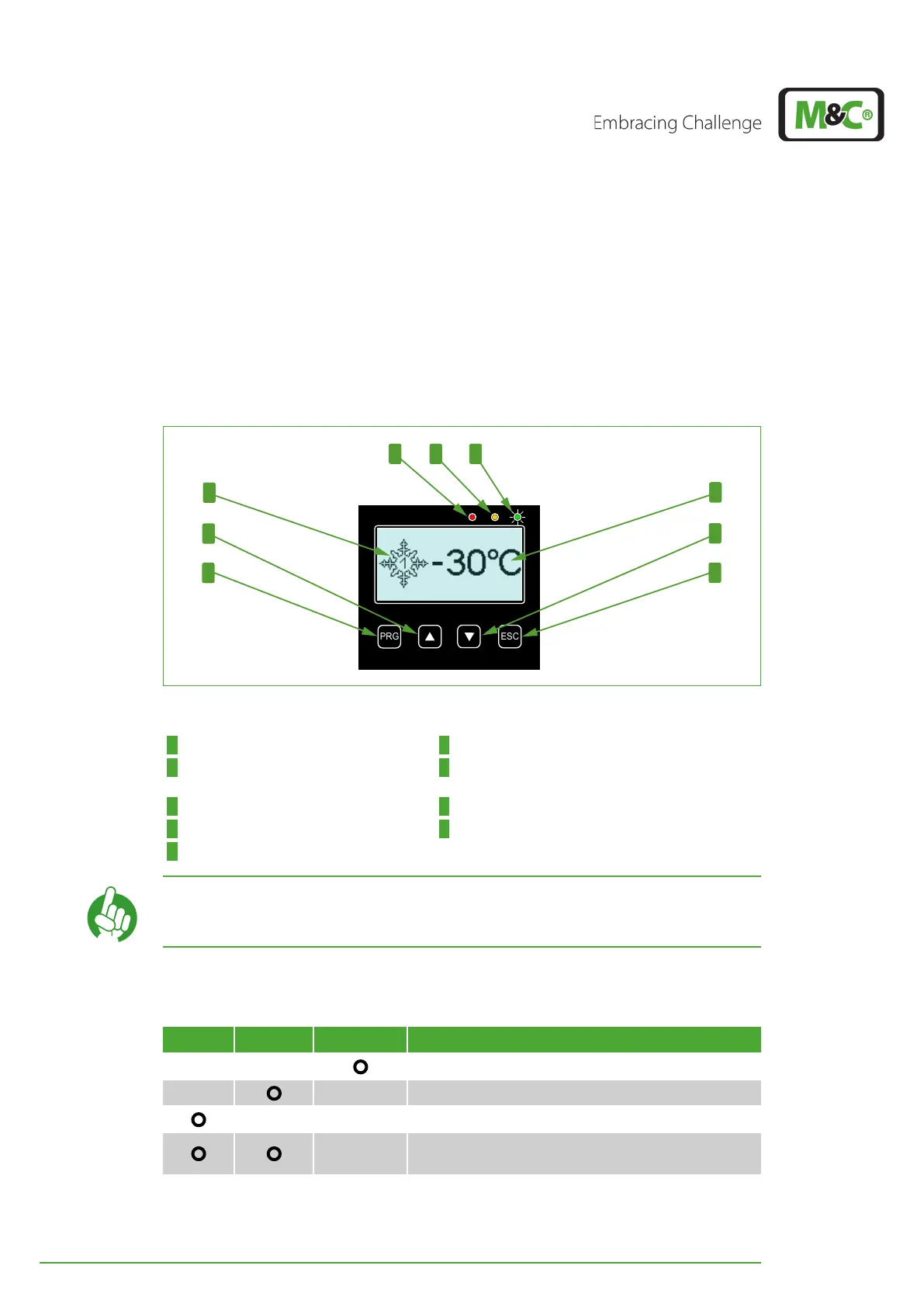
The EC-30C has a graphical, icon-based intuitive menu navigation. The graphic user inter-
face includes three LED indicators, the display and the operating buttons. The figure be-
low shows the screen, where the deep cooling unit has reached its target temperature of
-30 °C (~-22 °F), and describes the components of the user interface.
4
9
8
1 2 3
6
7
5
Fig. 5: Graphic user interface
1 Red LED (alarm message) 2 Yellow LED (warning message)
3 Green LED is on (OK) 4 Snow-flake-symbol with ‘1’ in its center (Tempera-
ture ≤ 0 °C and DCU 1 is active)
5 UP button (upwards pointing arrow) 6 PROGRAM button (PRG)
7 Temperature indication 8 DOWN button (downwards pointing arrow)
9 ESCAPE button (ESC)
Note
With the ESC button you will return to the start screen from any other
screen.
7.2 LED color coding and possible color combinations
Red Yellow Green Description
Everything is OK
One or more warning messages
One or more alarm messages
A combination of one or more alarm messages and
warning messages


 To Next Page