Stork Vitals+ Basic Setup and Use of Stork
Masimo Corporation 26 www.masimo.com
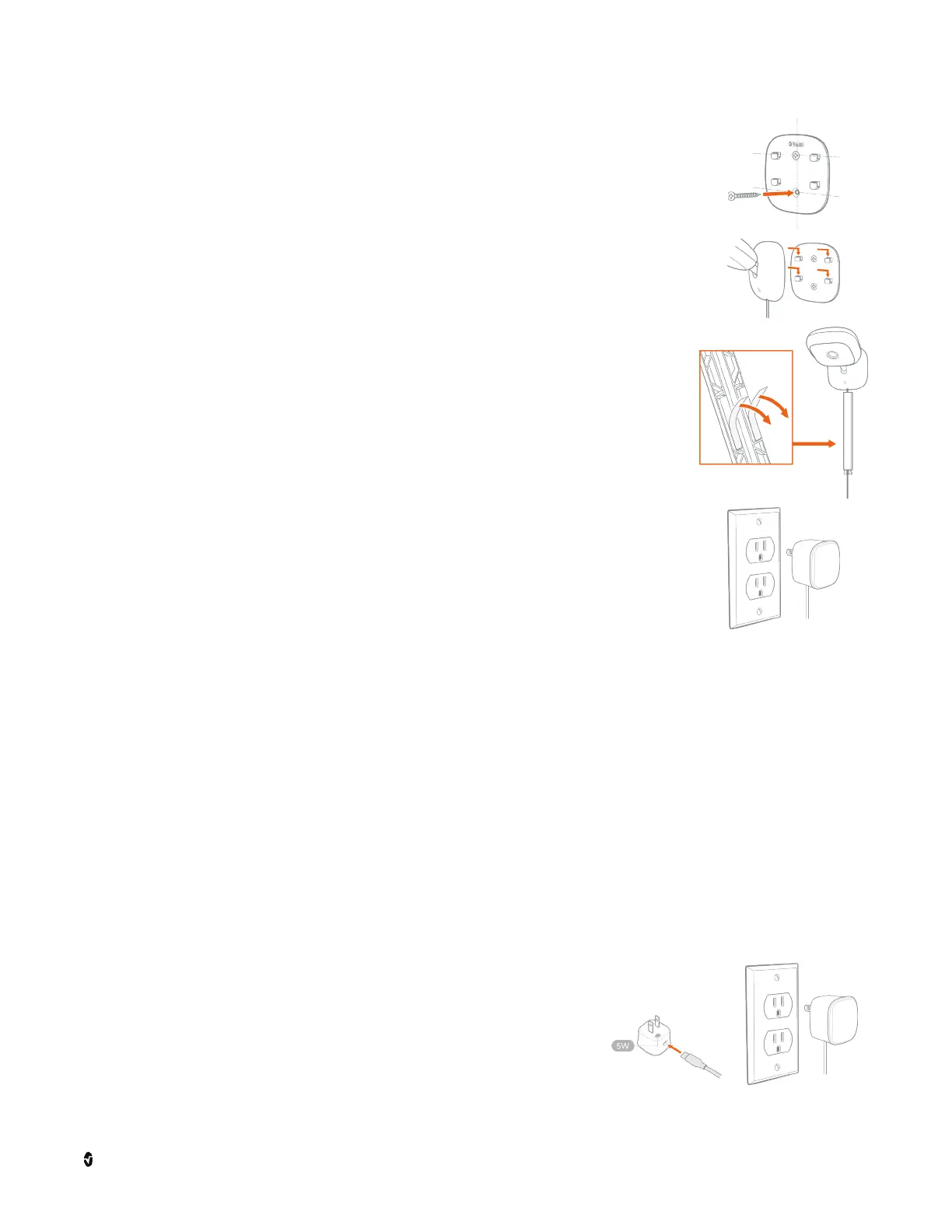
5. Hold the mounting plate against the wall. Secure the mounting plate
onto the wall with the included screws.
6. Align the 4 holes on the camera base with the hooks on the mounting
plate, and then slide the camera down to snap it in place.
7. Peel off the sticky pad liners on the back of the cable cover(s) to
apply, starting at the camera.
Add more covers as needed to fully protect the cable from being
pulled on by the baby while in the crib.
8. Ensure the wall socket being used is within reach of the camera
power cable. Plug the power cable into the 12W AC adapter. Plug
the power adapter into the wall socket to power on the camera.
The camera will automatically connect to the Stork app when
powered on if previously connected.
Adjust the camera angle as necessary for the best view.
Stork Sensor Setup
See
Device Management
on page 38 to connect the Stork Sensor and follow the app
instructions to:
• Charge the sensor.
• Pair the sensor using the Stork app.
Charging the Stork Sensor
1. To charge the Stork Sensor, plug the charge cable into
the 5W AC power adapter (A) and plug the power
adapter into a wall socket (B).
A
B



 To Next Page