Stork Vitals+ Advanced Use
Masimo Corporation 37 www.masimo.com
Lullaby Player
Lullaby music can be played over the Stork Camera speaker. When selected, controls to
play and pause the lullaby displays.
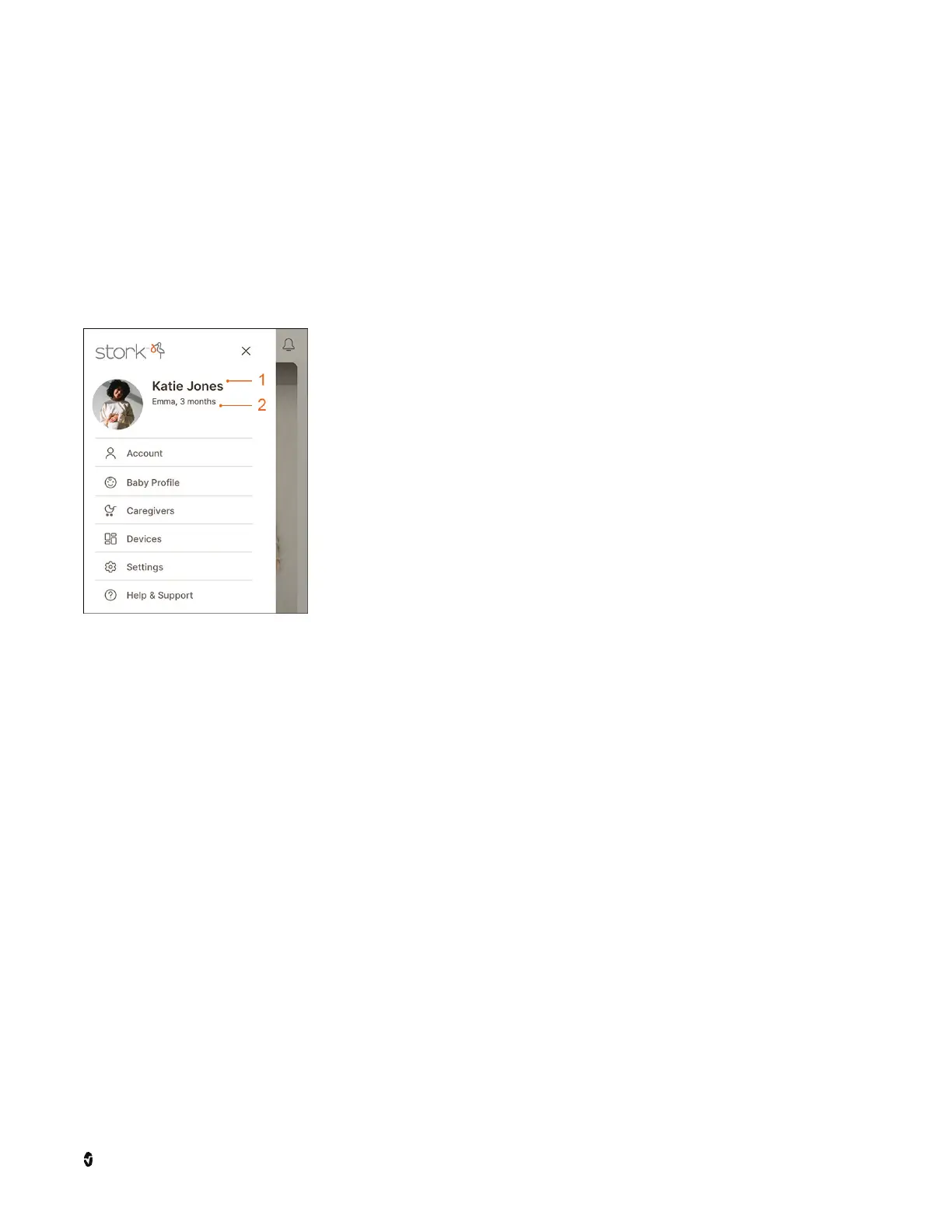
Side Menu
The
Side Menu
provides access to functions and features of Stork.
Account - View and make changes to the account. Touching the
name for the account (1) also opens the account. See
Account
Ma na gement
on page 37.
Baby Profile - View and make changes to the baby profile.
Touching the baby's name (2) also opens the baby profile. See
Baby Profile Management
on page 37.
Caregivers - Invite trusted people to view Stork health data. See
Caregivers
on page 38.
Devices - View device status and info, add new devices or
remove current devices. If an orange dot displays on the
icon, this indicates software updates are available for a device.
See
Device Management
on page 38.
Settings - Select the units of measurement or turn off the alarms
on the Stork Camera. See
Settings
on page 39.
Help & Support - View information and tutorials about the app
along with ways to contact customer service.
Sign Out - Select to sign out of the Stork app.
Account Management
From the
Account
screen, the first and last name can be updated, a picture can be added,
the password can be changed, or the account can be deleted.
Baby Profile Management
From the
Baby Profile
screen, the first and last name, biological sex, birthday, weight and
length can be updated.



 To Next Page