18
GB-18
Preparation Connections Initial Setup Using the Features DVR (Digital Video
Recorder)
Using the Features
via USB port
Using the DVD
Features
Hints and Tips
and Specification
Insertion of CI (Common Interface) Card
This function enables you to watch selected
scrambled services (pay services) of some channels.
Please switch off your TV, read the instructions
provided with the CI Card and ensure it is inserted
correctly before switching the TV on again.
Do not repeatedly insert or remove the CI
card into or from the TV as this may cause a
malfunction.
The CI Card does not come with the TV set. It
can only be obtained when you subscribe to
service providers like Pay TV or other service
providers.
This feature is not available in all countries.
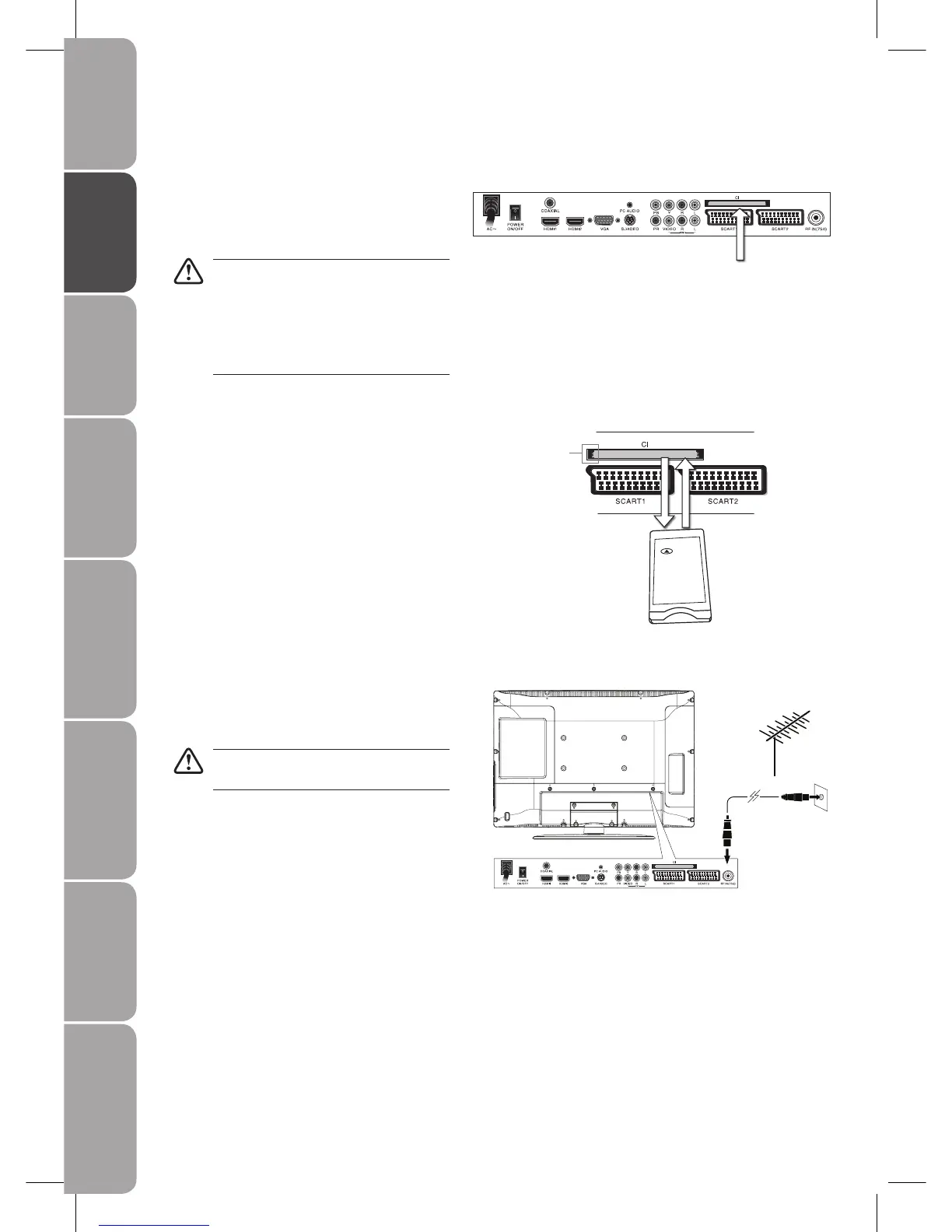
To insert a CI card
Insert the CI card into the slot in the direction of the
arrow until it fits.
To remove a CI card
To remove the CI card, press the release button and
pull it from its slot.
Connecting the Aerial
Connect one end of the RF coaxial cable to the aerial
socket on the wall and the other end of the cable to
the RF IN socket on the back of your TV.
Do not connect the TV to the mains supply
until you have completed all the connections.
Rear View of TV
Common Interface slot
Allow CI card to insert and
access the content that has
been encrypted.
Release
Button
CI Card



 To Next Page