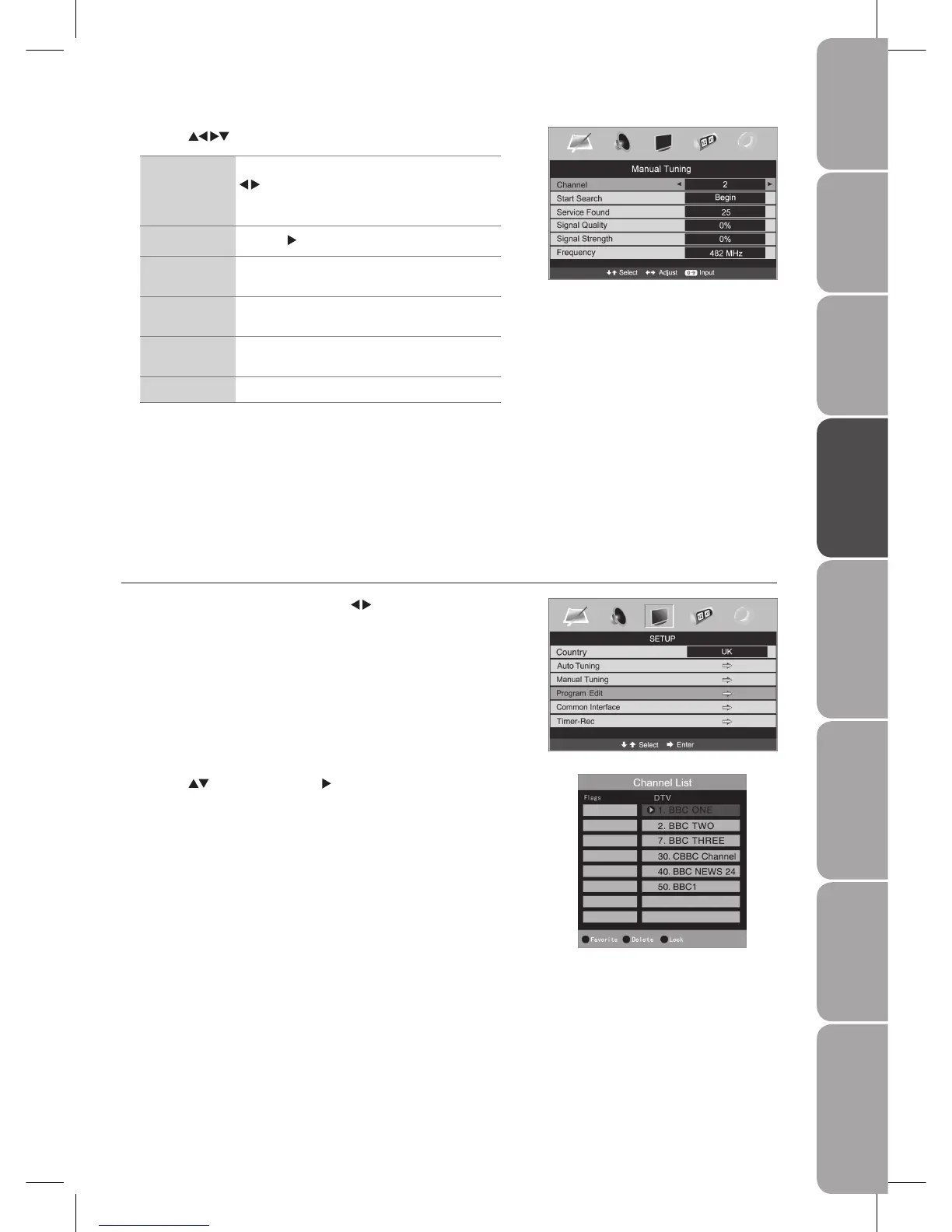
Press the 2. buttons and then the button to select Program Edit.
To save your favourite channel
Press the a. GREEN button on the remote control with the selected
channel.
Press the b. GREEN button again to undo it.
To Delete
Press the YELLOW button on the remote control with the selected channel.
To Lock
Press the a. BLUE button on the remote control with the selected channel.
Press the b. BLUE button again to undo it.
Press the 3. MENU button to save the setting and return back to the previous
menu.
Press the 4. EXIT button to exit the menu.
Press the 3. buttons to change the following settings.
Channel Display the current channel number. Press the
buttons to switch to the preferred channel
or press the 0-9 buttons to select the channel
directly.
Start Search
Press the
button to begin search.
Service Found Displays the number of programmes found within
the selected channel.
Signal Quality Display the signal quality of the currently
displayed channel.
Signal Strength Display the signal strength of the currently
displayed channel.
Frequency Display the frequency of the current channel.
Press the 4. MENU button to save the setting and return back to the previous
menu.
Press the 5. EXIT button to exit the menu.
Program Edit
Allows you to edit DTV programmes in the Channel List.
Press the 1. MENU button and then use the
buttons to select the SETUP
menu.



 To Next Page