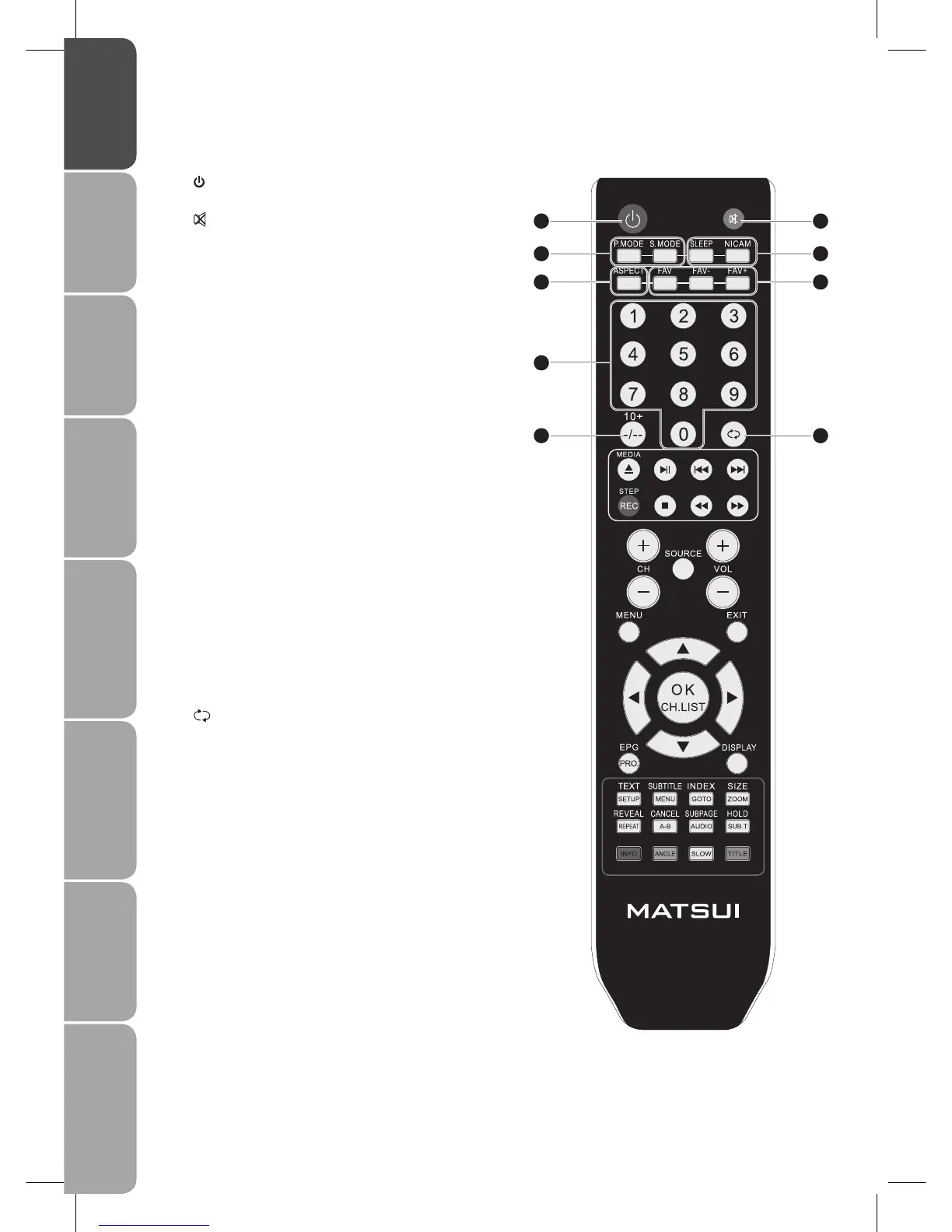
1
Switch the TV between on and standby mode.
2
Mute and restore your TV sound.
3 P.MODE
Selects picture mode: Standard, Personal, Movie, Sport,
Mild, Game.
S.MODE
Selects sound mode: Personal, Voice, Music, Theatre.
4 ASPECT
Select from the following modes settings: Auto, 16:9, 4:3,
Full screen, Zoom, Subtitle
5 SLEEP
Set the TV sleep timer.
NICAM
Switch between different audio languages (only applicable
when the TV programme has this feature).
6 FAV
Display the Favourite Channel List.
FAV +/-
Switch between your favourite channels.
7 0-9 Number Button
Select a programme.
Select numbered items in a menu.
8 -/--
Select and switch to a channel that is higher than
Channel 9. (Analogue TV mode)
10+
For example: for track 23, press 10+ twice followed by 3.
(DVD mode)
9
Return to previous viewing channel.
Remote Control
1
3
4
8
7
2
5
6
9



 To Next Page