Press the 4. MENU button to save the setting and return back to the previous
menu.
Press the 5. EXIT button to exit the menu.
Manual Tuning
Allows you to make manual fine tuning adjustments if the channel reception is poor under analogue TV mode.
Press the 1. MENU button and then use the
buttons to select the SETUP
menu.
Press the 2.
buttons to and then the button to select Manual Tuning.
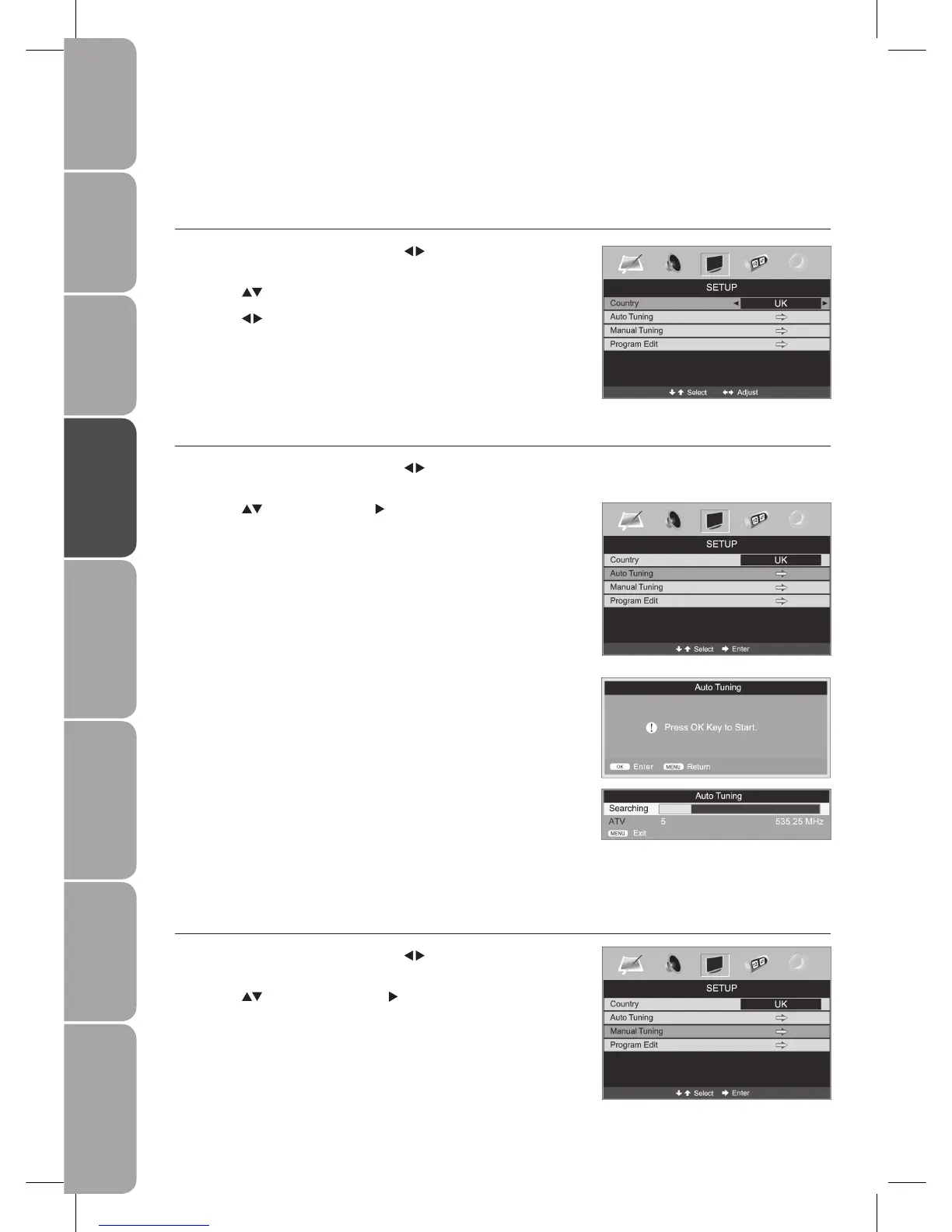
An Auto Tuning screen will pop up. Press the 3. OK button to start the auto
tuning. A list of receivable channels will be automatically created.
Customising the SETUP Setting (Analogue TV Mode)
Country
Allows you to select the country where you are using the TV.
Press the 1. MENU button and then use the
buttons to select the SETUP
menu.
Press the 2.
buttons to select Country.
Press the 3.
buttons to select the country: UK and others
You may now proceed to the Auto Tuning or Manual Tuning.4.
Auto Tuning
Use this to automatically find and store all available channels.
Press the 1. MENU button and then use the
buttons to select the SETUP
menu.
Press the 2.
buttons and then the button to select Auto Tuning.



 To Next Page