Repeat (for DVD / CD / JPEG discs)
Press the REPEAT button once to display the current repeat mode.
For CD disc, while playing in sequence, you may use the repeat playback. There are 2 repeat modes, press the • REPEAT button
to toggle between different repeat modes in sequence. (REPEAT (OFF) / REPEAT (1) / REPEAT (ALL)).
For DVD discs, you may setup the repeat playback mode. There are 3 repeat modes, press the • REPEAT button to toggle
between different repeat modes in sequence. (REP: (OFF) / REP: (CHAPTER) / REP: (TITLE) / REP: (ALL)).
For MP3 / JPEG discs, while playing the disc, you may use the repeat playback. There are 3 repeat modes, press the • REPEAT
button to toggle between different repeat modes in sequence. (REPEAT (OFF) / REPEAT (1) / REPEAT (DIR) / REPEAT (ALL)).
Info (for DVD / CD / JPEG discs)
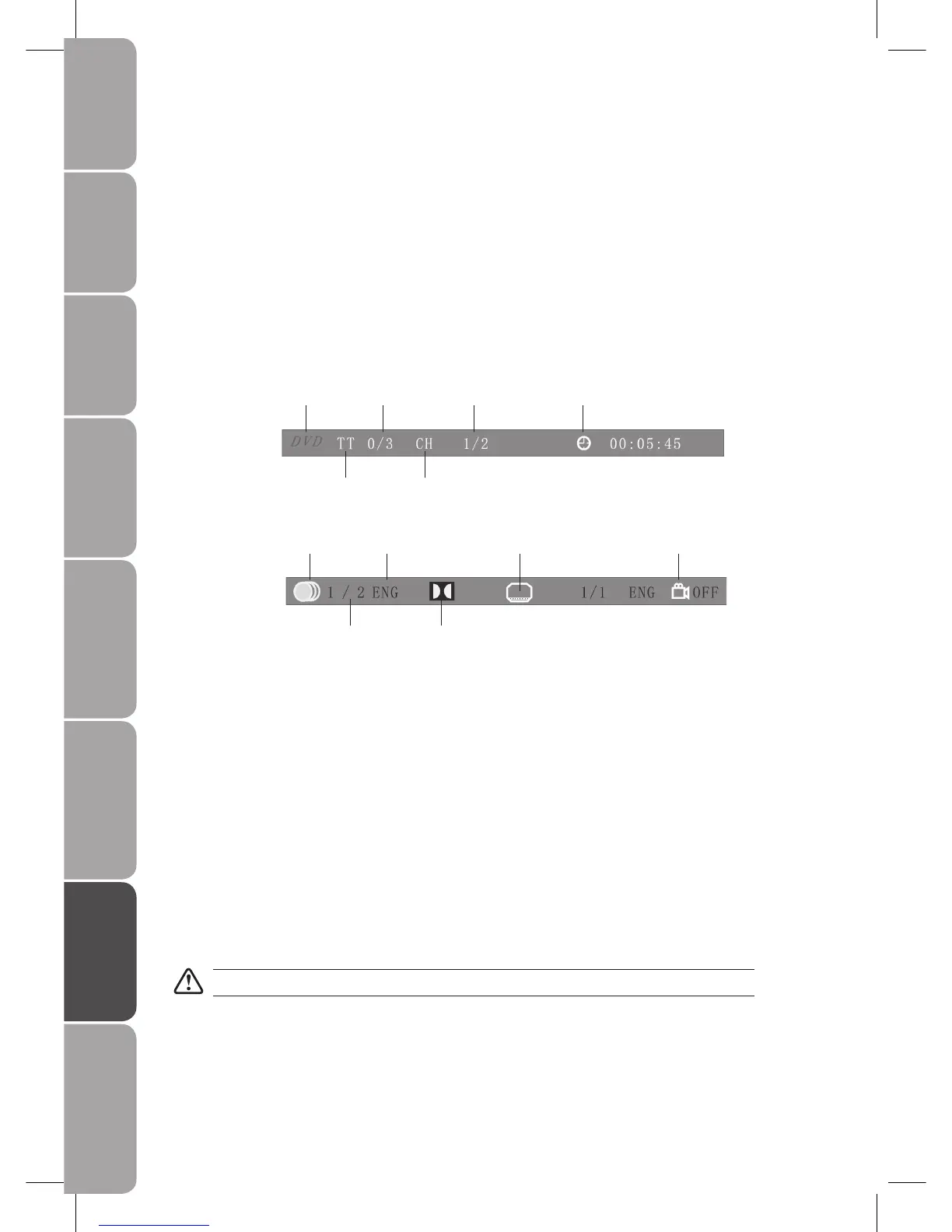
Press the INFO button to activate the on screen roll-down menu for the current Title, Chapter, Time and other information.
For DVD discs, press the INFO button once to display the first page as shown below:
Disc Type Chapter -/- (Current / Full) Elapsed disc time
Title -/- (Current / Full)
Audio Language Subtitle -/- (Current / Full) or OFF Angle ON / OFF
-/- (Current / Full) or OFF Audio Type
Press the INFO button again to display the second page as shown below:
Press the INFO button repeatedly to turn off the on screen display.
For CD / JPEG discs, press the INFO button once to display first page: Disc type, Track -/- (Current / Full), Mute status, Repeat mode
status, Current track time.
Press the INFO button repeatedly to turn off the screen display.
Goto (for DVD / CD / JPEG discs)
This function allows you to play your favorite Title / Chapter / Track. Press the GOTO button to activate the on screen scroll-down
menu for selecting. Input your Title / Chapter / Track number by 0-9 buttons or input the playback time. After editing, press the
OK button to start. If the input is invalid, it will not function.
Audio (for DVD / CD)
Press the AUDIO button once to display current audio mode.
Press again to toggle between different audio modes in sequence.
For CD discs: Stereo / MonoL / MonoR
Some disc may contain multi-languages which can be selected by pressing the AUDIO button.
Repeat A-B (for DVD / CD)
When playing DVD, CD disc, press the A-B button to repeat certain content. Press the A-B button on the start point (A) and the
end point (B) to select the repeat part. Press the A-B button a third time to cancel the A-B button function and return to normal
play.



 To Next Page