Function/Hot Key Indicators 1 - 9
Quick Start Guide
1
Function/Hot Key Indicators
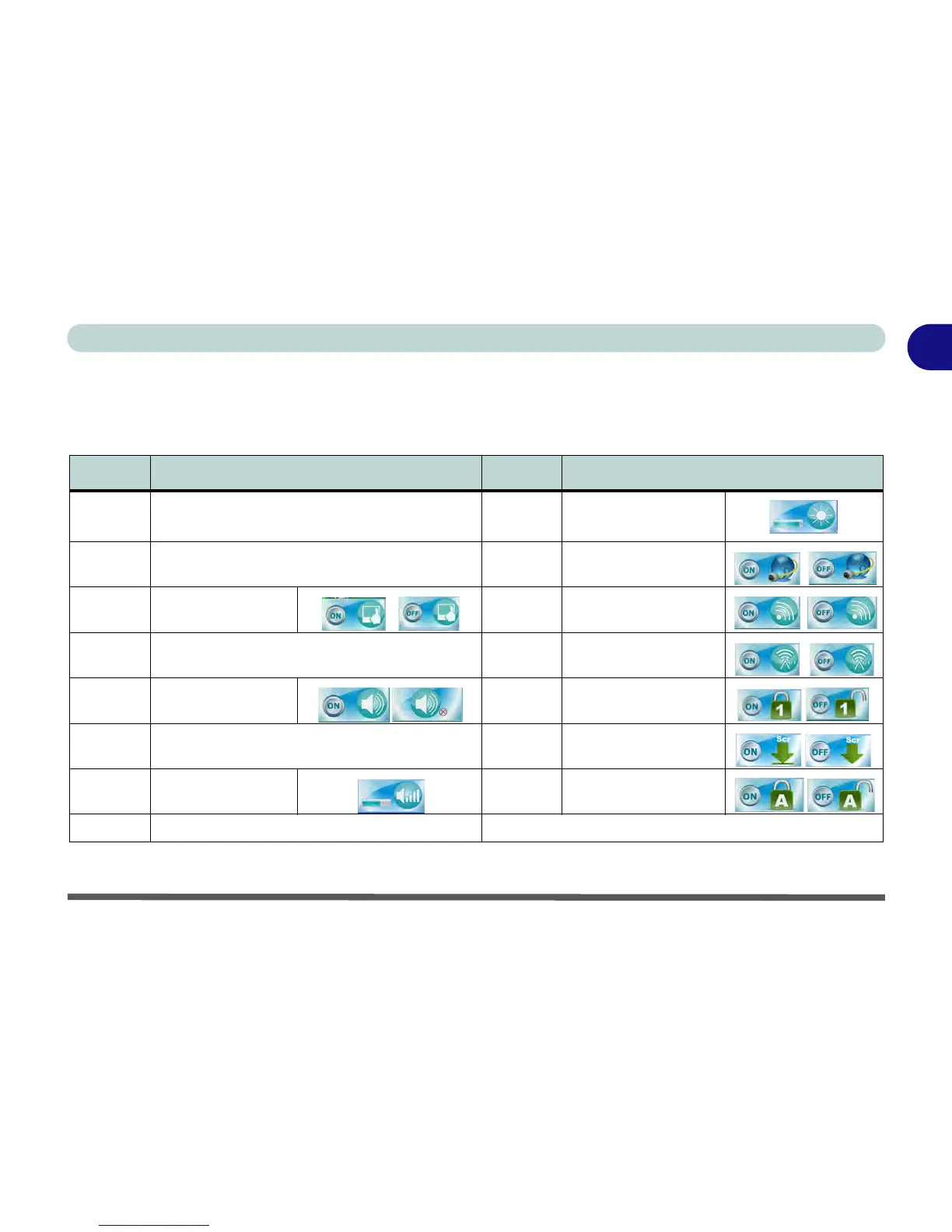
The function keys (F1 - F12 etc.) will act as hot keys when pressed while the Fn key is held down. In addition
to the basic function key combinations; visual indicators are available when the hot key utility is installed.
Table 1 - 2 - Function & Hot Key Indicators
Keys Function Keys Function
Fn + Power
Button
Powered USB 2.0 Port Power Toggle Fn + F8/F9
Brightness Decrease/
Increase
Fn + ~ Play/Pause (in Audio/Video Programs) Fn + F10 PC Camera Power Toggle
Fn + F1 TouchPad Toggle Fn + F11 WLAN Module Power Toggle
Fn + F2
Turn LCD Backlight Off
(Press a key to or use TouchPad to turn on)
Fn + F12
Bluetooth Module Power
Togg le
Fn + F3 Mute Toggle
Fn +
NumLk
Number Lock Toggle
Fn + F4 Sleep Toggle Fn + ScrLk Scroll Lock Toggle
Fn + F5/F6
Volume Decrease/
Increase
Caps Lock Caps Lock Toggle
Fn + F7 Display Toggle



 To Next Page