EasyManua.ls Logo

MAXDATA M-BOOK 600 - System Map: Bottom View

MAXDATA M-BOOK 600
248 pages
Print Icon
To Next Page IconTo Next Page
To Previous Page IconTo Previous Page
Loading...
System Map: Bottom View 1 - 13
Quick Start Guide
1
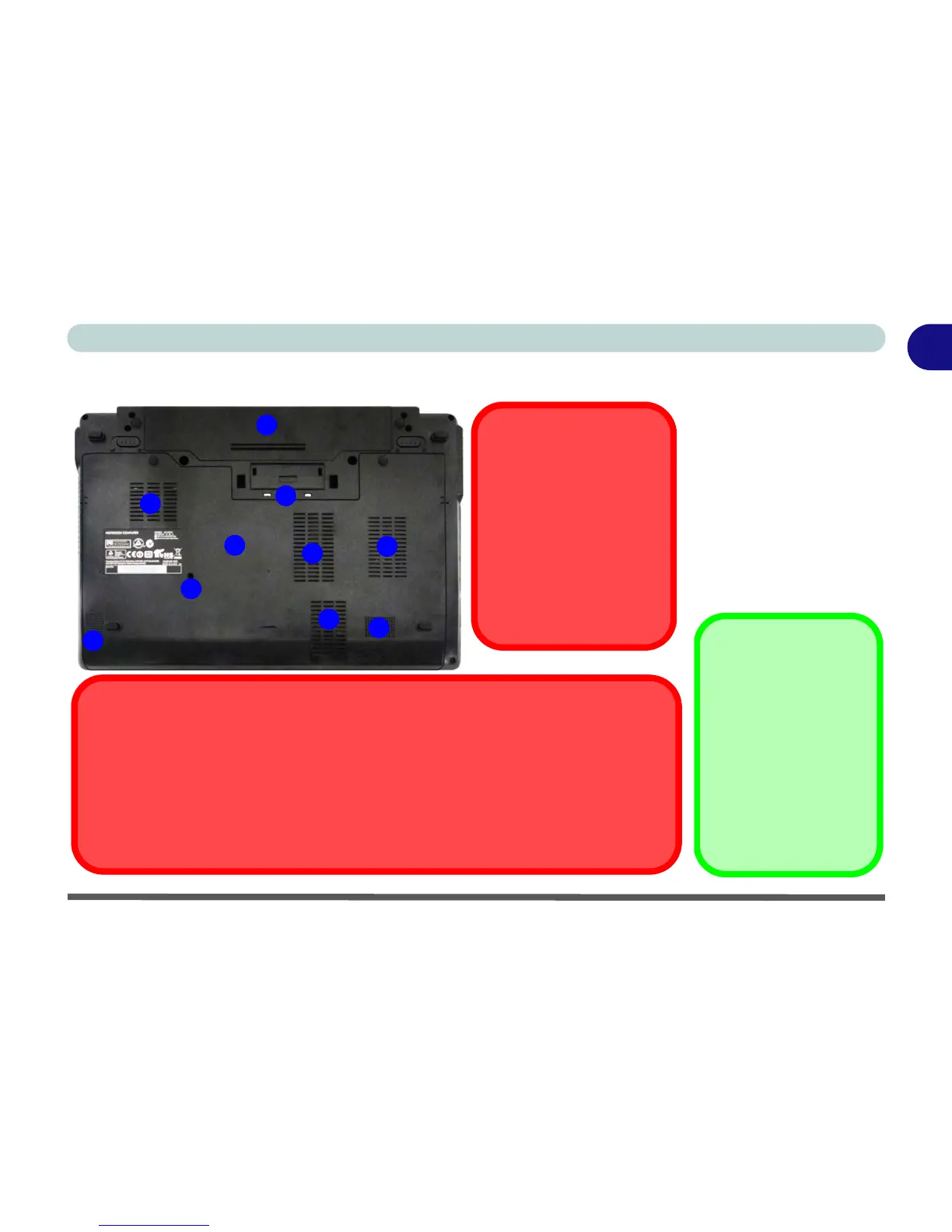
System Map: Bottom View
Figure 1 - 7
Bottom View
1. Battery
2. Docking Port
3. Fan Intake/Vent
4. Drainage Outlet
5. Speakers
6. Component Bay
Cover
Battery Information
Always completely dis-
charge, then fully
charge, a new battery
before using it. Com-
pletely discharge and
charge the battery at
least once every 30 days
or after about 20 partial
discharges.
2
1
4
3
CPU
The CPU is not a user ser-
viceable part.
Overheating
To prevent your computer
from overheating make
sure nothing blocks the
Vent/Fan Intake while the
computer is in use.
5
5
3
3
3
6
Docking Port Cover
If your purchase option includes the docking station, make sure you keep the cover
closed when the computer is not docked in the station. This will help prevent foreign objects
and/or dust getting in to the contact area.
If your purchase option does not include the docking station, an insert will be provided
to prevent accidentally opening the docking port. Do not attempt to open the cover or re-
move the insert in this case.


Table of Contents

Other manuals for MAXDATA M-BOOK 600

Related product manuals