2
Section 2: Installation and Wiring
2.1 Planning the System
The speed and efficiency of installing a Maxsys system will be
greatly enhanced by planning the installation. As a minimum, the
following checklist should be used to ensure that all of the details
have been considered:
• Draw a diagram of the installation showing the location of the
main panel, all keypads, zone inputs, bell outputs, relay out
-
puts and annunciators.
• Indicate all partitions on the diagram. Decide which zones,
bell and relay outputs, keypads and remote annunciators
belong to each partition.
• Determine where each system module is going to be located
and how far each module will be from the main panel.
• Determine the current draw on the main panel and each sys-
tem component used to ensure the system requirements can
be met (see
2.4 ”Current Ratings – Alarm Control Panel and
Modules’). Calculate each wire run using the Combus wiring
guidelines. Determine which wire gauge should be used and
where to place PC4204/PC4204CX modules to re-power the
Combus.
• For Addressable devices, determine where each device is to
be located and consult the Addressable Loop wiring guide
-
lines to determine wire gauge and wiring lengths (see 2.9
”AML Device Wiring’)
2.2 Terminal Descriptions
The following terminals appear on the alarm control panel:
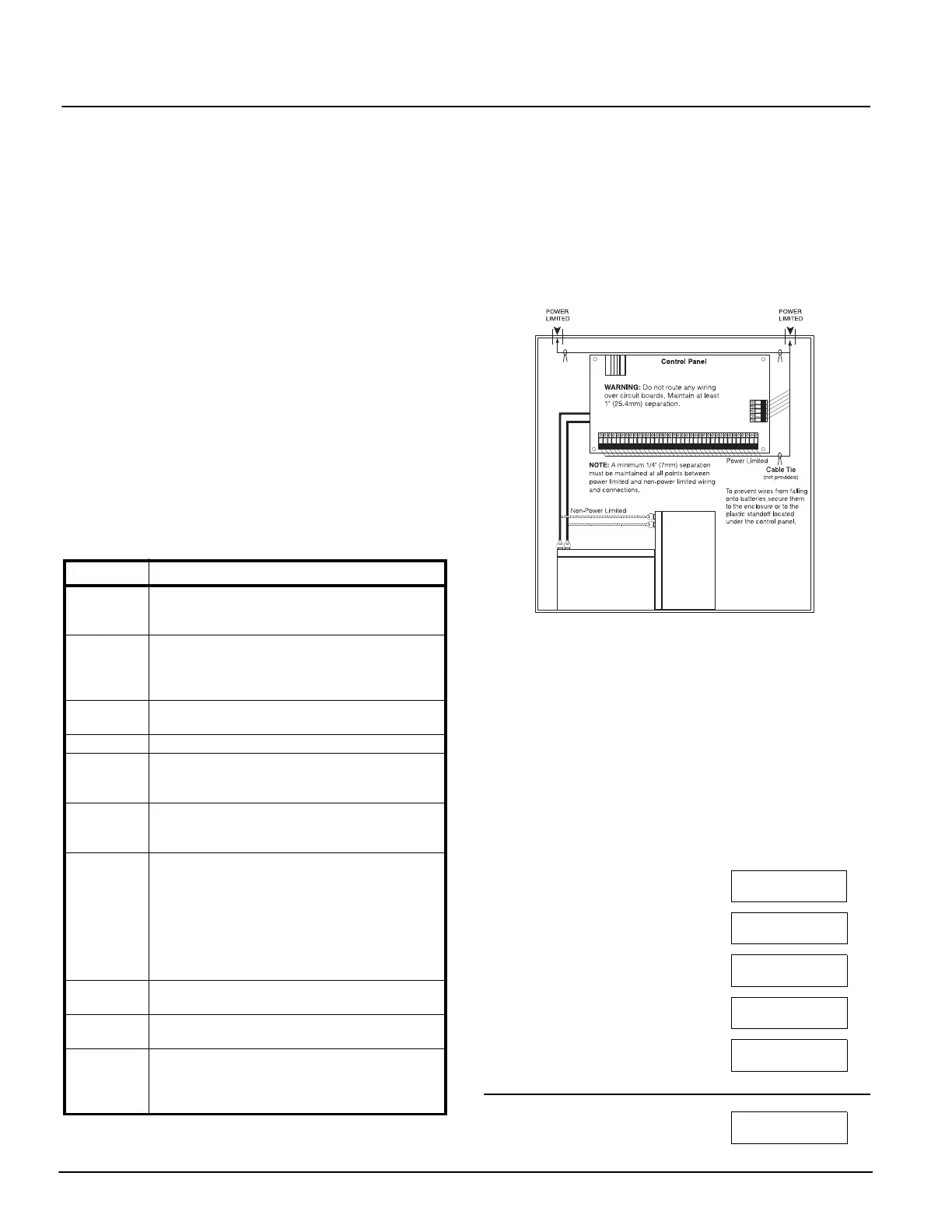
2.3 Wire Routing for Power and Non-Power Limited
All wiring entry points are designated by the arrows. All circuits
are classified UL installation power limited except for the battery
leads which are not power limited.
A minimum ¼” (7mm) separation must be maintained at all
points between power limited and non-power limited wiring and
connections.
NOTE: Wire entry for power limited wiring must be separated by a
different entry access from non-power limited wiring.
2.4 Current Ratings – Alarm Control Panel and Modules
In order for the system to operate properly, the power output of
the alarm control panel and power supply modules cannot be
exceeded. Use the data below to ensure that the available current
is not exceeded.
Alarm Control Panel
AUX - 500mA available for devices connected to the AUX,
SAUX+ and PGM terminals and modules connected to Combus
terminals. At least 100mA must be reserved for the Combus. To
calculate the amount of current required, complete the following
chart:
Main Panel Current Calculation
Maximum (Standby or Alarm)
AUX (500mA max.)
SAUX+ (300mA max.)
PGM1 (50/170mA max.*)
PGM2 (50/170mA max.*)
Combus (500mA max.)**
Total (must not exceed 500mA)
Ter mi na ls Description
Red and
Black Leads
Battery Connection. WARNING: Do not connect the
battery or transformer until all other wiring is
complete.
AC Power Terminals. WARNING: Connect the battery
before connecting the AC. Do not connect the
battery or transformer until all other wiring is
complete.
AUX+ and
AUX-
Auxiliary Power, 500mA MAX
SAUX+ Switched Auxiliary Power, 300mA MAX
BELL+ and
BELL-
Bell/Siren Power. These terminals are used for powering
bells, sirens or other devices requiring steady output volt
-
age on alarm; 700mA MAX
PGM1 and
PGM2
Programmable Output Terminals.
50mA MAX (standard output) or
170mA MAX (addressable loop)
RED, BLK,
YEL, GRN
Combus Terminals. The Combus is used by the panel and
the modules to communicate with each other. RED and
BLK are used for power, and YEL and GRN for data.
NOTE: The four Combus terminals of the main
panel must be connected to the four Combus
terminals or wires of all modules. For instruc
-
tions regarding Combus wiring, refer to Section
2.4 ’Combus Operation and Wiring’.
Z1 to Z16 Zone Input Terminals. Zone inputs Z1 to Z16 are provided for
wiring zones on the alarm control panel
TIP, RING,
T1, R1
Telephone Line Terminals
EGND Earth Ground Connection. A ground connection assem-
bly is included with the control panel. Please refer to the
control panel wiring diagram for ground connection
instructions.



 To Next Page