4
–
104
When Driving
Fuel Economy Monitor
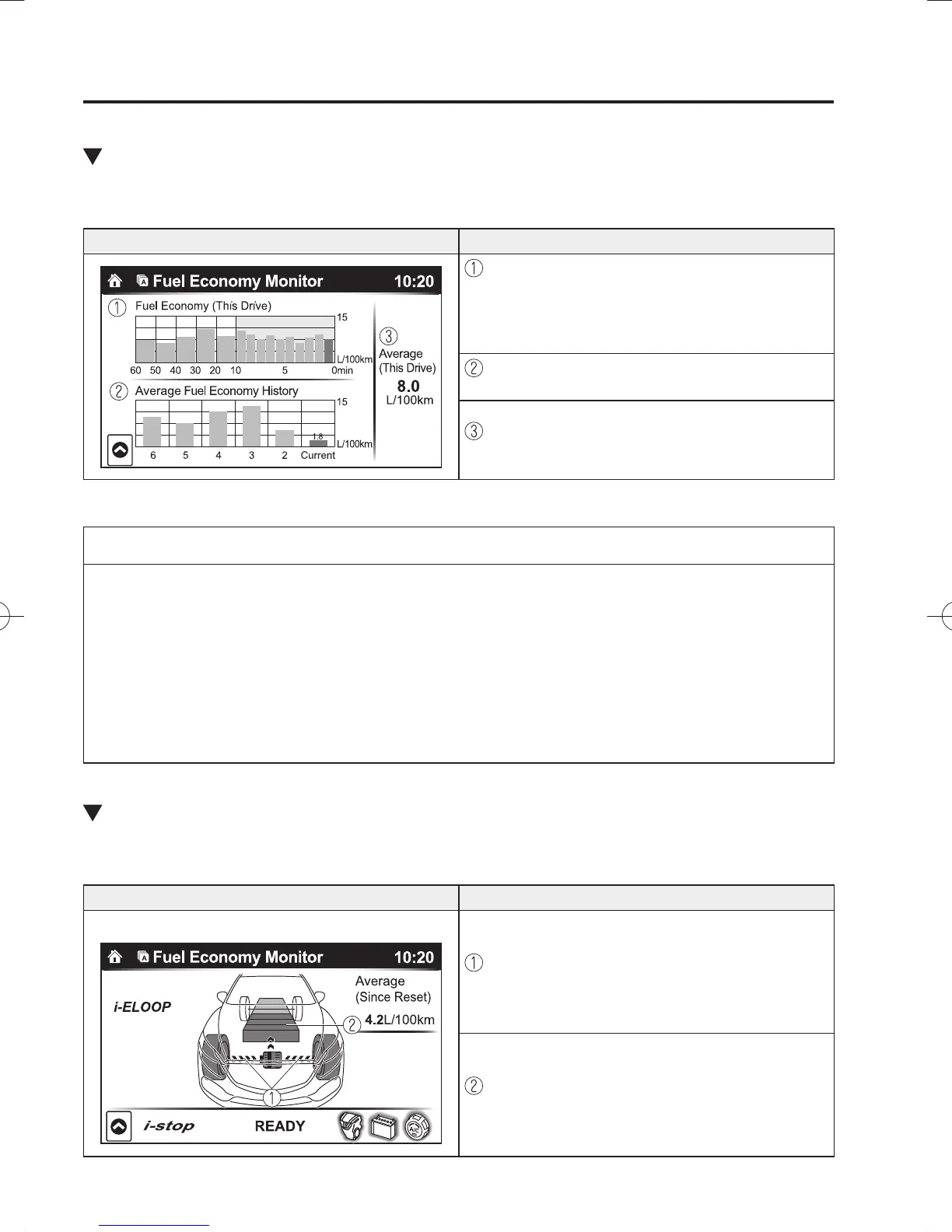
Fuel Consumption Display
Information regarding the fuel economy is displayed.
Indication on display Control status
Displays the fuel economy for the past 60 minutes.
Displays the fuel economy every minute for the
past 1 to 10 minutes.
Displays the fuel economy every 10 minutes for
the past 10 to 60 minutes.
Displays the average fuel economy over the past 5
resets and after the current reset.
Calculates the average fuel economy every minute
after vehicle travel begins, and displays it.
NOTE
The fuel economy data can be reset by doing the following operation:
Press the reset switch from the menu screen.
When the function which synchronizes the fuel economy monitor and the trip meter
is on, reset trip A of the trip meter.
Delete the average fuel economy information displayed in the trip computer.
After resetting the fuel economy data, “-- -” is displayed while the average fuel
economy is calculated.
Control Status Display
The i-stop operation status and the i-ELOOP power generating status are displayed.
Indication on display Control status
With i-ELOOP system
Displays the level of electricity generated by
regenerative braking.
Displays the amount of the electricity stored in the
rechargeable battery.
/C\FCA(-''(A'FKVKQPKPFD/C\FCA(-''(A'FKVKQPKPFD



 To Next Page