5
–
69
Interior Features
Audio System
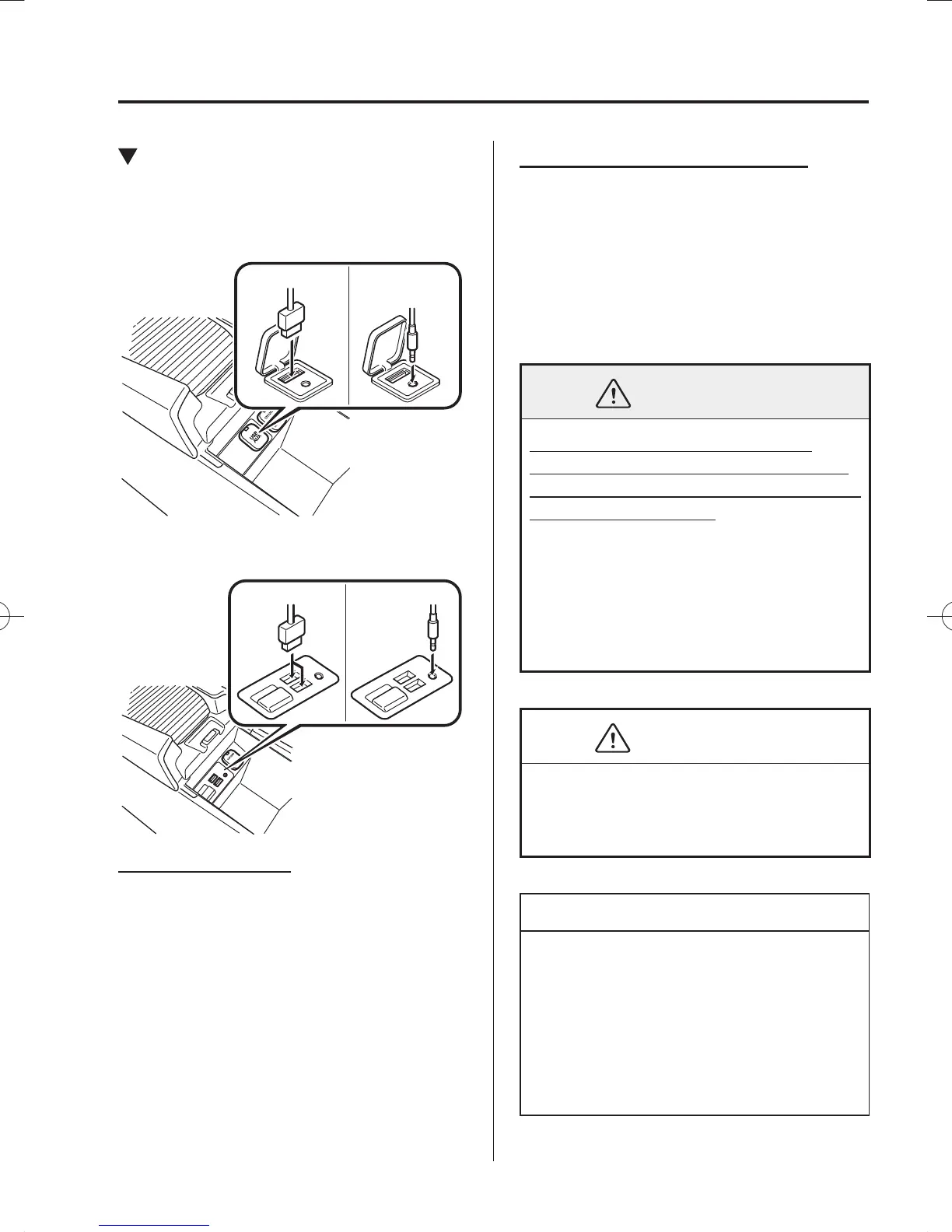
How to connect USB port/
Auxiliary jack
Type A/Type B
USB port Auxiliary jack
Type C/Type D
USB port Auxiliary jack
Connecting a device
1. Open the console lid.
2. If there is a cover on the AUX jack or
USB port, remove the cover.
3. Connect the connector on the device to
the USB port.
Connecting with a connector lead
1. Open the console lid.
2. If there is a cover on the AUX jack or
USB port, remove the cover.
3. Connect the device plug/connector lead
to the auxiliary jack/USB port. Pass the
device plug/connector lead through the
notch in the console and connect.
WARNING
Do not allow the connection plug
cord to get tangled with the shift lever
(manual transaxle) or the selector lever
(automatic transaxle):
Allowing the plug cord to become
tangled with the shift lever (manual
transaxle) or the selector lever
(automatic transaxle) is dangerous as
it could interfere with driving, resulting
in an accident.
CAUTION
Do not place objects or apply force to
the auxiliary jack/USB port with the
plug connected.
NOTE
Insert the plug into the auxiliary jack/
USB port securely.
Insert or pull out the plug with the
plug perpendicular to the auxiliary
jack/USB port hole.
Insert or remove the plug by holding
its base.
/C\FCA(-''(A'FKVKQPKPFD/C\FCA(-''(A'FKVKQPKPFD



 To Next Page