MI 3290 Earth Analyser General Settings
27
8 General Settings
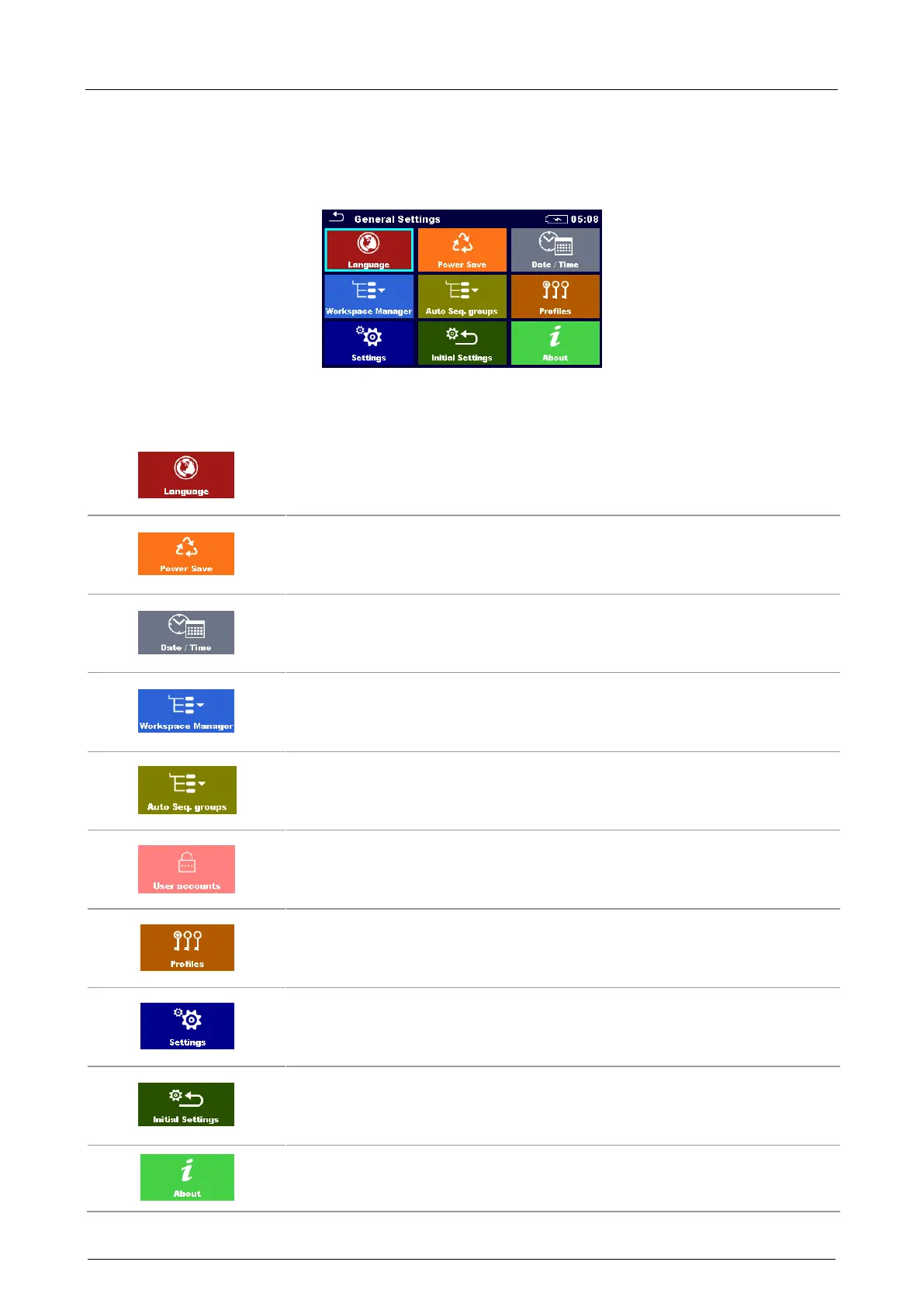
In the General settings menu general parameters and settings of the instrument can be viewed or
set.
Figure 8.1: General settings menu
Options in General Settings menu:
Language
Instrument language selection. Refer to chapter 8.1 Language for
more information.
Power Save
Brightness of LCD, enabling/disabling Bluetooth communication. Refer
to chapter 8.2 Power Save for more information.
Date /Time
Instruments Date and time. Refer to chapter 8.3 Date and time for
more information.
Workspace Manager
Manipulation with project files. Refer to chapter 8.9 Workspace
manager for more information.
Auto Sequence® groups
Manipulation with lists of Auto Sequences®. Refer to chapter 8.8 Auto
Sequence® groups for more information.
User accounts
User accounts settings. Refer to chapter 8.10 User accounts for more
information.
Instrument Profile
Selection of available instrument profiles. Refer to chapter 8.4
Instrument profiles for more information.
Settings
Settings of different system / measuring parameters. Refer to chapter
8.5 Settings for more information.
Initial Settings
Factory settings. Refer to chapter 8.6 Initial Settings for more
information.
About
Instrument info. Refer to chapter 8.7 About for more information.



 To Next Page