MI 3290 Earth Analyser General Settings
32
8.8 Auto Sequence® groups
The Auto Sequences® in Earth Analyser can be organized in lists of Auto Sequences®. In a list, a
group of similar Auto Sequences® is stored. The Auto Sequence® groups menu is intended to
manage with different lists of Auto Sequences® that are stored on the microSD card.
8.8.1 Auto Sequence® groups menu
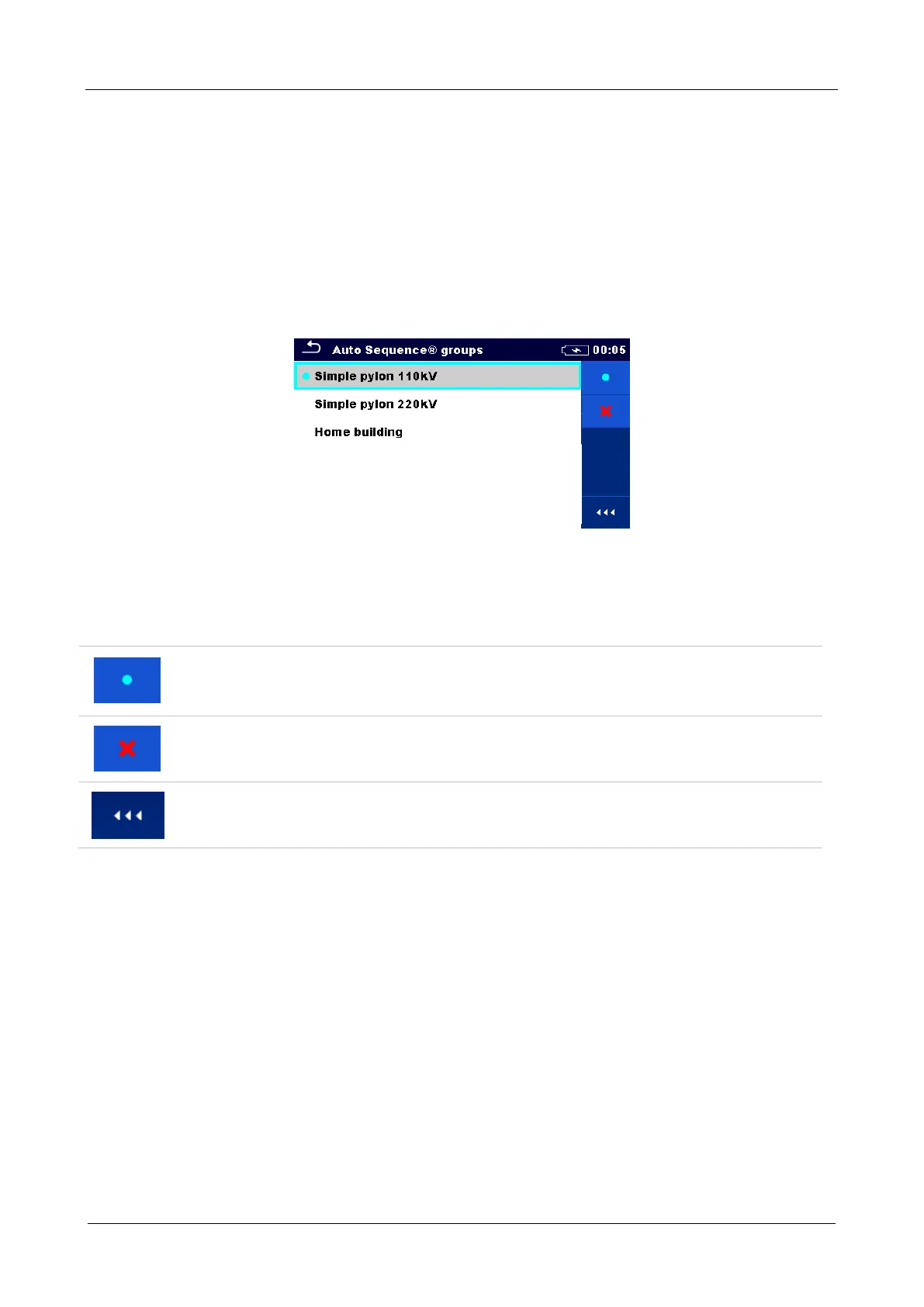
In Auto Sequence® groups menu, lists of Auto Sequences® are displayed. Only one list can be
opened in the instrument at the same time. The list selected in the Auto Sequence® groups menu
will be opened in the Auto Sequence® main menu.
Figure 8.9: Auto Sequence® groups menu
8.8.2 Operations in Auto Sequence® groups menu:
Options
Opens the selected list of Auto Sequences®. Previously selected list of Auto
Sequences® will be closed automatically.
Refer to chapter 8.8.3 Selecting a list of Auto Sequences® for more information.
Deletes the selected list of Auto Sequences®.
Refer to chapter 8.8.4 Deleting a list of Auto Sequences® for more information.
Opens options in control panel / expands column.














 To Next Page