MI 3290 Earth Analyser General Settings
35
8.9.3 Operations with Workspaces
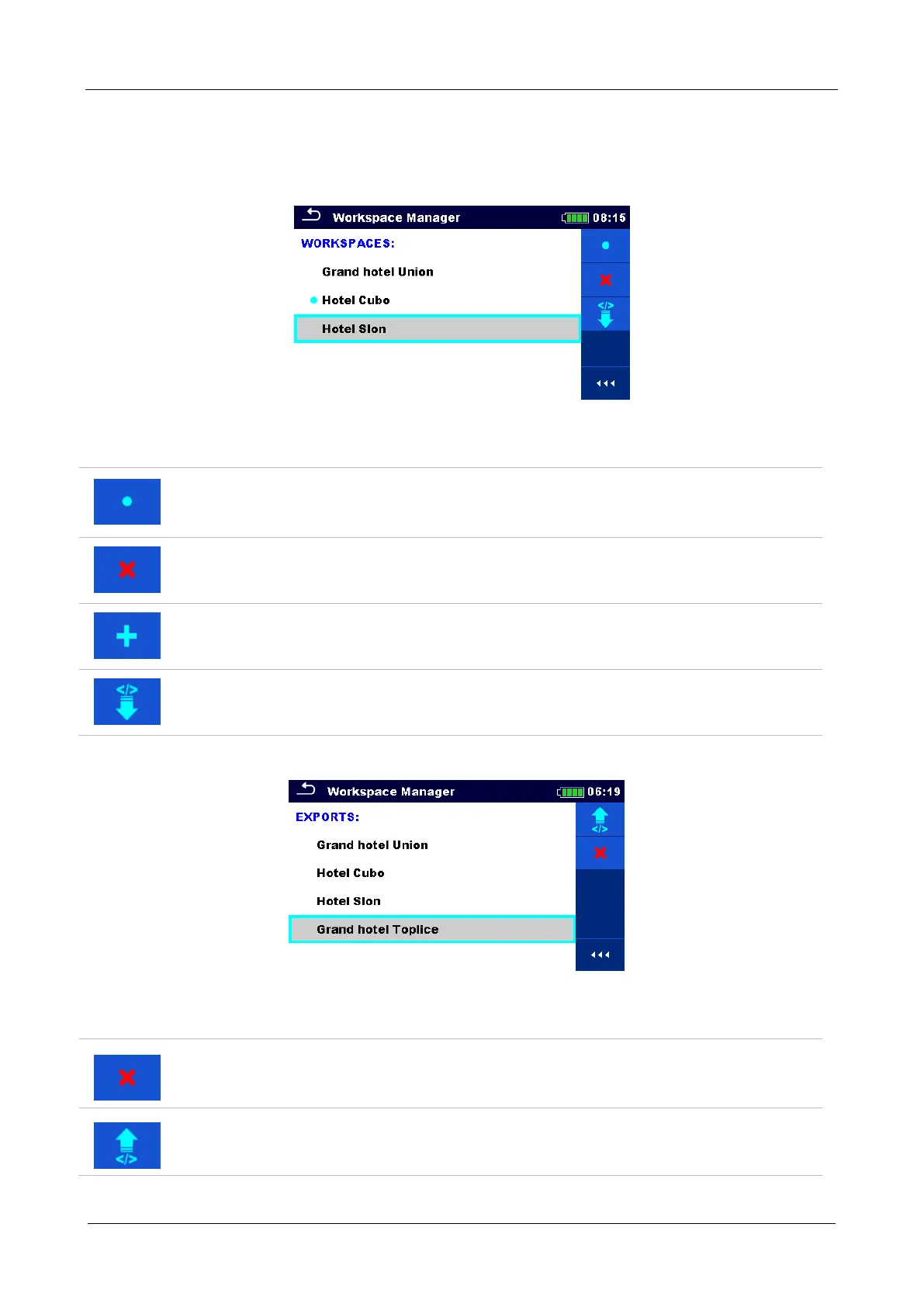
Only one Workspace can be opened in the instrument at the same time. The Workspace selected
in the Workspace Manager will be opened in the Memory Organizer.
Figure 8.11: Workspaces menu
Options
Marks the opened Workspace in Memory Organizer.
Opens the selected Workspace in Memory Organizer.
Refer to chapter 8.9.6 Opening a Workspace for more information.
Deletes the selected Workspace.
Refer to chapter 8.9.7 Deleting a Workspace / Export for more information.
Adds a new Workspace.
Refer to chapter 8.9.5 Adding a new Workspace for more information.
Exports a Workspace to an Export.
Refer to 8.9.9 Exporting a Workspace for more information.
8.9.4 Operations with Exports
Figure 8.12: Workspace manager Exports menu
Options
Deletes the selected Export.
Refer to chapter 8.9.7 Deleting a Workspace / Export for more information.
Imports a new Workspace from Export.
Refer to 8.9.8 Importing a Workspace for more information.














 To Next Page