MI 3290 Earth Analyser Memory Organizer
50
9.1.4.5 Add a new measurement
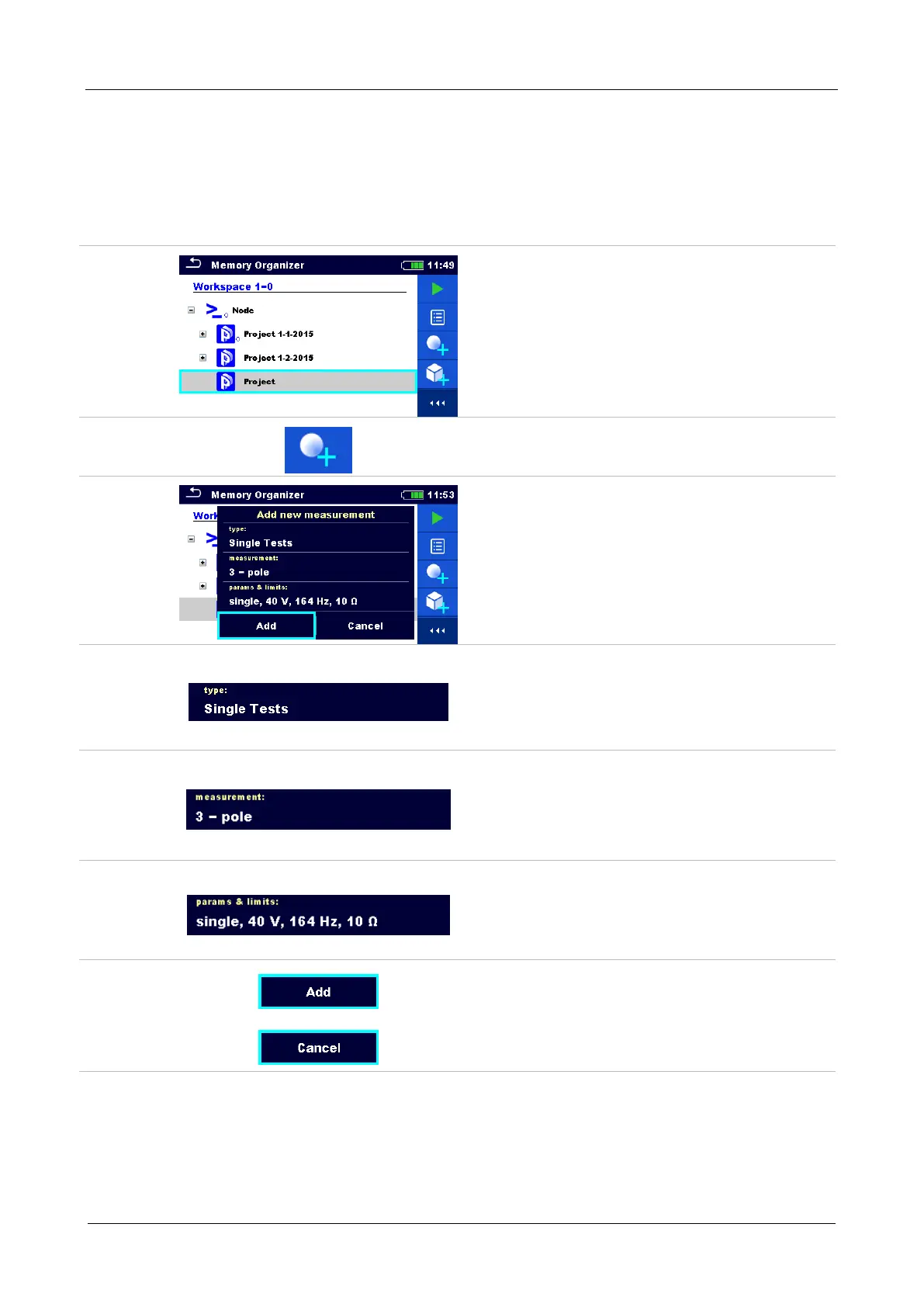
In this menu new empty measurements can be set and then added in the structure tree. The type
of measurement, measurement function and its parameters are first selected and then added
under the selected Structure item.
Procedure
Select level in structure where
measurement will be added.
Select Add measurement in Control panel.
Add new measurement menu.
Type of test can be selected from this
field. Options: Single Tests, Auto
Sequence®. Tap on field or press the
enter key to modify.
Last added measurement is offered by
default. To select another measurement
tap on field or press enter to open menu
for selecting measurements.
Select parameter and modify it as
described earlier. Refer to chapter 10.1.2
Setting parameters and limits of single
tests for more information.
Adds the measurement under the selected
Structure project in the tree menu.
Returns to the structure tree menu without
changes.














 To Next Page