AirConditioningandAudioSystems
MakingaCallintheContacts
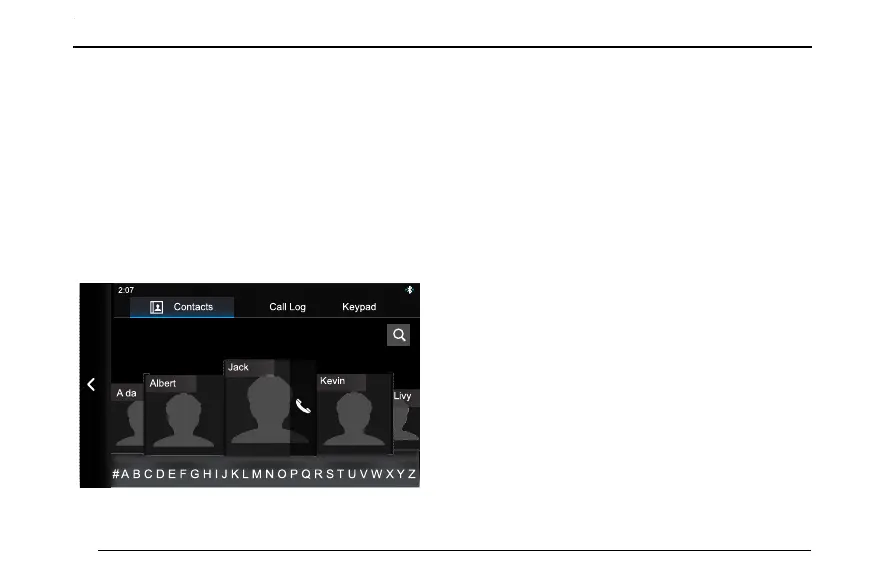
EnterBluetoothphoneinterface,andthentouch
[Contacts]toentertheContactsinterface.
PhoneBookSynchronization
WhentheentertainmentsystemandcellphoneBluetooth
areconnected,thesystemwillautomaticallysynchronize
thecontactsinthecellphoneintothesystem.
EnterBluetoothphoneinterface,andthentouch
[Contacts].Thecontactsinthecellphonewillappear.
da
Contacts Call Log Keypad
# A B C D E F G H I J K L M N O P Q R S T U V W X Y Z
2:0 7
Livy
Kevin
ThecontactssynchronizedthroughBluetoothsupport
voicecallingandquicksearchingfunctionsanddoesnot
supportdeletingcontacts.
Note:Forsomemobilephones,adialogboxasking
whethertosynchronizetheBluetoothcontactswill
popupbeforethesynchronizationofBluetooth
contacts.
Note:Sincethesystemtemporarilysupportssome
commerciallyavailablecellphonetypes,thecaseofno
synchronizationofBluetoothcontactswilloccur.
Note:IntheprocessofusingtheBluetoothphone,
ifthephonebookinthemobilephoneistobe
changed,whenparingandconnectingagainincase
ofdisconnection,theentertainmentsystemwillnot
synchronouslyupdatetheBluetoothphonebook.
QuickSearch
T ouchlettersbelow[Contacts]interfacetoquicklylocate
thecontactswiththisletterastheinitialletter.
88


 To Next Page