AirConditioningandAudioSystems
BasicOperations
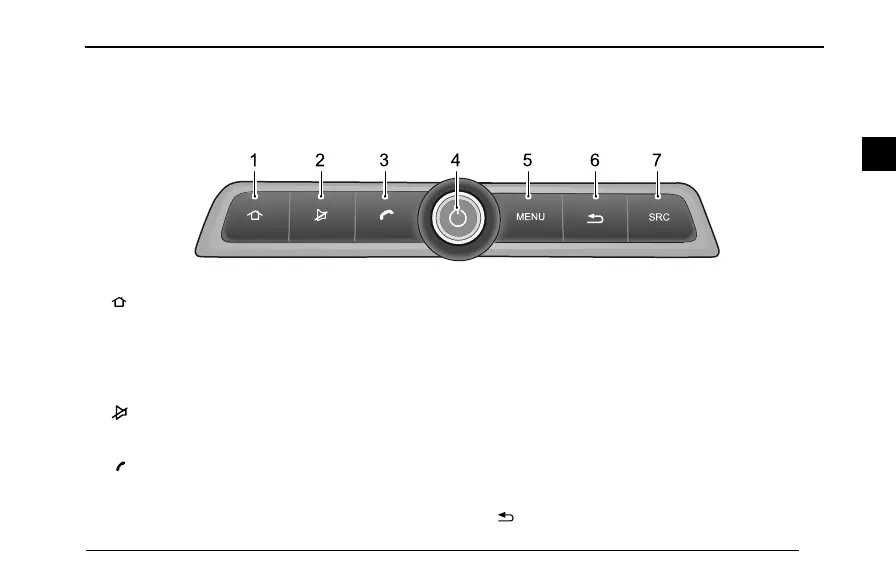
EntertainmentPlayerControlPanel
1Button
Shortpressthebuttontoentermaininterface.Long
presstoturnoffthescreenbacklight,thesystem
operatenormally.Anyoperationtriggeringthe
entertainmentsystemwillturnonthebacklight.
2Button
Activate/Cancelmute.
3Button
PressthisbuttontoansweracallwhenusingBluetooth
phone;pressthisbuttontohangupthephoneduring
thetalking;pressthisbuttontoenterdialinterface
whilenotintalking.
4ON/OFFButton/VOLKnob
Shortpresstoenter/exitthestandbymode,longpress
for10secondstorestartthesystem.Rotatetheknob
toadjustthevolumeloudness.
5MENUButton
Open/closethemenubar(thisbuttonisinvalidifthere
isnosettingbarinthisprogram).
6Button
71
2



 To Next Page