AirConditioningandAudioSystems
Entertainment
Instructions
USB/AUXInstructions
•USBportsupportsUdiscmusic,iPodconnectionand
MirrorLinkconnection,providing1amperecharging
current.
•AUXportsupportsAUXaudio/videoinput.
PrecautionsforPlayingaStorageMediaMode
•ThissystemsupportsUdisc,Bluetooth,iPodandAUX
storagemedia.
•IftheUdisc,iPodandAUXmediaarenotusedfor
playbackforalongtime,donotconnecttheUdisc,
iPodandAUXmediatotheporttomaintainagood
connectivityoftheinterface.
•WhenthesystemisusingUSBandiPodstoragemedia,
donotdirectlypullouttheUSBdiscoriPodstorage
mediatoavoiddamagetoUSBdiscoriPodstorage
mediaorentertainmentsystemfailure.
•PleasekeeptheUSB/AUXportdry.Payattentionto
avoidachildstufngtheUSB/AUXportincasetheport
isunusablesinceitisblocked.
Radio
RadioMenu
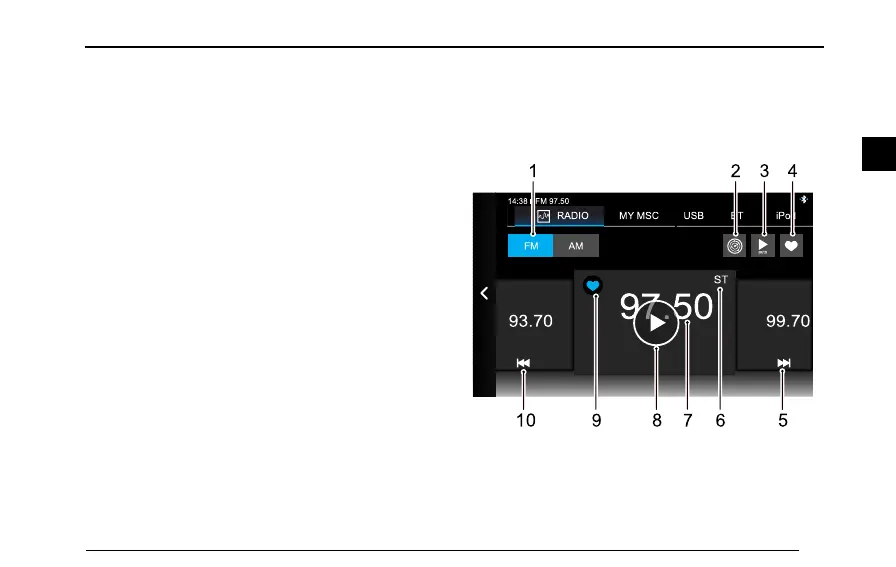
T ouchradio/musicareainthemaininterface,andthen
touch[Radio]toenterradiointerface.
14:3 8 FM 97.50
RADIO MY MSC USB BT iPod
FM AM
99. 70
97. 50
93. 70
S T
1T ouchtoswitchbetweenFMandAMband
2FullBandScanning
3AutoPlay
93
2


 To Next Page