AirConditioningandAudioSystems
2VolumeUpButton
3Button
Shortpresstomutethesystemifnotincalling/talking
state.Shortpresstohangupifincalling/talkingstate;
shortpresstoanswerandlongpresstorefuseifin
incomingcallstate.
4SRCButton
Switchtonextavailablemediaaudio.
5Button
Shortpresstoswitchtonextaudio/videoandlong
presstofastforwardwhileplayinganaudio/video.
Whileplayingtheradio,shortpresstoswitchto
nextstation;longpresstosearchandplaythenext
station;longpressconsistently,theradiowillsearch
oneroundandcontinuetoplaythecurrentstation.
6VolumeDownButton
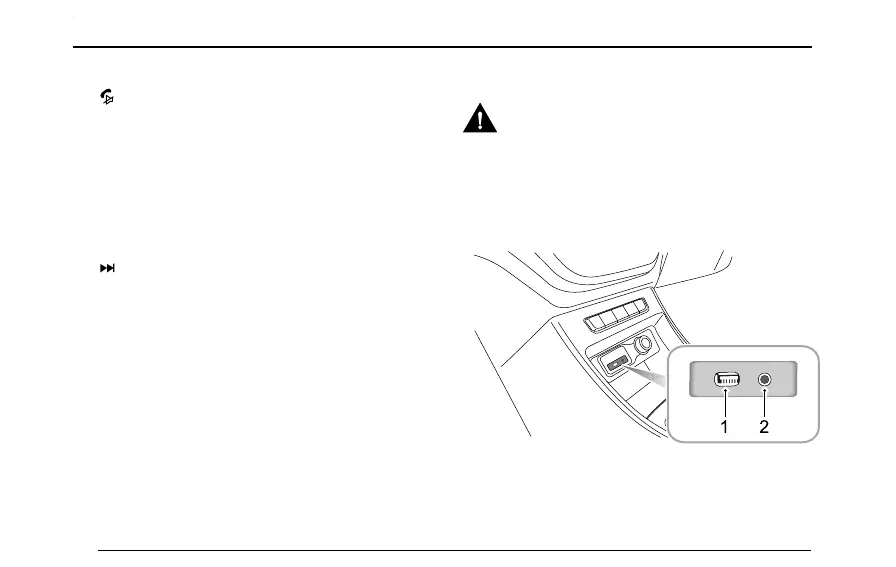
AVBox
Thestorageboxshallbekeptclean,soasto
avoidthejackandportblockupwhichmay
resultindevicefailure.
Location
AUXportandUSBportarelocatedinthestorageboxat
theupperpartofthecenterconsole.
1USBPort
ConnecttoaUSBstoragedevicewiththisport.The
iPodconnectingwirecanalsobeconnected.
76


 To Next Page