AirConditioningandAudioSystems
InUSBmode,shortpress[SCAN]buttontoscanthe
tracksincurrentfolder.Pressitagaintoscanthetracks
inUSB.Pressitoncemoretocancelscanplaybackmode.
Inscanplaybackmode,eachtrackwillplayfor10seconds,
thenskiptothenexttrackandplayfor10seconds.
Afteralltracksarecycled,thisfunctionwillbecanceled
automatically.Ifyouwanttostopthescanning,longpress
[SCAN]button,and“SCAN”onthescreenwilldisappear,
thenreturntothenormalplaybackstate.
ID3InformationDisplay
InUSBmode,theradiowilldisplaythenameofthetrack
le.Whenthescreencannotdisplaythefulllename,the
radiowillextendthedisplaytonextpageautomatically.
Longpress[
]button,theradiowillscrollthescreen
todisplaythelename.
InUSBmode,withashortpressonthe[]button,the
radiowilldisplay:tracktitle-elapsedtime-artist-album
-foldername-tracklenameinorder.
Note:Whenthefulllenamecanbedisplayed,the
radiowillnotscrollthescreenandturntothenext
pageautomatically.
RemoveUSB
DonotforcetoremoveUSBwhenlesintheUSBisbeing
played,otherwisethelesmaybedamaged.
AUXInputPlayback
Afterconnectingtheexternalaudioconnectingwirewith
theAUXport,themusicintheexternalaudiosourcewill
beplayedbythespeakerwhenthesystemisswitchedto
AUXmode.
o
o QQ ÀÀ
Ö
Ö QQ ÀÀ
TRS
Ë
Ë
Ø
Ø
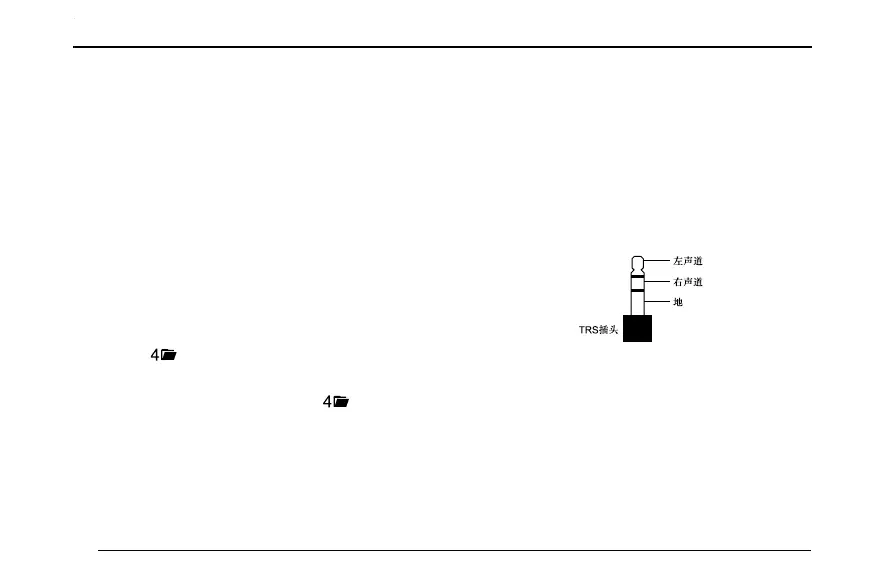
Note:Pleaseusea3.5mmTRSplugtocarryoutAUX
audioconnection.
Note:Makesuretheexternalaudiosourceisturned
on.
66


 To Next Page