© Microhard Systems Inc. Confidential 107
Appendix C: AT Utility Firmware Upgrade Procedure
To update the firmware on the Pico Series Radio, it is recommended to use the Microhard Utility called AT
Firmware Upgrade. This utility is available for download from the Microhard Support Site below:
http://www.microhardcorp.com/support
To access the downloads section of the support site, you must first register, if you have not already done so.
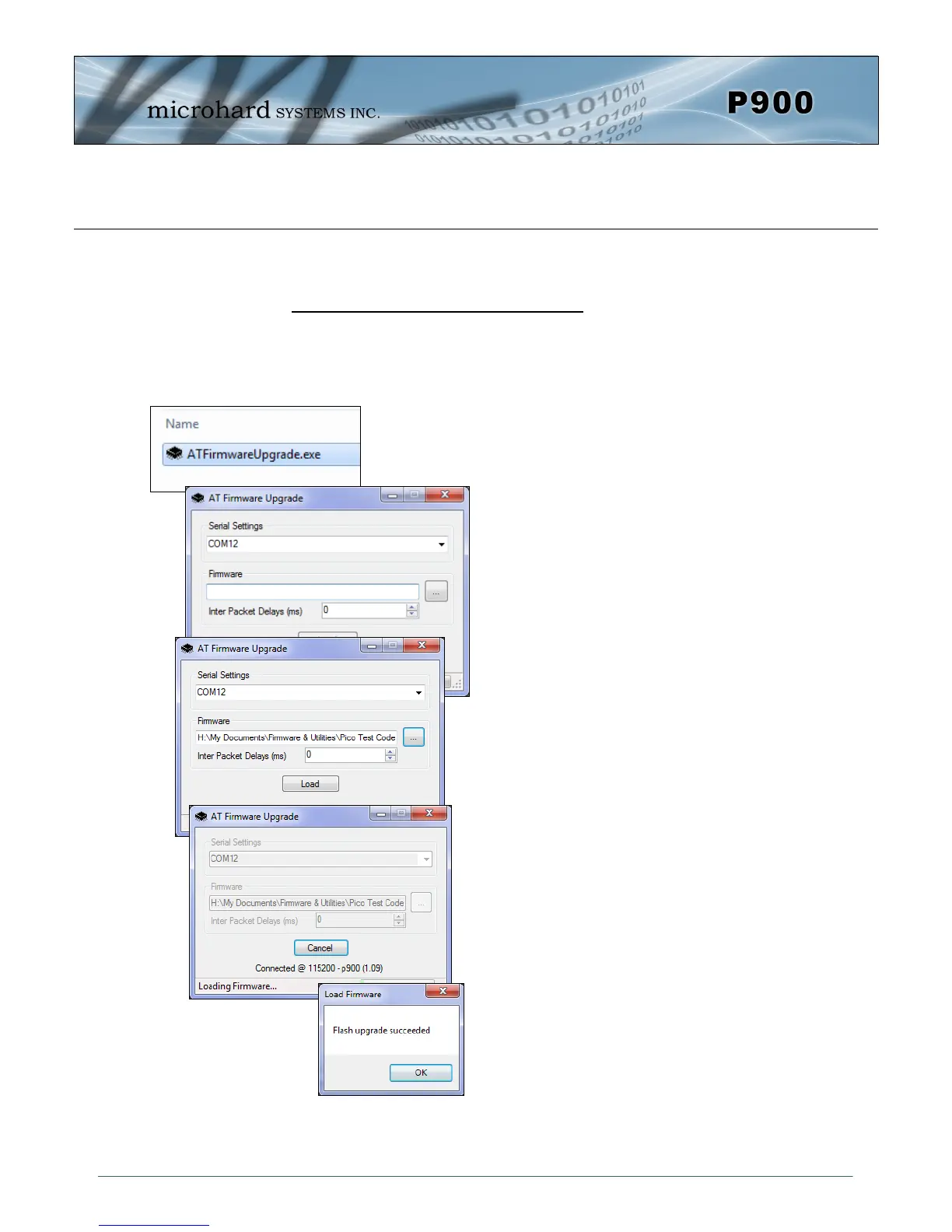
1. Power up the Pico Modem and Connect a
straight through serial cable to the DATA
Port of the module. (If installed in develop-
ment board).
2. Run the firmware utility downloaded from
the Microhard Support site.
“ATFirmwareUpgrade.exe”
3. Select the COM port on your PC that is
connected to the Pico Module.
4. Browse to the firmware file supplied by Mi-
crohard Systems. (.img) to be uploaded to
the module. It is recommended to set the
delay to 0.
5. Click the “Load” button.
6. The utility will establish a connection to the
module and load the firmware. Once com-
plete, a message will be display at the bot-
tom of the utility window indicating that the
process succeeded.
Image C-1: Firmware Upgrade


 To Next Page