© Microhard Systems Inc. Confidential 34
3.0 Mesh Configuration
2. Escape from Data Mode
With the P900 powered up and ‘online’, connect a 9-pin straight-through serial cable
from the PC serial port to the RS-232 DATA port on the dev board.
Launch a terminal program (e.g. HyperTerminal) and configure for the P900’s estab-
lished serial baud rate parameters (PC & modem must match).
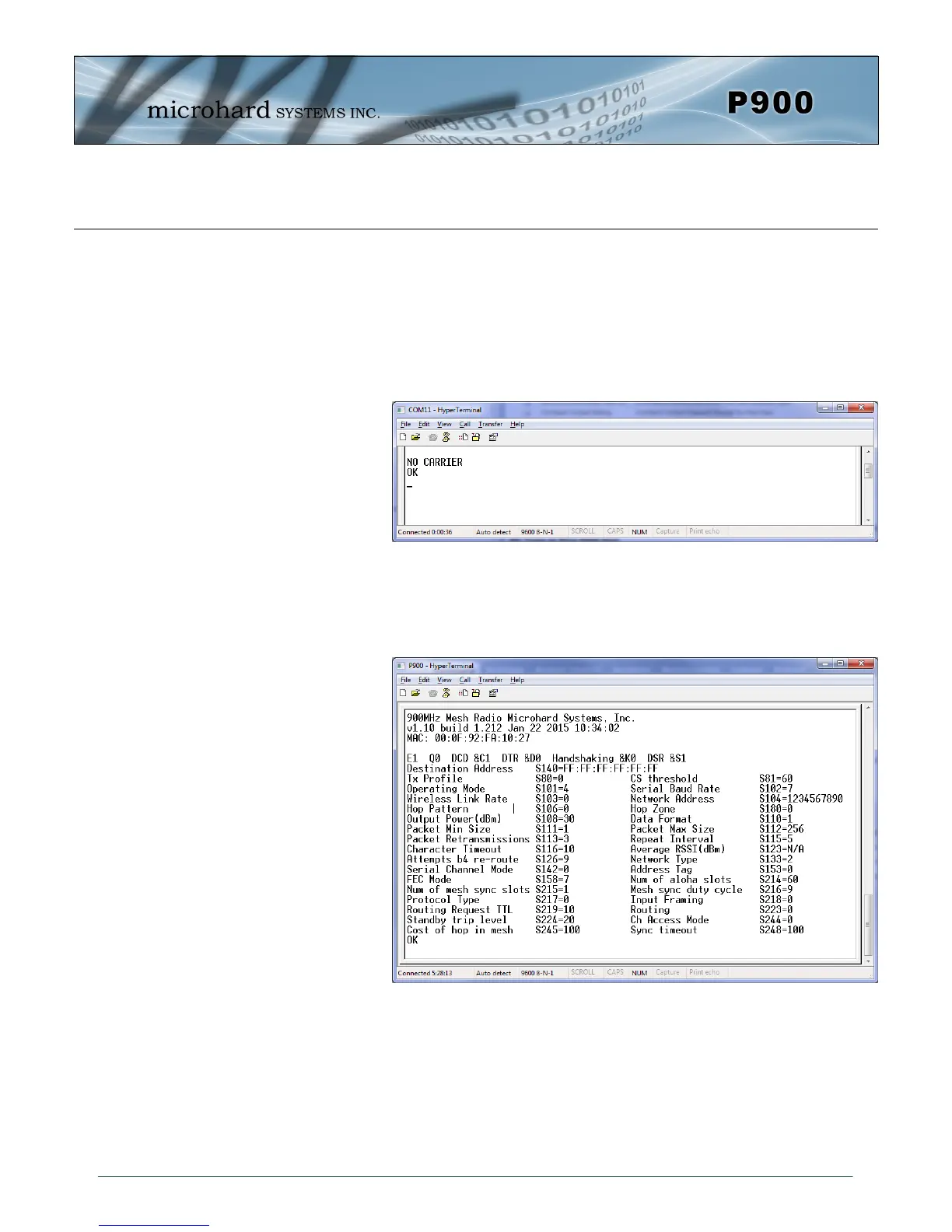
Pause 1 second, type ‘+++’ , pause 1 second: the monitor should show the module
response of ‘NO CARRIER OK’
The P900 is now in command mode, and AT commands can be used to configure or
query the settings.
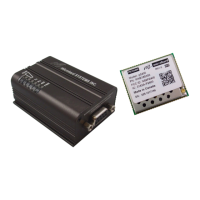
Entering the AT&V command as shown will show the current configuration as seen
below: (The data displayed varies based on network and unit type.)
3.1.2 Data Mode
Data Mode is the normal operational state of all deployed P900 modules. In this mode the module is
prepared to exchange data as per its configuration settings. Available LED indications can provide an
indication of the data exchange (TX and RX LEDs).
To enter DATA mode from COMMAND mode, enter the command: ATA [Enter]
Image 3-2: Command Mode
Image 3-3: Command Mode - AT&V Display


 To Next Page